MCP server · Productivity
PerMark MCP server
Your AI can see the Markdown document you are reading and the comments you leave on it.
PerMark is a free Markdown reader and editor for Windows, macOS and Linux. It also has an optional connection that lets your AI helper know which document, section and words you are looking at. It is handy if you use AI to write plans, specs or reports and you want to review and steer that writing.
What is an MCP server? The 30-second version
On its own, your AI can only chat with you. An MCP server is a small helper program that gives your AI a new skill or a connection to an app. This one connects your AI to PerMark, the app where you read Markdown files. Once connected, your AI can look up what you are reading and what you asked it to change.
What this MCP server does
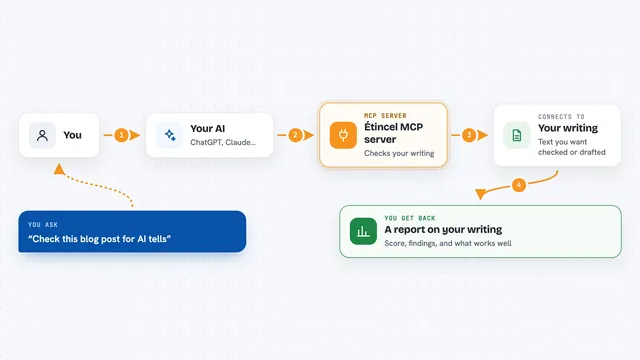
You ask your AI something about the document you have open in PerMark. The AI uses this helper to ask PerMark what is open, which section you are in and what you have selected. PerMark answers with that information, plus any comments you left. Then the AI can reply or make changes based on what you are actually looking at.
What you can do with it
- See which Markdown document you have open
- Know which section and words you selected
- Read the comments you left for it to resolve
- Mark your comments as done with a reply
- Check which documents changed since you last read them
- Search sections across your project
- Find documents by tag
Try asking your AI
- “Rewrite the section I have selected to be shorter.”
- “What comments do I have open right now?”
- “Show me the unread changes in this project.”
- “Find all sections about retry policy.”
What it gives back to you
It gives your AI a summary of what you are reading: the file name, the section heading, the selected text and your open comments. It can also return lists of unread documents, search results or tags. In the chat, you see the AI's answer or the changes it made, based on that information.
Before you start
What you need
- PerMark app installed
- The agent connection turned on in PerMark settings
- An AI tool that supports MCP, like Claude Desktop or Cursor
Good to know
It can read your open documents and comments, so only enable it for projects you are comfortable sharing with your AI.
Install it with your AI
Add PerMark MCP server to your AI, no technical skills needed
You don't install anything by hand. You copy one prompt, paste it into an AI that can work on your computer, and it checks, installs and connects the server for you, asking you when it needs something.
Sign in to get the install prompt
Members get a ready-made prompt that lets the Claude desktop app check PerMark MCP server, install it and connect it for them, step by step. You don't need any technical skills: you copy, paste and answer a few questions. Your connected AI can also find and install any of the 4,609 MCP servers here for you.
Who it's for
People who use AI to write Markdown documents and want to review and steer that writing without leaving their reader.