
MCP server · Productivity · official
Étincel MCP server
by AIStoryHub · official
Your AI can check your writing for machine-sounding habits and learn to draft in your own voice.
Étincel is a writing helper that looks at your text and points out the patterns that make it read like a machine wrote it, such as paragraphs that are all the same length or phrases like "leverage" and "seamless". It also lets you train your AI to write more like you, using samples of your own writing. It is handy for anyone who writes memos, blog posts, docs, or emails and wants them to sound human.
What is an MCP server? The 30-second version
On its own, your AI can only chat with you. An MCP server is a small helper program that gives your AI a new skill or a connection to a service. This one connects your AI to Étincel, a writing checker and voice trainer. Once it is connected, your AI can scan your drafts for AI tells and draft new text in a style you have taught it.
What this MCP server does
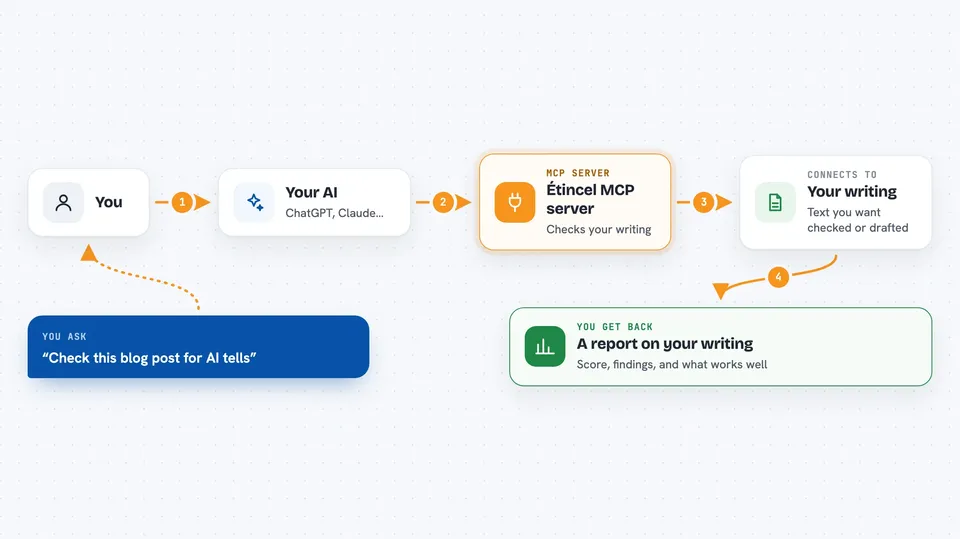
You ask your AI to check a piece of writing, or to draft something new. The AI passes your text to this helper. The helper runs a fixed set of rules over the words and measures things like sentence length and paragraph shape. It hands back a score, a list of specific findings with locations, and a note about what is working well. If you have trained a voice, it can also feed that style to the AI before it drafts.
 Click to zoom
What you can do with it
- Scan a draft for machine-sounding patterns and see exactly where they are
- Train a writing style from samples of your own emails or posts
- Ask your AI to draft in your trained voice
- Compare a new draft against your usual rhythm and habits
- See if you keep opening pieces the same way
- Pick from twelve ready-made tone and use-case presets
- Set a default style so you do not repeat yourself every time
Try asking your AI
- “Check this blog post for AI tells and tell me what to fix”
- “Train a style called me from these three emails I wrote”
- “Write this memo in my voice”
- “Set my default style to me”
What it gives back to you
You get a plain report in the chat: a tier like green, orange, or red, a score, and a list of findings with severity and a short explanation of each one. It also shows a strengths signal, such as how specific the writing is and how much sentence rhythm varies. For style training, it confirms the voice was saved and you can use it by name afterward.
Before you start
What you need
- The Claude desktop app or another MCP client
- Node.js installed if you run it with npx
- Your own writing samples if you want to train a voice
Good to know
It can permanently delete a trained voice, and forking a public style makes a network call to etincel.ai, but the audit itself never changes your text.
Install it with your AI
Add Étincel MCP server to your AI, no technical skills needed
You don't install anything by hand. You copy one prompt, paste it into an AI that can work on your computer, and it checks, installs and connects the server for you, asking you when it needs something.
Sign in to get the install prompt
Members get a ready-made prompt that lets the Claude desktop app check Étincel MCP server, install it and connect it for them, step by step. You don't need any technical skills: you copy, paste and answer a few questions. Your connected AI can also find and install any of the 4,361 MCP servers here for you.
Who it's for
Anyone who writes non-fiction for work, like marketers, founders, technical writers, and people who send a lot of memos and emails.




