MCP server · Productivity
Confluence MCP server
by aashari
Lets your AI read, search, and update your Confluence pages and spaces for you.
This is a small helper that connects your AI assistant to your company's Confluence wiki. Once it is set up, you can ask your AI questions about your team's pages and documents in plain English, and it will go look them up. It is handy for anyone who spends time digging through Confluence for policies, specs, or guides.
What is an MCP server? The 30-second version
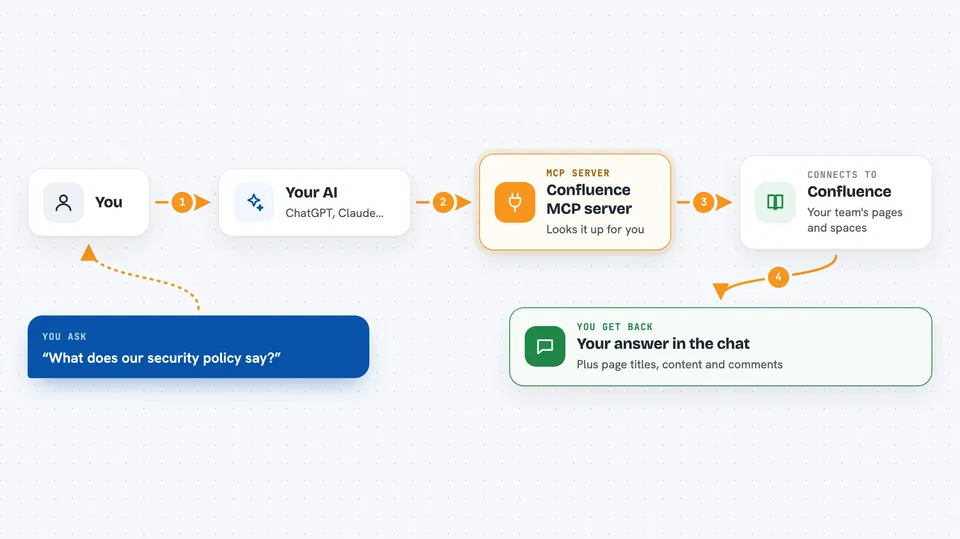
On its own, your AI can only chat with you using what it already knows. An MCP server is a small helper program that gives your AI a new skill or a connection to an app, and here it connects your AI to Confluence. When you ask a question, your AI hands the request to this helper, the helper talks to your Confluence site, and the answer comes back into your chat. You do not need to understand how it works inside; you just set it up once.
What this MCP server does
You ask your AI something like what your security policy says, or to find pages about onboarding. The AI passes that request to this helper, which calls your Confluence site using your account details. Confluence sends back the matching spaces, pages, comments, or blog posts. The helper tidies the result and hands it to your AI, which explains it to you in the chat. If you ask it to create or update something, it can do that too, as long as your account has permission.
 Click to zoom
What you can do with it
- List all the spaces in your Confluence
- Search pages by keyword or by space
- Read the full content of a page
- Show comments on a page
- Create a new page in a space
- Update an existing page
- Delete a page or comment
Try asking your AI
- “What's our API authentication process?”
- “Find all pages about security best practices”
- “Show me the latest release notes from the Product space”
- “Create a new page in the DEV space titled API Guide”
What it gives back to you
You get back plain answers, lists of pages or spaces with their titles and IDs, page content, and comments, all written into your chat. When it creates or updates something, it tells you what it changed and gives you the new page details. Very large results get trimmed, and the full version is saved to a temporary file on your computer with a note telling you where.
Before you start
What you need
- A Confluence Cloud account with access to the spaces you want to read
- A Confluence API token from Atlassian (a kind of password just for apps; you create it for free on the Atlassian website)
- Your Confluence site name (the part before .atlassian.net) and the email you log in with
- Node.js installed on your computer, or an AI assistant that can run MCP servers
Good to know
It can create, change, and delete real Confluence content, so double check before letting it change or remove anything important.
Install it with your AI
Add Confluence MCP server to your AI, no technical skills needed
You don't install anything by hand. You copy one prompt, paste it into an AI that can work on your computer, and it checks, installs and connects the server for you, asking you when it needs something.
Sign in to get the install prompt
Members get a ready-made prompt that lets the Claude desktop app check Confluence MCP server, install it and connect it for them, step by step. You don't need any technical skills: you copy, paste and answer a few questions. Your connected AI can also find and install any of the 4,361 MCP servers here for you.
Who it's for
Developers, product managers, HR and support teams, and anyone who looks things up in Confluence all day.