MCP server · Research
FYI CLI MCP server
by edithatogo
Track and manage Freedom of Information requests on Alaveteli sites like FYI.org.nz and WhatDoTheyKnow.
This is a helper for people who file official information requests, also called FOI or OIA requests. It connects your AI assistant to public request platforms built on Alaveteli, such as FYI.org.nz in New Zealand, WhatDoTheyKnow in the UK, and RightToKnow in Australia. It is handy if you track many requests and want your AI to help you keep them organised.
What is an MCP server? The 30-second version
On its own, your AI can only chat with you. An MCP server is a small helper program that gives your AI a new skill or a connection to an app or service. This one connects your AI to Alaveteli-based FOI platforms, so it can look up requests, authorities, and correspondence for you. You ask in plain words, and the helper does the looking up.
What this MCP server does
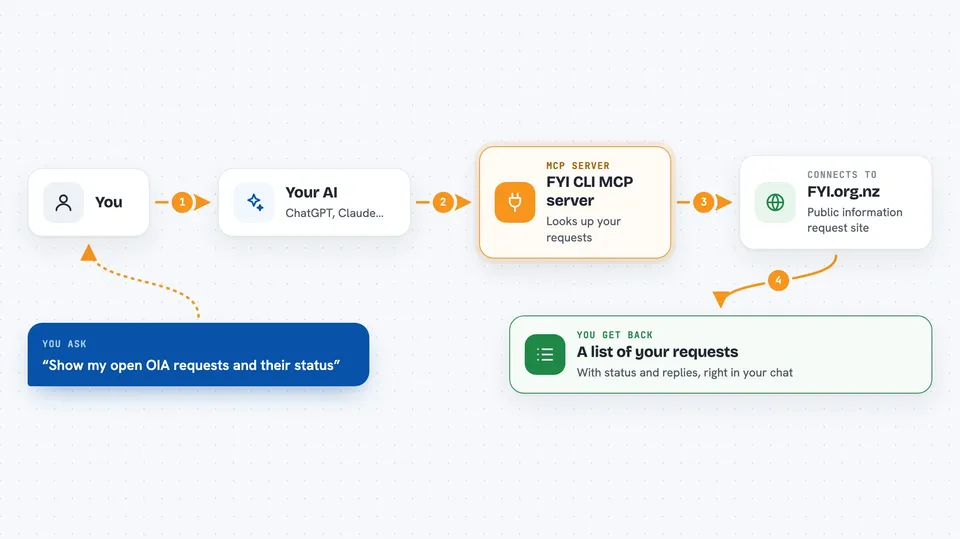
You ask your AI something about your FOI requests. The AI passes your question to this helper program. The helper talks to the Alaveteli site or to your local request database. It brings back the matching requests, authorities, or correspondence. You see the answer in your chat, without opening the website yourself.
 Click to zoom
What you can do with it
- List your FOI requests and their current status
- Look up public authorities on an Alaveteli site
- Find correspondence attached to a request
- Track requests from draft to completion
- Import the official authority list into your local database
- Search public requests by date range
- Export requests as, CSV, or HTML
Try asking your AI
- “Show me all my open OIA requests and their status”
- “Find requests about housing from January 2024 on FYI.org.nz”
- “List the authorities in the Ministry of Justice category”
- “What correspondence has come in on my latest request?”
What it gives back to you
You get back lists, summaries, and answers in your chat. For example, a list of requests with their status, or the names of authorities that match a search. If you ask for an export, it can produce files in JSON, CSV, or HTML. It can also report what it changed when you add or update a request.
Before you start
What you need
- The fyi-mcp program installed on your computer
- An account on the Alaveteli site you want to use, such as FYI.org.nz
- An API key from that site (a kind of password for apps; the site gives you one)
- The Claude desktop app or another AI tool that supports MCP servers
Good to know
This tool can create and update requests on public FOI platforms, so check what your AI is about to do before you let it act.
Install it with your AI
Add FYI CLI MCP server to your AI, no technical skills needed
You don't install anything by hand. You copy one prompt, paste it into an AI that can work on your computer, and it checks, installs and connects the server for you, asking you when it needs something.
Sign in to get the install prompt
Members get a ready-made prompt that lets the Claude desktop app check FYI CLI MCP server, install it and connect it for them, step by step. You don't need any technical skills: you copy, paste and answer a few questions. Your connected AI can also find and install any of the 4,609 MCP servers here for you.
Who it's for
Journalists, researchers, activists, and anyone who files or tracks many official information requests.