
MCP server · Research
Open Sales Stack MCP servers
by ekas-io
Lets your AI research companies and people using public web data, from websites, job ads, LinkedIn and more.
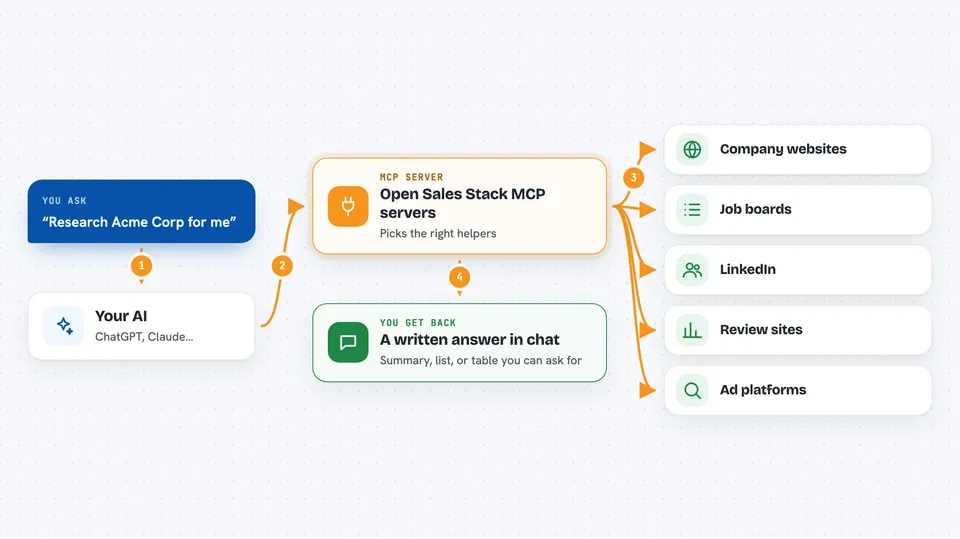
Open Sales Stack is a collection of small helper programs that let your AI research companies and people for you, using information that is already public online. It was built by a company called Ekas and it is free and open source. It is handy if you work in sales, recruiting or marketing and you spend a lot of time looking companies up by hand.
What is an MCP server? The 30-second version
On its own, your AI can only chat with you. An MCP server is a small helper program that gives your AI a new skill, in this case a connection to public web research tools. Once you add these helpers, your AI can go and look things up for you when you ask, like a company's website, its job openings or its LinkedIn page. You do not need to know how it works inside. You just ask, and your AI picks the right helper.
What this MCP server does
You ask your AI something like research this company for me. Your AI looks at the list of helpers it has and picks the ones that fit, for example the one that reads websites or the one that finds job ads. That helper goes out to the public web, gathers what it finds, and hands it back to your AI. Your AI then puts it together into a short answer for you in the chat. Each helper works on its own, so you can use one or all of them.
 Click to zoom
What you can do with it
- Pull product info, pricing and team pages from any company website
- Detect which tools a company uses, like its CRM or chat software
- Find a company's open job roles across several job boards
- Look up LinkedIn company profiles and people profiles
- Check which ads a company is running on LinkedIn and Meta
- Gather star ratings and review themes from sites like G2 and Capterra
- Research funding rounds, recent news and public company filings
Try asking your AI
- “Research Acme Corp for me and tell me what they sell and who their customers are”
- “What tools does stripe.com use for marketing and support?”
- “Find any sales job openings at this company and summarise them”
- “Look up this person on LinkedIn and tell me what they post about”
What it gives back to you
You get back a written answer in the chat, built from what the helpers found. That can be a short summary, a list of job roles, a list of tools a company uses, review scores, or ad counts. Some helpers return structured details like pricing or team names. Your AI decides how to present it, so you can always ask it to show things as a table or a list.
Before you start
What you need
- Python 3.10 or newer installed on your computer
- An API key from OpenAI, Anthropic or Google Gemini (a kind of password for apps; the site gives you one for free or paid)
- The Claude desktop app or Claude Code
- A terminal where you can paste a few commands
Good to know
Some helpers read public web pages and may need a LinkedIn login for people profiles, so keep your login details private and only research what you are allowed to.
Install it with your AI
Add Open Sales Stack MCP servers to your AI, no technical skills needed
You don't install anything by hand. You copy one prompt, paste it into an AI that can work on your computer, and it checks, installs and connects the server for you, asking you when it needs something.
Sign in to get the install prompt
Members get a ready-made prompt that lets the Claude desktop app check Open Sales Stack MCP servers, install it and connect it for them, step by step. You don't need any technical skills: you copy, paste and answer a few questions. Your connected AI can also find and install any of the 4,361 MCP servers here for you.
Who it's for
Sales, recruiting and marketing people who research companies and prospects often and want their AI to do the looking up for them.


