
MCP server · Music
Melrōse Music MCP server
by emicklei
Let your AI write and play little melodies as MIDI through the Melrōse music tool.
This is a small helper that lets your AI create and play music using Melrōse, a tool where you write melodies as code. It is handy if you like music, are curious about making tunes with your AI, or want to hear a quick idea played out loud. You do not need to be a musician to try it.
What is an MCP server? The 30-second version
On its own, your AI can only chat with you in text. An MCP server is a small helper program that gives your AI a new skill or a connection to another tool. This one connects your AI to Melrōse, a music-making tool, so the AI can turn your request into notes and send them to a MIDI player. When you ask for a tune, the AI writes it in the Melrōse language and this helper plays it for you.
What this MCP server does
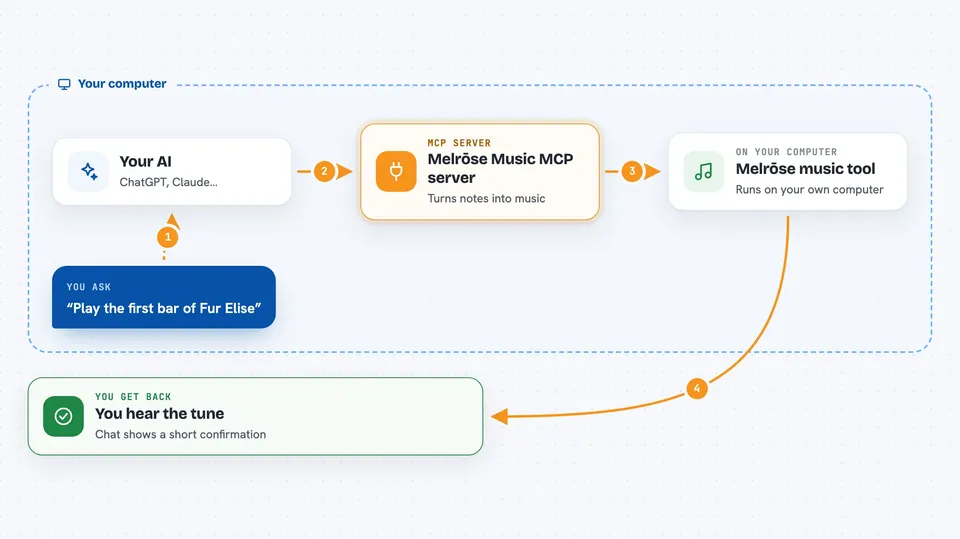
You ask your AI for a tune, like a short melody or a famous song opening. The AI writes that tune in the Melrōse music language, which is a way of writing notes as text. It then asks this helper to play that text through Melrōse. Melrōse sends the notes to a MIDI receiver, such as a music program or a hardware keyboard, and you hear the music. You can also ask the AI to change the tempo or pick a different output device.
 Click to zoom
What you can do with it
- Play a short melody you describe in words
- Play the opening of a well-known tune
- Change the tempo to make it faster or slower
- List the MIDI devices Melrōse can send music to
- Switch to a different output device
- Hear a chord or a few notes played back
Try asking your AI
- “Play the music sequence C D E”
- “Play the first bar of Fur Elise”
- “Play the notes of Frere Jacques”
- “Change the tempo in Melrōse to a lower value”
What it gives back to you
You get a short confirmation in the chat, like the AI saying it played the tune at a certain tempo. For a play request, it often shows how long the music took, for example a few seconds. For device requests, it lists the MIDI devices it found. You hear the actual music through your MIDI setup, not in the chat.
Before you start
What you need
- The Go SDK installed on your computer (the Go programming language tools)
- A MIDI receiver such as a music program (DAW) or a hardware synthesizer
- The Claude desktop app or another AI app that supports MCP servers
Good to know
You need a working MIDI setup to hear anything, and the AI writes the music text itself, so the tune may not sound exactly like the song you had in mind.
Install it with your AI
Add Melrōse Music MCP server to your AI, no technical skills needed
You don't install anything by hand. You copy one prompt, paste it into an AI that can work on your computer, and it checks, installs and connects the server for you, asking you when it needs something.
Sign in to get the install prompt
Members get a ready-made prompt that lets the Claude desktop app check Melrōse Music MCP server, install it and connect it for them, step by step. You don't need any technical skills: you copy, paste and answer a few questions. Your connected AI can also find and install any of the 4,066 MCP servers here for you.
Who it's for
Music fans, hobbyist composers, and anyone curious about making simple tunes with their AI.


