
MCP server · Analytics
Bagel MCP server
Ask plain-English questions about robot, drone and IoT logs and get real answers back.
Bagel is a helper that lets your AI read robot, drone and sensor logs for you. Instead of writing scripts to dig through flight recordings or sensor data, you just ask a question in normal words. It is handy for anyone who works with robots, drones, vehicles or connected devices and has data files piling up.
What is an MCP server? The 30-second version
On its own, your AI can only chat with you. An MCP server is a small helper program that gives your AI a new skill or a connection to something else. This one connects your AI to Bagel, which knows how to open robot, drone and IoT data files. So when you ask a question about your logs, your AI passes it to Bagel, and Bagel does the actual reading and counting for you.
What this MCP server does
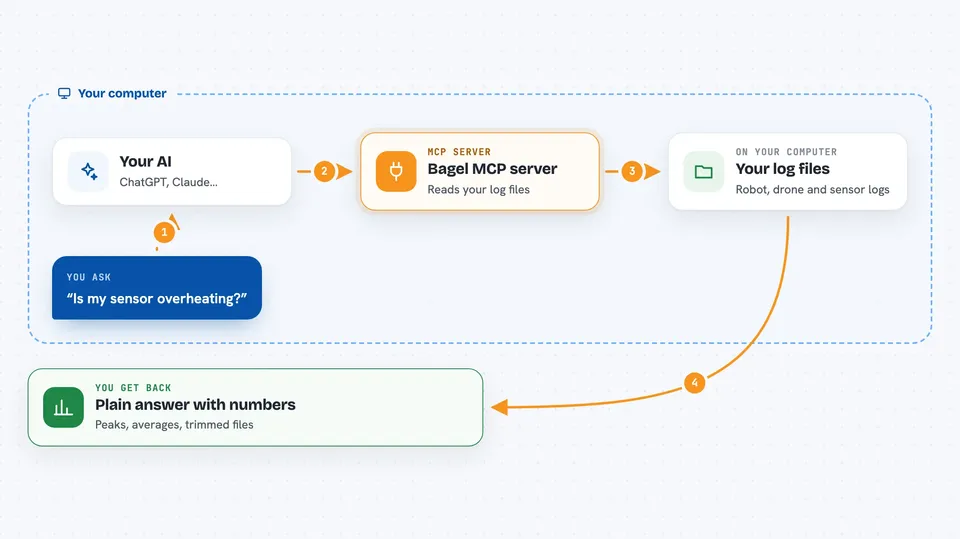
You ask your AI a question about your data, like whether a sensor is overheating. Your AI sends that question to Bagel. Bagel looks at the file, figures out which parts matter, and runs a real database query over the data. It shows you the query it used, so you can check the math yourself. Then you get a plain answer back in the chat, with the numbers behind it.
 Click to zoom
What you can do with it
- Summarize the metadata of a robot or drone log file
- Find peak values, averages and percentiles in a sensor topic
- Check the correlation between two signals, like current and voltage
- Spot sudden decelerations or other events in a recording
- Keep only the time windows around events you care about and drop the rest
- Read error messages from robot text logs and explain what went wrong
- Run the same check across a whole folder of log files at once
Try asking your AI
- “Summarize the metadata of the ROS2 bag in my data folder”
- “What's the peak z-axis deceleration in the IMU topic, and the running average over 5 seconds?”
- “Every time the drone decelerates harder than -10 m/s squared, keep 10 seconds before and after and drop the rest”
- “Read the ERROR lines from my robot log folder and tell me what went wrong”
What it gives back to you
You get answers in plain language, backed by real numbers: peaks, averages, correlations, counts and short summaries. For event searches, it can also produce trimmed data files that keep only the moments you asked about. It shows the actual query it ran, so you can see how the answer was worked out. Some results can be exported for viewing in tools like Rerun, PlotJuggler or LeRobot.
Before you start
What you need
- Docker Desktop installed on your computer
- An AI app that supports MCP, such as Claude Code, Gemini CLI, Cursor or Codex
- Your own robot, drone or IoT data files to point it at
Good to know
Bagel can write new trimmed data files and upload results to cloud storage, so check the preview it shows before you let it run on your real data.
Install it with your AI
Add Bagel MCP server to your AI, no technical skills needed
You don't install anything by hand. You copy one prompt, paste it into an AI that can work on your computer, and it checks, installs and connects the server for you, asking you when it needs something.
Sign in to get the install prompt
Members get a ready-made prompt that lets the Claude desktop app check Bagel MCP server, install it and connect it for them, step by step. You don't need any technical skills: you copy, paste and answer a few questions. Your connected AI can also find and install any of the 4,361 MCP servers here for you.
Who it's for
Robotics, drone and IoT engineers, testers and analysts who have lots of log files and want quick answers without writing scripts.


