MCP server · Analytics
FoundryNet Forge MCP server
by FoundryNet
Lets your AI read and manage data from industrial machines like CNC machines and robots in plain language.

Forge by Foundry Labs is a hosted helper that connects your AI assistant to industrial machines. You talk to your AI in normal words, and it can look up machine data, ask for predictions, and keep records of what happened. It is most useful if you work with factory equipment, maintenance, or production and you want answers without digging through each machine maker's own software.
What is an MCP server? The 30-second version
On its own, your AI can only chat. An MCP server is a small helper program that gives your AI a new skill or a connection to another service. This MCP server connects your AI to Forge, a service that talks to industrial machines from many different manufacturers. Once it is connected, you can ask your AI about your machines and it will go ask Forge for you.
What this MCP server does
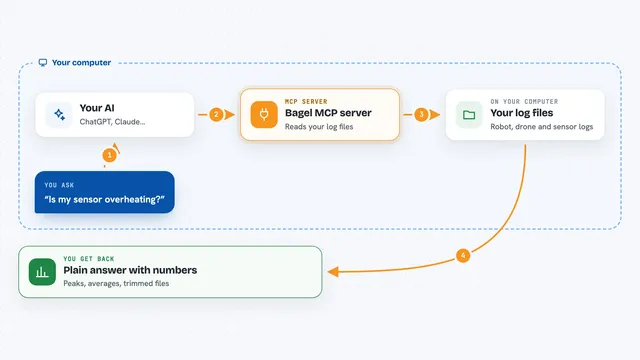
You ask your AI a question about your equipment, like which machine needs attention. Your AI sends that request to this helper. The helper passes it to the Forge service, which knows how to read data from many machine brands and turn it into one common set of names. Forge sends the answer back, and your AI explains it to you in the chat. Some requests can also change things, like turning an automation on, and the helper records those actions.
 Click to zoom
What you can do with it
- Look up a machine and confirm what it is
- Turn raw machine data from different brands into one common format
- Check a machine's history and past readings
- Ask for a failure prediction or remaining life estimate
- Score the health of a whole fleet of machines
- Calculate how efficiently a machine or fleet is running
- Record and verify a completed task as a work record
Try asking your AI
- “Which of my machines is most likely to fail this week?”
- “Show me the health of my whole fleet right now.”
- “What did machine M-1042 do over the last 24 hours?”
- “Create an automation that alerts me when temperature goes above 80 degrees.”
What it gives back to you
You get back plain answers in the chat, like lists of machines, health scores, predictions, and short summaries of what a machine did. Some tools return numbers, like efficiency percentages or energy use. When you ask it to record work, it gives you back a verified record you can check later. Everything shows up as text you can read and copy.
Before you start
What you need
- A free Forge API key from foundrynet.io/signup (a kind of password; you get one free without a card)
- An MCP client such as Claude Desktop or Cursor
Good to know
Some tools can change or start things on your equipment and create permanent records, so review before you approve them.
Install it with your AI
Add FoundryNet Forge MCP server to your AI, no technical skills needed
You don't install anything by hand. You copy one prompt, paste it into an AI that can work on your computer, and it checks, installs and connects the server for you, asking you when it needs something.
Sign in to get the install prompt
Members get a ready-made prompt that lets the Claude desktop app check FoundryNet Forge MCP server, install it and connect it for them, step by step. You don't need any technical skills: you copy, paste and answer a few questions. Your connected AI can also find and install any of the 4,361 MCP servers here for you.
Who it's for
People who work with factory or industrial equipment and want quick answers without learning each machine maker's software.