
MCP server · Coding
codemcp
by ezyang
Let your AI edit files and run tests in a project on your computer, with every change saved as a Git commit.
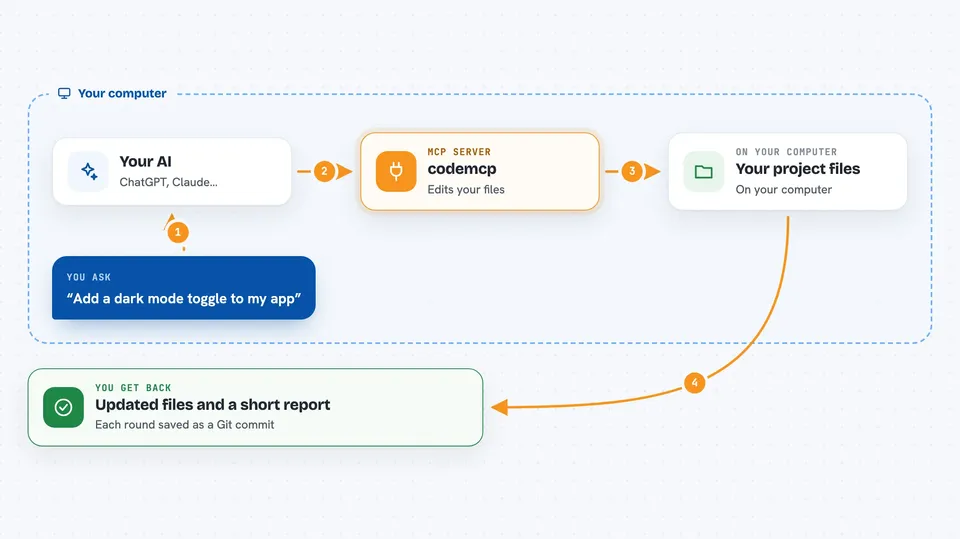
codemcp is a helper that turns Claude into a pair programming assistant for a project on your own computer. You ask for a feature, a bug fix, or a cleanup, and Claude edits the actual files instead of you copying code back and forth. It is handy for developers who want to work inside their own editor and keep control of every change.
What is an MCP server? The 30-second version
On its own, your AI can only chat with you. An MCP server is a small helper program that gives your AI a new skill or a connection to something else. Here, codemcp connects your AI to a project folder on your computer, so it can read files, write files, and run commands you have allowed. You stay in charge: the helper only does what you set up in advance.
What this MCP server does
You tell your AI what you want changed in your project. The AI uses codemcp to open the files, make the edits, and run the commands you allowed, like a formatter or your tests. codemcp saves each round of edits as a Git commit, so you can review or undo them later. When it is done, you get the changed files on your computer and a short report in the chat.
 Click to zoom
What you can do with it
- Ask for a new feature and have the files edited for you
- Fix a failing test by letting the AI run your test command
- Refactor code across several files in one go
- Run your formatter automatically after every edit
- Review all changes as Git commits and roll them back if needed
- Work in your own editor, since codemcp does not require a specific one
What it gives back to you
You get the edited files in your project folder, plus a short summary in the chat of what was changed. codemcp also creates a Git commit for each round of edits, so you can see the history and undo anything. If you allowed test or format commands, you see their output too.
Before you start
What you need
- uv installed on your computer
- Git installed on your computer
- The claude-mcp browser extension (or Claude Desktop)
- A codemcp.toml file in the project you want to work on
Good to know
codemcp can edit and run commands in your project, so only allow commands you trust and review the changes it makes.
Install it with your AI
Add codemcp to your AI, no technical skills needed
You don't install anything by hand. You copy one prompt, paste it into an AI that can work on your computer, and it checks, installs and connects the server for you, asking you when it needs something.
Sign in to get the install prompt
Members get a ready-made prompt that lets the Claude desktop app check codemcp, install it and connect it for them, step by step. You don't need any technical skills: you copy, paste and answer a few questions. Your connected AI can also find and install any of the 4,609 MCP servers here for you.
Who it's for
Developers and programmers who want an AI to edit code directly in their own project and editor.



