MCP server · Notes
memvid MCP server
by ferrants
Lets your AI save text into a memory video and search it later by meaning, not just keywords.
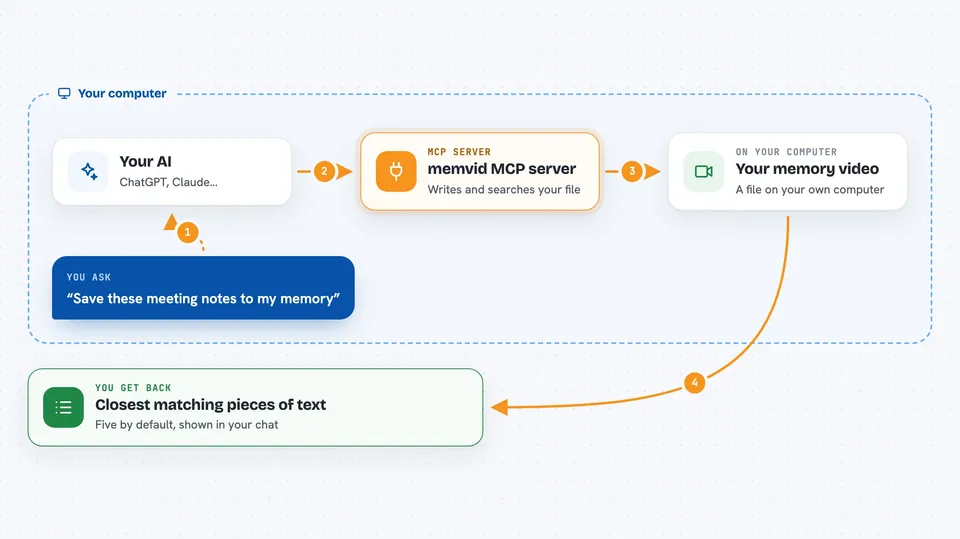
This is a small helper program that connects your AI to memvid, a tool that stores text inside a video file and lets you search it by meaning. It is handy if you want your AI to remember notes, documents, or snippets and find them again later. You run it on your own computer.
What is an MCP server? The 30-second version
On its own, your AI can only chat with you. An MCP server is a small helper program that gives your AI a new skill or a connection to another tool. This one connects your AI to memvid, a way of saving text into a video file. Once it is connected, your AI can add text to that memory and search it when you ask.
What this MCP server does
You ask your AI to remember some text, and the AI sends it to this helper. The helper uses memvid to write that text into a video file on your computer. Later, when you ask a question, the AI sends your question to the helper, which searches the video and finds the closest matching pieces. The AI then shows you those matches in the chat. One thing to know: each time you add new chunks, the memory video is reset, so it starts fresh.
 Click to zoom
What you can do with it
- Save chunks of text into a memory video
- Search your saved text by meaning
- Get back the top matching pieces of text
- Control how many results come back
- Keep your memory file on your own computer
Try asking your AI
- “Save these meeting notes to my memvid memory”
- “Search my memory for anything about the budget”
- “What did I save about the client kickoff”
- “Find the top 10 chunks about onboarding”
What it gives back to you
You get back a list of the closest matching chunks of text, usually five by default. Each match is a piece of what you saved earlier. You can ask for more or fewer results. The AI shows them to you in the chat as text.
Before you start
What you need
- Python 3.11 installed on your computer
- A terminal where you can run commands
- The project files from the memvid-mcp-server GitHub page
Good to know
Adding new chunks resets your memory video, so anything saved before is replaced.
Install it with your AI
Add memvid MCP server to your AI, no technical skills needed
You don't install anything by hand. You copy one prompt, paste it into an AI that can work on your computer, and it checks, installs and connects the server for you, asking you when it needs something.
Sign in to get the install prompt
Members get a ready-made prompt that lets the Claude desktop app check memvid MCP server, install it and connect it for them, step by step. You don't need any technical skills: you copy, paste and answer a few questions. Your connected AI can also find and install any of the 4,361 MCP servers here for you.
Who it's for
People who want a simple, local way to save and search their own notes or documents with AI help.