MCP server · Notes · official
Chroma MCP server
by chroma-core · official
Let your AI save notes, documents and text into a searchable memory, then find them again by meaning.
This is a helper that connects your AI assistant to Chroma, a free open-source tool for storing and searching text. It is handy if you keep a lot of notes, documents or snippets and want your AI to remember them and find the right one when you ask. You do not need to be technical to use it, but someone has to set it up once for you.
What is an MCP server? The 30-second version
On its own, your AI can only chat with you. It cannot remember things between conversations or look anything up in your own files. An MCP server is a small helper program that gives your AI one new skill. This one gives it a connection to Chroma, so your AI can save text into your own little library and search that library when you ask a question.
What this MCP server does
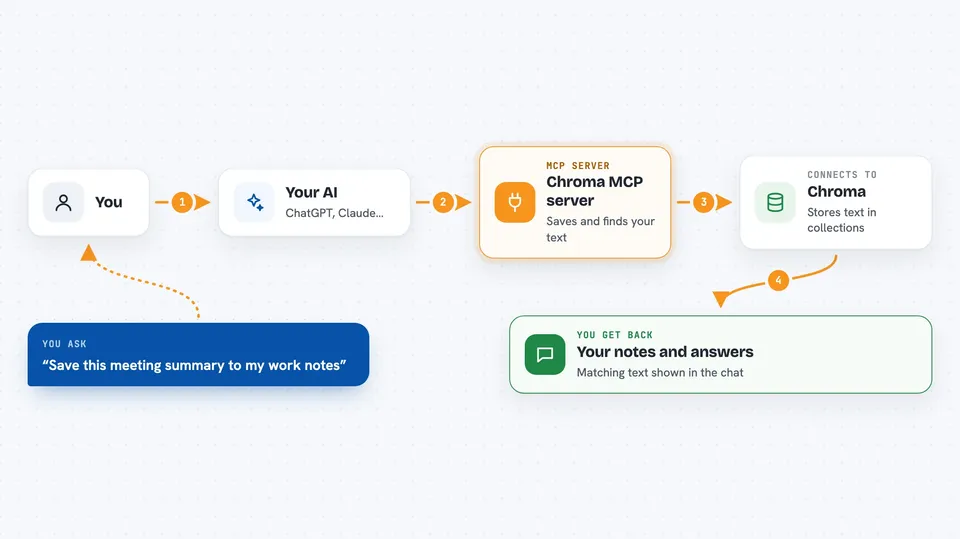
You ask your AI something, like to save a note or to find notes about a topic. The AI passes that request to this helper. The helper talks to Chroma, which stores your text in groups called collections. Chroma then searches by meaning, not just exact words, and hands the matching pieces back. Your AI reads them and answers you in the chat.
 Click to zoom
What you can do with it
- Save notes, documents or text snippets into a collection
- Search your saved text by meaning, not just exact keywords
- Filter results by tags or other details you attached
- List all your collections and see how many items each one holds
- Look at a small sample of what is inside a collection
- Update or remove items you saved earlier
- Delete a whole collection when you no longer need it
Try asking your AI
- “Save this meeting summary to my work notes collection”
- “Find everything I saved about the Q3 budget”
- “Show me a few items from my research collection”
- “How many documents are in my recipes collection?”
What it gives back to you
You get answers in plain chat text. When you search, the AI shows the matching pieces of text, often with the tags or details you saved alongside them. When you save or change something, it tells you it was done. When you list collections, you get a simple list with names and counts.
Before you start
What you need
- The Claude desktop app or another AI app that supports MCP servers
- uvx installed on your computer (a small tool that runs this server; your setup guide will explain it)
- For cloud use: a Chroma Cloud account with a tenant ID, database name and API key
- For self-hosted use: the address of your own Chroma instance
Good to know
This helper can delete collections and documents, so be careful when you ask it to remove things, and keep your API keys private.
Install it with your AI
Add Chroma MCP server to your AI, no technical skills needed
You don't install anything by hand. You copy one prompt, paste it into an AI that can work on your computer, and it checks, installs and connects the server for you, asking you when it needs something.
Sign in to get the install prompt
Members get a ready-made prompt that lets the Claude desktop app check Chroma MCP server, install it and connect it for them, step by step. You don't need any technical skills: you copy, paste and answer a few questions. Your connected AI can also find and install any of the 4,361 MCP servers here for you.
Who it's for
People who keep a lot of notes, research or documents and want their AI to remember and search them, especially writers, researchers and support teams.