MCP server · Notes
amnesic MCP server
by SurajKGoyal
Give your AI a lasting memory of your database tables, columns and what they mean.
amnesic is a small helper that remembers things about your database so you don't have to explain them again every time you chat with your AI. You write down what a table or column really means once, and every future session already knows it. It's handy if you keep working with the same database and are tired of repeating yourself.
What is an MCP server? The 30-second version
On its own, your AI can only chat with you. An MCP server is a small helper program you connect to your AI that gives it a new skill or a link to an app or service. This one links your AI to your database's notes, so it can look up what tables and columns mean. Once it's connected, you just ask in normal words and the AI quietly checks those notes for you.
What this MCP server does
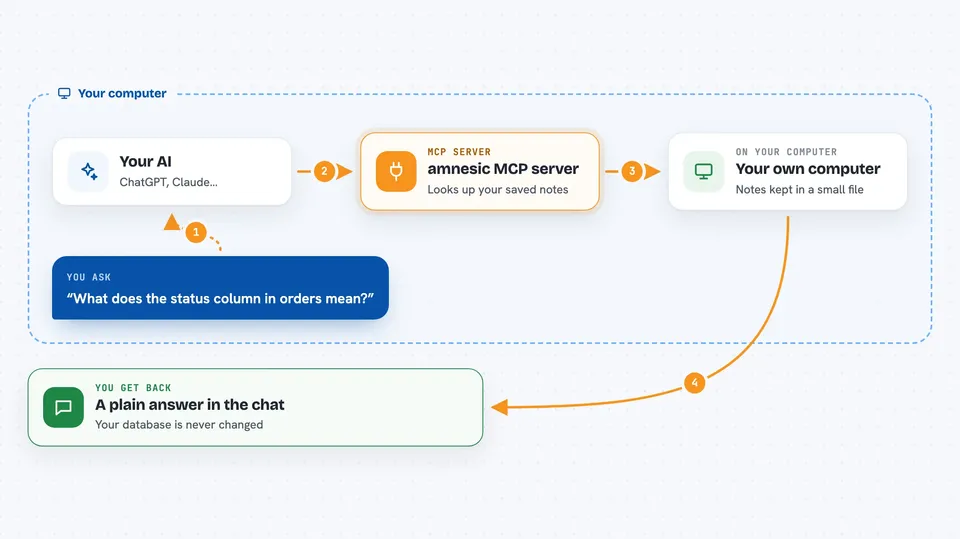
You install amnesic and point it at your database, then add it to your AI app. From then on, when you ask a question, your AI uses amnesic to look up the notes you saved about your tables and columns. amnesic keeps those notes in a small file on your own computer, one per database. It can also search those notes so your AI finds the right table fast. Everything it does is read-only, so it never changes your database.
 Click to zoom
What you can do with it
- List all the database connections you have set up
- See all known tables with their descriptions
- Search your saved notes for a table or column
- Save a plain-English description for a table or column
- Look up the relationships between tables
- Export your notes to a file to share with a teammate
- Import notes from a file into another connection
Try asking your AI
- “What does the status column in the orders table mean?”
- “Find any table related to customers and explain it”
- “Which columns link orders to users?”
- “Summarize what the products table is for”
What it gives back to you
You get back plain answers in the chat, like a short explanation of a column or a list of matching tables. If you ask it to save a note, it confirms that the note was stored. If you ask it to search, it shows the closest matches it found. Nothing in your actual database is changed.
Before you start
What you need
- Python installed on your computer
- The pipx tool (or uv, or plain pip)
- Access details for your database (host, user, password) if you want to connect a real one
- An AI app that supports MCP, like Claude Desktop or Cursor
Good to know
It is read-only by design, so it will not change or delete anything in your database.
Install it with your AI
Add amnesic MCP server to your AI, no technical skills needed
You don't install anything by hand. You copy one prompt, paste it into an AI that can work on your computer, and it checks, installs and connects the server for you, asking you when it needs something.
Sign in to get the install prompt
Members get a ready-made prompt that lets the Claude desktop app check amnesic MCP server, install it and connect it for them, step by step. You don't need any technical skills: you copy, paste and answer a few questions. Your connected AI can also find and install any of the 4,361 MCP servers here for you.
Who it's for
Developers and analysts who work with the same database often and want their AI to remember what the tables and columns mean.