MCP server · Notes
Qdrant MCP server
by qdrant
Give your AI a long-term memory so it can save notes and find them again later.
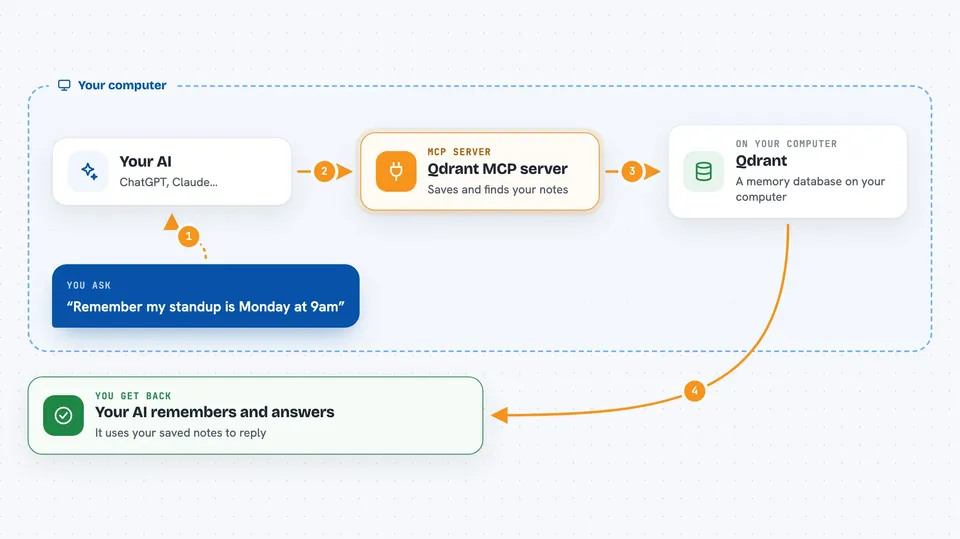
This is a small helper that gives your AI a memory it can keep. You can tell your AI to remember something, and later ask it about that thing, even in a brand new chat. It is handy for anyone who keeps repeating the same background information to their AI.
What is an MCP server? The 30-second version
On its own, your AI can only chat. It forgets everything the moment you close the window. An MCP server is a small helper program that gives your AI a new skill or a connection to another service. This one connects your AI to Qdrant, a place for storing and searching text, so your AI can save things there and look them up again when you ask.
What this MCP server does
You ask your AI to remember something, like a project detail or a preference. The AI passes that text to this helper. The helper saves it in Qdrant, a database built for searching by meaning rather than exact words. Later, when you ask a question, the helper searches that stored text and hands the closest matches back to your AI, which then answers you using them.
 Click to zoom
What you can do with it
- Save notes, facts, or preferences your AI should remember
- Search your saved notes using plain everyday language
- Keep separate collections for different topics or projects
- Attach extra details to a saved note, like a label or a link
- Limit how many search results come back at once
- Switch to read-only mode so nothing new can be saved
Try asking your AI
- “Remember that our team standup is every Monday at 9am.”
- “What did I tell you about the Johnson project deadline?”
- “Save this note under my recipes collection: the cake needs 20 more minutes.”
- “Search my notes for anything about the new office address.”
What it gives back to you
When you save something, you get a short confirmation that it was stored. When you search, you get back the matching pieces of text, usually as a short list of messages in the chat. Your AI then reads those and answers your question in its own words.
Before you start
What you need
- A Qdrant database, either running on your computer or a free cloud account
- An API key from Qdrant if you use their cloud service (a kind of password for apps)
- A name for your collection, which is just a folder for your saved notes
- The uvx tool installed, or Docker if you prefer that route
Good to know
Anything your AI saves goes into your Qdrant database, so avoid storing passwords or private details you would not want kept there.
Install it with your AI
Add Qdrant MCP server to your AI, no technical skills needed
You don't install anything by hand. You copy one prompt, paste it into an AI that can work on your computer, and it checks, installs and connects the server for you, asking you when it needs something.
Sign in to get the install prompt
Members get a ready-made prompt that lets the Claude desktop app check Qdrant MCP server, install it and connect it for them, step by step. You don't need any technical skills: you copy, paste and answer a few questions. Your connected AI can also find and install any of the 4,361 MCP servers here for you.
Who it's for
Anyone who wants their AI to remember things between chats, like writers, researchers, support staff, or developers keeping notes on their projects.