MCP server · Notes
Weaviate MCP server
by weaviate
Let your AI search and update your Weaviate collections as a knowledge base or chat memory.
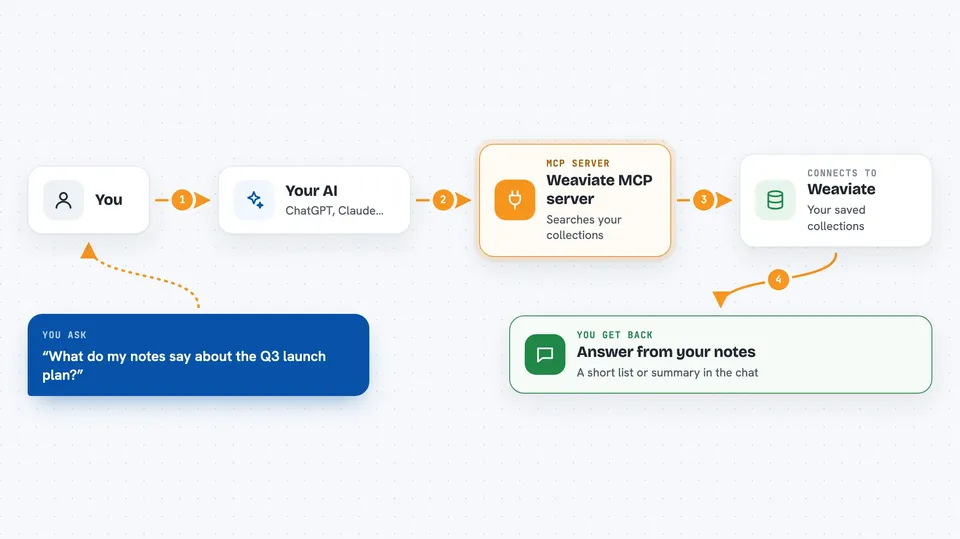
This is a helper that connects your AI assistant to Weaviate, a place where you store and search information. It is handy if your team keeps documents, notes, or past conversations in Weaviate and you want your AI to look things up or save new items for you. The old standalone version is retired; the same helper is now built into Weaviate itself, so you turn it on instead of installing it.
What is an MCP server? The 30-second version
On its own, your AI can only chat with you using what it already knows. An MCP server is a small helper program that gives your AI a new skill or a connection to another app or service. Here, that helper lives inside Weaviate and lets your AI reach your Weaviate collections, so it can search them or add to them when you ask. You do not install a separate program; you switch the helper on inside Weaviate.
What this MCP server does
You ask your AI a question in plain words, like what your notes say about a topic. The AI passes that request to the Weaviate helper. The helper searches your Weaviate collections using a mix of meaning-based and keyword search, and can also look up how a collection is set up or list its tenants. Then it sends the matching items back, and your AI turns them into an answer for you. If you ask it to save something, it can also create or update an item in a collection.
 Click to zoom
What you can do with it
- Search your Weaviate collections with a mix of meaning-based and keyword search
- Look up how a collection is set up, including its fields
- List the tenants inside a multi-tenant collection
- Create a new item in a collection
- Update an existing item in a collection
- Use your collections as a knowledge base for answers
- Use your collections as memory for past chats
Try asking your AI
- “Search my Weaviate notes for anything about the Q3 launch plan”
- “What fields does the Customers collection have?”
- “List the tenants in the Support collection”
- “Save this summary as a new item in my MeetingNotes collection”
What it gives back to you
You get answers in the chat, built from the items the helper found in Weaviate, often as a short list or summary with the matching text. When you ask about a collection's setup, you get its fields and settings in plain words. When you ask it to save or update something, it tells you that the change was made. You do not see raw technical output unless you ask for it.
Before you start
What you need
- A Weaviate instance running version 1.37.1 or newer
- The MCP server switched on in Weaviate by setting MCP_SERVER_ENABLED=true
- Your Weaviate API key, which is the password your Weaviate setup uses for apps
Good to know
It can create and change items in your Weaviate collections, so check before asking it to save or update anything important.
Install it with your AI
Add Weaviate MCP server to your AI, no technical skills needed
You don't install anything by hand. You copy one prompt, paste it into an AI that can work on your computer, and it checks, installs and connects the server for you, asking you when it needs something.
Sign in to get the install prompt
Members get a ready-made prompt that lets the Claude desktop app check Weaviate MCP server, install it and connect it for them, step by step. You don't need any technical skills: you copy, paste and answer a few questions. Your connected AI can also find and install any of the 4,361 MCP servers here for you.
Who it's for
People and teams who already keep documents, notes, or chat history in Weaviate and want their AI assistant to search and update it for them.