
MCP server · Research
Movie Scene Map MCP server
by Flightmussy
Ask your AI where a film was shot, or what was filmed at a place you name.
This is a helper for the Movie Scene Map atlas, a big collection of real filming locations for films and series, plus the real places video games, anime and manga are set in. It is handy if you are curious about a film you just watched, planning a trip around a favourite show, or writing something and need to check where a scene was really made. You do not need to install anything or sign up.
What is an MCP server? The 30-second version
On its own, your AI can only chat with you using what it already learned. An MCP server is a small helper program that gives your AI one new skill, in this case a connection to the Movie Scene Map atlas. Once your AI can reach this server, it can look up filming locations for a title, or look up what was filmed at a place, and bring the answer back into your chat. You just ask in normal words and the AI does the looking up for you.
What this MCP server does
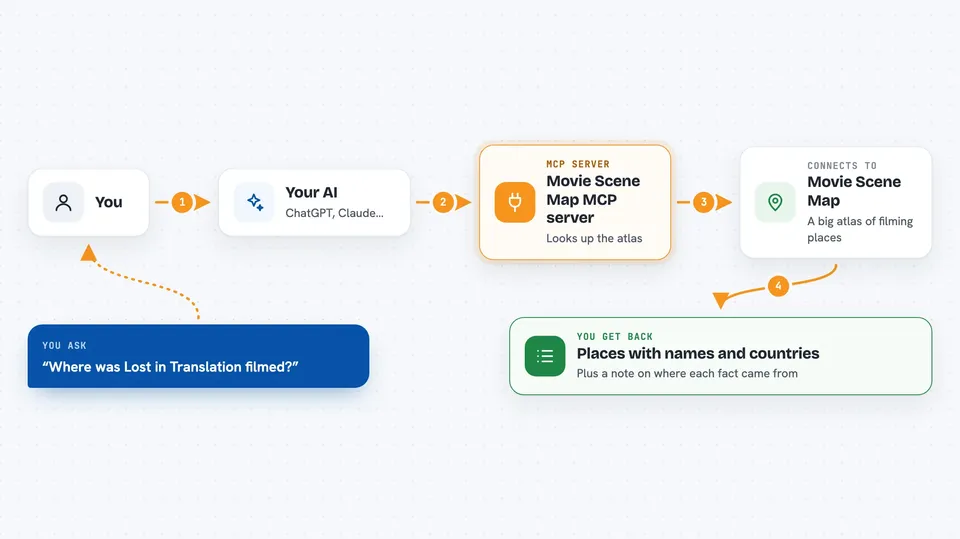
You ask your AI something like where a film was shot, or what was made at a place you name. The AI sends that question to this helper, which reads the Movie Scene Map atlas. The atlas answers with places, coordinates, and the source behind each claim, such as a Wikidata statement or a line from a Wikipedia article. The AI then writes the answer back to you in your chat, in plain words. You can also ask it to search titles, list countries, or show what is near a spot on the map.
 Click to zoom
What you can do with it
- Find the filming locations of a film or series
- Find what was filmed, set, or made at a place you name
- Search for a production by name, even with accents or odd capitalisation
- Search for places by name, filtered by country or kind of place
- See which locations sit within a chosen distance of a point on the map
- List the top-ranked locations worldwide or inside one country
- Get live totals, like how many places each country holds
Try asking your AI
- “Where was the film Lost in Translation filmed?”
- “What was filmed at the Park Hyatt Tokyo?”
- “Show me the top filming locations in Iceland.”
- “Which places are within 5 km of these coordinates: 48.8584, 2.2945?”
What it gives back to you
You get back a written answer in your chat, usually a short list of places with their names, countries, and coordinates, plus a note about where each fact came from. For a title, you see the places it was shot at or set in, and whether the link is a filming location or a story setting. For a place, you see everything recorded as made there. The server also tells you when coverage is thin, for example when a production is only known at country level.
Before you start
Good to know
The data is honest about its limits: a place being listed does not mean a specific scene was shot there, and video games, anime and manga are placed by where the story is set, not by filming.
Install it with your AI
Add Movie Scene Map MCP server to your AI, no technical skills needed
You don't install anything by hand. You copy one prompt, paste it into an AI that can work on your computer, and it checks, installs and connects the server for you, asking you when it needs something.
Sign in to get the install prompt
Members get a ready-made prompt that lets the Claude desktop app check Movie Scene Map MCP server, install it and connect it for them, step by step. You don't need any technical skills: you copy, paste and answer a few questions. Your connected AI can also find and install any of the 4,609 MCP servers here for you.
Who it's for
Film and TV fans, travellers planning trips around shows, and writers or researchers who need to check where something was really shot or set.



