MCP server · Developer tools
Storybook Design System Extractor MCP server
by freema
Lets your AI read your Storybook design system and pull out components, HTML, styles and theme tokens.
This is a small helper that connects your AI assistant to a Storybook design system. Storybook is the place where design teams keep all their ready-made building blocks, like buttons, forms and alerts. If you work with those building blocks and want your AI to look them up for you, this is handy.
What is an MCP server? The 30-second version
On its own, your AI can only chat with you. An MCP server is a small helper program that gives your AI a new skill or a connection to an app or service. This one connects your AI to your Storybook design system, so it can look up components, their HTML and their styles when you ask. You do not need to know how it works inside; you just ask in plain words.
What this MCP server does
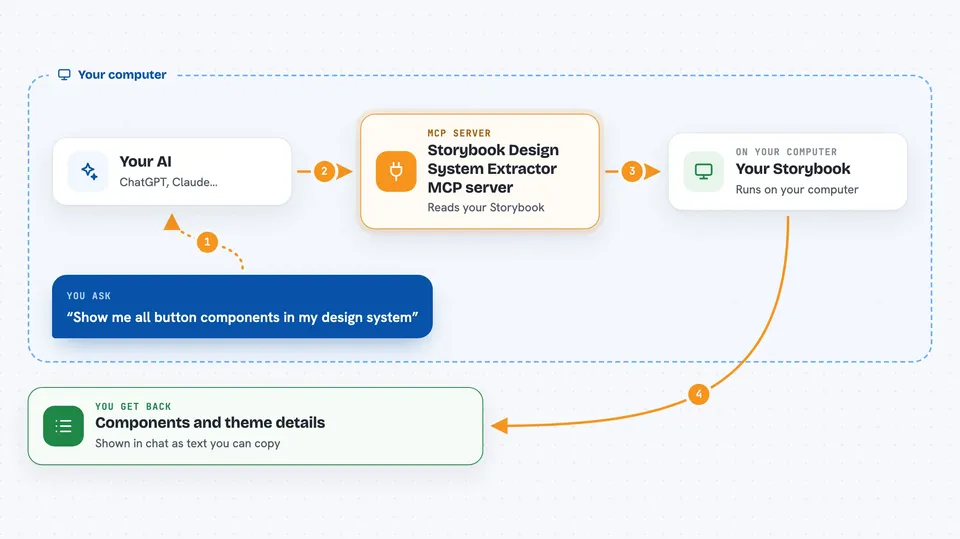
You ask your AI something like show me all the button components. The AI passes that request to this helper. The helper opens your Storybook, finds the matching components, and reads their rendered HTML, styles and theme details. Then it sends that information back to the AI, which explains it to you in the chat. For big components it works in the background and checks back when it is done.
 Click to zoom
What you can do with it
- List all components in your Storybook, with a short or full view
- Search components by name, category or purpose like form inputs
- Get the rendered HTML of a specific component or one of its variants
- Find which other components are used inside a component
- Pull out theme details like colors, spacing and typography
- Read design tokens from an external CSS file on the same site
- Track and cancel long-running extraction jobs
Try asking your AI
- “Show me all available button components in the design system”
- “Find form input components and show me their HTML structure”
- “Extract the color palette and typography tokens from the design system”
- “Get the HTML and styles for the alert component so I can recreate it”
What it gives back to you
You get back lists of components, HTML snippets, class names, variant names, and theme details like colors and spacing. For long tasks, you first get a job id and then the finished result when it is ready. The AI shows all of this in the chat, usually as text you can read or copy. Nothing is changed in your Storybook; it only reads.
Before you start
What you need
- Node.js 20 or newer installed on your computer
- Chrome or Chromium (used behind the scenes to render components)
- A running Storybook instance, version 7 to 10, and its web address
- An MCP client like the Claude desktop app or Claude CLI
Good to know
It only reads from your Storybook, but it does open your Storybook in a headless browser, so make sure the address you give it is one you trust.
Install it with your AI
Add Storybook Design System Extractor MCP server to your AI, no technical skills needed
You don't install anything by hand. You copy one prompt, paste it into an AI that can work on your computer, and it checks, installs and connects the server for you, asking you when it needs something.
Sign in to get the install prompt
Members get a ready-made prompt that lets the Claude desktop app check Storybook Design System Extractor MCP server, install it and connect it for them, step by step. You don't need any technical skills: you copy, paste and answer a few questions. Your connected AI can also find and install any of the 4,361 MCP servers here for you.
Who it's for
Designers, front-end developers and anyone who works with a Storybook design system and wants their AI to look things up quickly.