
MCP server · Finance and crypto
Zcash ZAP1 receipts MCP server
Give your AI a way to create and check Zcash proof receipts for agent and payment workflows.
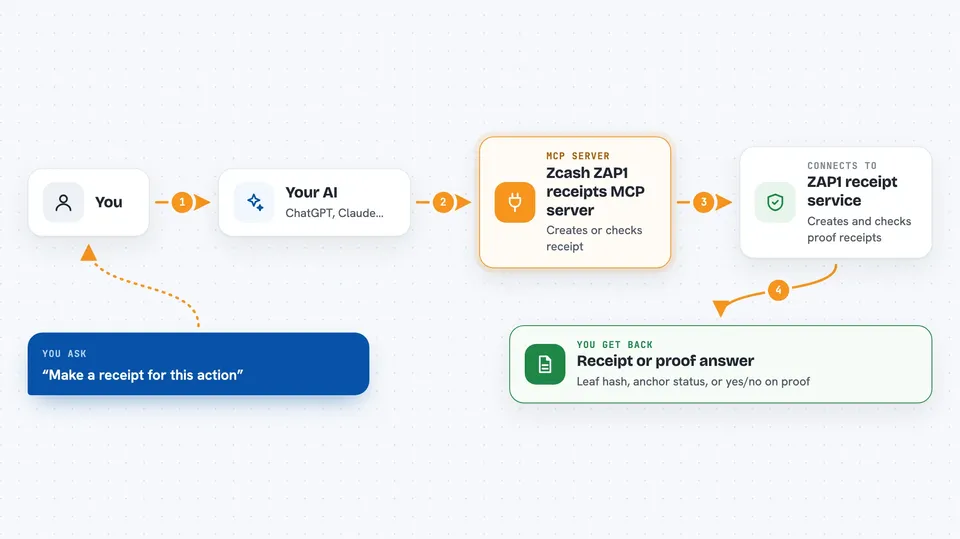
This is a helper for your AI that deals with Zcash receipts. It lets your AI create proof records, check whether they are anchored, and verify them later without trusting the server. It is handy if you work with Zcash payments, agent actions, or audit trails and want a verifiable paper trail.
What is an MCP server? The 30-second version
On its own, your AI can only chat. An MCP server is a small helper program that gives your AI a new skill or a connection to an app or service. This one connects your AI to ZAP1, a proof and receipt layer for Zcash workflows, so your AI can create, look up, and verify receipts for you when you ask. You do not need to know how it works inside; you just ask in plain words.
What this MCP server does
You ask your AI something like "make a receipt for this action" or "is this leaf anchored yet". Your AI passes that request to this helper. The helper talks to the ZAP1 service (and, for chain questions, to a Zcash node called Zebra). It creates a typed record, checks anchor status, or verifies a proof. Then it hands the result back to your AI, and your AI shows it to you in the chat.
 Click to zoom
What you can do with it
- Create a typed ZAP1 receipt for an agent action or payment
- Check whether a receipt leaf is anchored or still waiting
- Verify a Merkle proof for a receipt
- Get the full proof bundle for a leaf hash
- Look up recent attestation events and protocol stats
- Decode Zcash memo payloads (ZAP1, ZIP 302, text, binary)
- Check the current Zcash block height and look up a transaction
Try asking your AI
- “Create a ZAP1 receipt for this agent action with these input and output hashes”
- “Is this leaf hash anchored yet, and what is the Merkle root”
- “Verify this ZAP1 proof and tell me if it is valid”
- “Decode this Zcash memo and tell me what type it is”
What it gives back to you
You get back plain answers in the chat: a leaf hash, a Merkle root, an anchor status, a yes or no on a proof, a list of recent events, or a decoded memo. For proofs, you can also get a proof bundle you can hand to someone else. Everything is shown as text or a small structured block you can copy.
Before you start
What you need
- Node.js 18 or newer (the npx command uses it)
- An MCP client like the Claude desktop app
- A ZAP1 API key for write operations (read-only tools do not need one; you can request a trial key from the project)
- A running Zebra node if you want live Zcash chain queries
Good to know
This server does not hold keys, scan balances, or sign transactions, so it cannot move your money, but write operations need an API key and may create records on the ZAP1 service.
Install it with your AI
Add Zcash ZAP1 receipts MCP server to your AI, no technical skills needed
You don't install anything by hand. You copy one prompt, paste it into an AI that can work on your computer, and it checks, installs and connects the server for you, asking you when it needs something.
Sign in to get the install prompt
Members get a ready-made prompt that lets the Claude desktop app check Zcash ZAP1 receipts MCP server, install it and connect it for them, step by step. You don't need any technical skills: you copy, paste and answer a few questions. Your connected AI can also find and install any of the 4,609 MCP servers here for you.
Who it's for
People who work with Zcash payments, agent workflows, or audit trails and want a verifiable receipt layer next to their wallet or signer.



