MCP server · Research
Pumperly MCP server
by GeiserX
Ask your AI to find cheap fuel, plan fuel-saving routes and locate EV chargers near you.
This is a small helper that connects your AI assistant to Pumperly, a fuel price comparison service. Once it is set up, you can just ask your AI things like where the cheapest petrol is on your way home. It is handy for anyone who drives, commutes, or plans trips and wants to spend less on fuel.
What is an MCP server? The 30-second version
On its own, your AI can only chat with you. An MCP server is a small helper program that gives your AI a new skill or a connection to an app or service. This one connects your AI to Pumperly, so it can look up fuel prices, find stations and plan routes for you. You ask in normal words, and the helper quietly does the looking up behind the scenes.
What this MCP server does
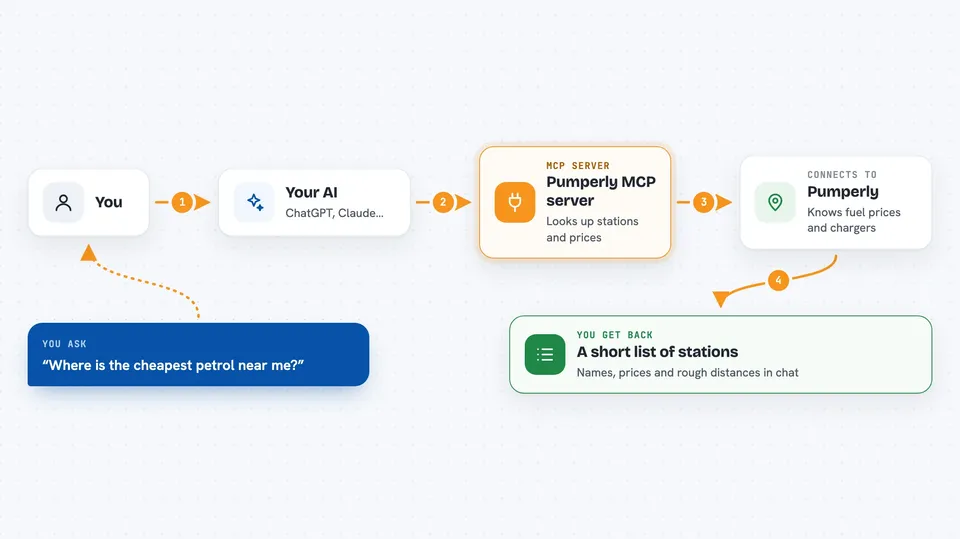
You ask your AI a question about fuel or a route. The AI passes your request to this helper program. The helper talks to a Pumperly service, which knows about gas stations, prices and charging points. Pumperly sends back the details, and your AI turns them into a plain answer in the chat. You never have to visit a website or read a table of numbers yourself.
 Click to zoom
What you can do with it
- Find the nearest gas stations to where you are
- Compare fuel prices across stations in an area
- Plan a route and see which stations are along the way
- Look up EV charging stations near a place
- Turn a place name or address into map coordinates
- Check the current fuel price data and exchange rates the service is using
Try asking your AI
- “Where is the cheapest petrol near me right now?”
- “Plan a route from Manchester to Leeds and show me fuel stations along the way.”
- “Are there any EV charging points close to the office?”
- “What is the average diesel price in this area today?”
What it gives back to you
You get a plain answer in the chat, usually a short list of stations with their names, prices and rough distances. For routes, you get a suggested path plus the stations that sit near it. It can also give you coordinates for a place you named. Everything comes back as text you can read, not as a file to download.
Before you start
What you need
- The Claude desktop app or another AI tool that supports MCP servers
- Node.js installed on your computer (the free software that runs the helper)
- Nothing else, no account or key is needed
Good to know
Prices and station details come from an outside service and can be out of date, so check before you rely on them for a long trip.
Install it with your AI
Add Pumperly MCP server to your AI, no technical skills needed
You don't install anything by hand. You copy one prompt, paste it into an AI that can work on your computer, and it checks, installs and connects the server for you, asking you when it needs something.
Sign in to get the install prompt
Members get a ready-made prompt that lets the Claude desktop app check Pumperly MCP server, install it and connect it for them, step by step. You don't need any technical skills: you copy, paste and answer a few questions. Your connected AI can also find and install any of the 4,361 MCP servers here for you.
Who it's for
Drivers, commuters, delivery workers and anyone who plans trips and wants to keep fuel costs down.