MCP server · Developer tools
Linux server MCP tools
Let your AI read logs, check services, run safe commands and look after a Linux server for you.

This is a helper that lets your AI assistant work on a Linux server: read log files, check whether services are running, look at WordPress sites and run safe commands. It is meant for people who look after a server, like a web host, a small business owner or an admin who wants a hand. Everything it can touch is limited by a list you set up yourself, so it cannot wander off.
What is an MCP server? The 30-second version
On its own, your AI can only chat with you. An MCP server is a small helper program that gives your AI a new skill or a connection to something else. This helper connects your AI to a Linux server, so when you ask about a log file or a service, the AI can actually go and look instead of guessing. You install it once on the server, and after that your AI can use it whenever you ask.
What this MCP server does
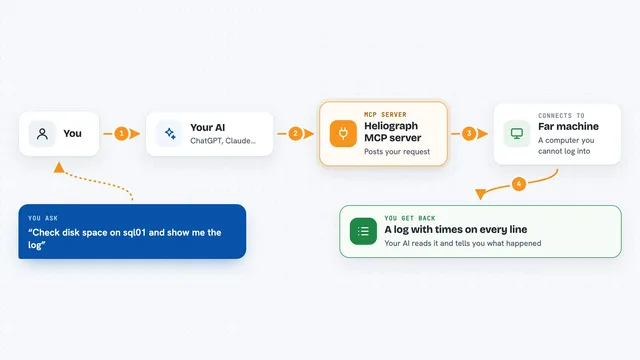
You ask your AI something like what is wrong with the web server. The AI sends that request to this helper program running on your Linux machine. The helper checks the server, reads the log file or asks about the service, and only does things that are on your allowed list. Then it sends the answer back, and your AI explains it to you in the chat. If you ask for something outside the list, the helper simply says no.
 Click to zoom
What you can do with it
- Read log files and search them for keywords
- Check whether a service like Apache or PostgreSQL is running
- Reload or restart a service from your allowed list
- List, add, remove or turn off cron jobs
- Run safe WordPress commands like flushing the cache or listing plugins
- Run read-only MySQL queries to look at data
- Run small Python snippets in a sandbox with no internet access
What it gives back to you
You get back plain answers in the chat: log lines, a list of services, plugin names, query results, or a short confirmation that a service was restarted or a cron job was added. Structured things like plugin lists or database results come back as neat tables or lists. If something is not allowed, you get a short message saying it was denied and why. Every reply also carries a small note about which server it came from.
Before you start
What you need
- A Linux server with systemd
- Python 3.13 or newer installed on that server
- Root access on the server to install and run it
- An AI tool that supports MCP, such as Cursor, Claude or VS Code
Good to know
Some actions really change your server, like restarting a service, editing cron jobs or running shell commands, so only connect this to a server you are allowed to change and keep the allowed lists tight.
Install it with your AI
Add Linux server MCP tools to your AI, no technical skills needed
You don't install anything by hand. You copy one prompt, paste it into an AI that can work on your computer, and it checks, installs and connects the server for you, asking you when it needs something.
Sign in to get the install prompt
Members get a ready-made prompt that lets the Claude desktop app check Linux server MCP tools, install it and connect it for them, step by step. You don't need any technical skills: you copy, paste and answer a few questions. Your connected AI can also find and install any of the 4,361 MCP servers here for you.
Who it's for
People who look after a Linux server, such as web hosts, system administrators, and small business owners running their own sites.