MCP server · Developer tools
execkit MCP server
Let your AI run commands in a lasting session on your computer, a server over SSH, or a Docker container.

execkit is a helper that gives your AI assistant a real command line to work with. It keeps the session alive between steps, so when the AI changes folder or sets a setting, that stays put for the next command. It is handy if you want your AI to run commands on a remote server or inside a container, and keep a record of what it did.
What is an MCP server? The 30-second version
On its own, your AI can only chat. An MCP server is a small helper program that gives your AI a new skill or a connection to something outside the chat. This one connects your AI to a shell session, on your own machine, on a server you reach over SSH, or inside a Docker container. Once it is set up, your AI can run commands there and bring the results back to you.
What this MCP server does
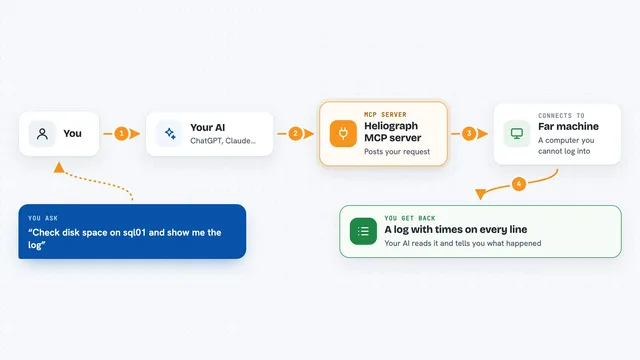
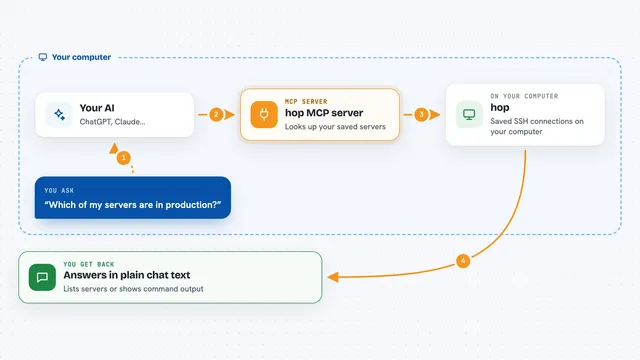
You ask your AI to run something, like building a project or checking a log file. The AI sends the command to execkit. execkit runs it in a session that remembers where you were and what was set before. It catches the output, hides anything that looks like a password or token, and trims long output so it does not flood the chat. Then it hands back a clean result: what the command printed, whether it worked, how long it took, and which folder it ran in.
 Click to zoom
What you can do with it
- Run commands on your own computer and keep the folder and settings between steps
- Connect to a server over SSH and run commands there
- Run commands inside a Docker container
- Hide passwords and tokens from the output before your AI sees them
- Trim long output so only the part you need comes back
- Save a record of every command that ran
- Watch a session live in your terminal or browser
- Save and restore files on a remote workspace if something goes wrong
Try asking your AI
- “Create a session on my server over SSH and show me what is in the home folder”
- “In that session, run the build and tell me if it failed”
- “Start a Docker session on the web container and check the last 50 lines of the log”
- “Show me the audit log of everything that ran today”
What it gives back to you
You get back a tidy result in the chat: the command's normal output, any error output kept separate, whether it succeeded, how long it took, and which folder it ran in. If output was trimmed, it tells you that too. If a command timed out, it says so clearly and the session stays usable. You can also ask to see the audit log or watch the session live.
Before you start
What you need
- The uv tool installed (a small program that runs Python tools; the README shows a one-line install)
- For SSH sessions: a server you can reach and your login details
- For Docker sessions: Docker installed and a container running
- The target machine needs a normal shell and the base64 command
Good to know
This lets your AI run real commands, so it can change or delete files, and the built-in command filter is easy to get around, so give the AI and the SSH user as few rights as you can.
Install it with your AI
Add execkit MCP server to your AI, no technical skills needed
You don't install anything by hand. You copy one prompt, paste it into an AI that can work on your computer, and it checks, installs and connects the server for you, asking you when it needs something.
Sign in to get the install prompt
Members get a ready-made prompt that lets the Claude desktop app check execkit MCP server, install it and connect it for them, step by step. You don't need any technical skills: you copy, paste and answer a few questions. Your connected AI can also find and install any of the 4,361 MCP servers here for you.
Who it's for
People who want their AI to run commands on a server or in a container, and anyone who needs a record of what the AI actually did.