MCP server · Developer tools
Forge MCP server
by ferodrigop
Let your AI open and watch real terminal windows, run commands, and manage several coding agents at once.
Forge is a helper that gives your AI its own set of terminal windows. A terminal is just the black text window where commands run. If you or your AI work with code, Forge lets the AI start programs, watch them, and read what they print, all while you chat with it.
What is an MCP server? The 30-second version
On its own, your AI can only chat with you. An MCP server is a small helper program that gives your AI a new skill or a connection to another tool. Forge is that helper, and its skill is running and watching real terminal sessions on your computer. So when you ask your AI to start a dev server or run your tests, it can actually do it through Forge instead of just telling you what to type.
What this MCP server does
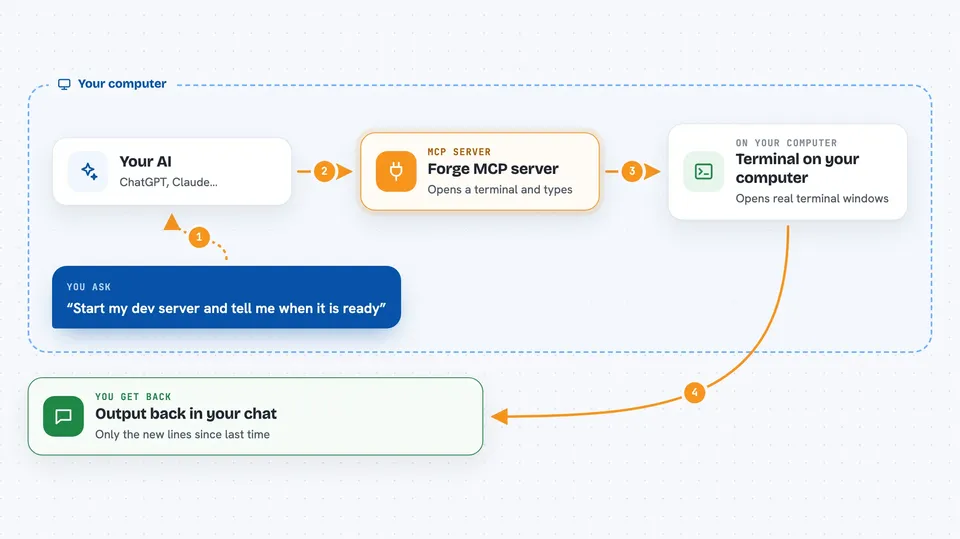
You ask your AI to do something, like start your app or run the test suite. The AI uses Forge to open a terminal window and type the command for you. Forge keeps that window alive and remembers everything it prints. When you ask again, the AI reads only the new output since last time, so it does not waste space. You get the results back in your chat, and Forge can clean up the window when it is done.
 Click to zoom
What you can do with it
- Start a long-running dev server and keep it alive
- Run a build or test command and get the full output back
- Open several terminals at once and read them together
- Send keystrokes like Ctrl+C or Enter to a running program
- Search a terminal's output for a word or pattern
- Wait until a program prints a certain line before moving on
- Launch other AI coding agents as separate sessions
Try asking your AI
- “Start my Next.js dev server and tell me when it is ready”
- “Run npm test and show me the results”
- “Open three terminals and start the frontend, the API, and the database”
- “Watch the server log and tell me if an error appears”
What it gives back to you
You get text back in your chat: the output of commands, the current screen of a terminal, or a short status like running or exited. For searches, you get the matching lines. For long-running programs, you get only the new lines since the last time the AI looked, so the answers stay short.
Before you start
What you need
- Node.js 18 or newer if you install with npm
- A terminal app on your computer (the normal command window)
- An MCP-compatible AI client like Claude Code, Codex, or Gemini CLI
Good to know
Forge runs real commands on your computer, so anything your AI starts can change or delete files, and spawned coding agents may use paid API credits.
Install it with your AI
Add Forge MCP server to your AI, no technical skills needed
You don't install anything by hand. You copy one prompt, paste it into an AI that can work on your computer, and it checks, installs and connects the server for you, asking you when it needs something.
Sign in to get the install prompt
Members get a ready-made prompt that lets the Claude desktop app check Forge MCP server, install it and connect it for them, step by step. You don't need any technical skills: you copy, paste and answer a few questions. Your connected AI can also find and install any of the 4,361 MCP servers here for you.
Who it's for
Developers and technical teams who use AI coding agents and want them to run and watch real terminal programs.