MCP server · Developer tools
backscroll MCP server
by soren-achebe
Your AI can search and read the output of your past terminal commands, all stored locally.

backscroll is a small tool that remembers what your terminal commands printed, not just what you typed. It saves every command's output, exit code, folder, and timing into a local file on your own machine. This MCP server lets your AI assistant look through that saved history for you.
What is an MCP server? The 30-second version
On its own, your AI can only chat with you. An MCP server is a small helper program that gives your AI a new skill or a connection to something else. Here, it connects your AI to backscroll, the tool that records your terminal command outputs. Once connected, your AI can look up past commands and their results when you ask.
What this MCP server does
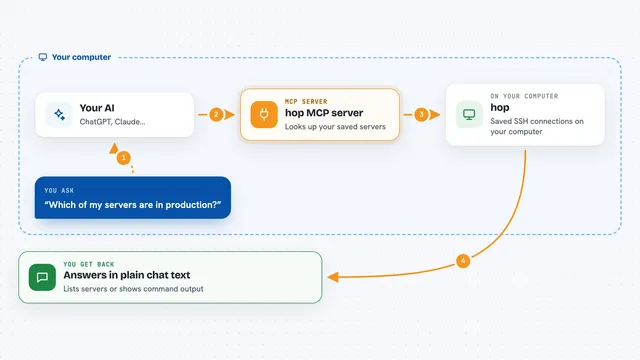
You ask your AI something like what did that failing command print earlier. Your AI uses this helper to talk to backscroll on your computer. backscroll searches its local database of past commands and their outputs. Then your AI brings back the matching command, its output, exit code, and when it ran. Everything stays on your machine, nothing goes to the cloud.
 Click to zoom
What you can do with it
- Search past command outputs for a word or error message
- Show the full output of a specific past command
- Compare two runs of the same command to see what changed
- List recent commands with their exit codes and durations
- Find only the commands that failed in the last few hours
- Export a command and its output as a markdown block
Try asking your AI
- “What did the last terraform apply command print?”
- “Search my command history for permission denied errors”
- “Show me all commands that failed in the last two hours”
- “What is different between the last two runs of make test?”
What it gives back to you
You get back the command text, its full output, the exit code, the folder it ran in, and how long it took. For searches, you get a list of matching commands with a snippet of the output around the match. For diffs, you get a line-by-line comparison of two outputs. It all appears as normal text in your chat.
Before you start
What you need
- backscroll installed on your computer
- The backscroll shell integration added to your shell config
- A recorded shell session started with backscroll run
Good to know
It reads your local command history and outputs, which may contain secrets, so backscroll redacts secrets by default but you should still be careful about what you share.
Install it with your AI
Add backscroll MCP server to your AI, no technical skills needed
You don't install anything by hand. You copy one prompt, paste it into an AI that can work on your computer, and it checks, installs and connects the server for you, asking you when it needs something.
Sign in to get the install prompt
Members get a ready-made prompt that lets the Claude desktop app check backscroll MCP server, install it and connect it for them, step by step. You don't need any technical skills: you copy, paste and answer a few questions. Your connected AI can also find and install any of the 4,361 MCP servers here for you.
Who it's for
Developers, system administrators, and anyone who works in a terminal and wants to find past command output without scrolling.