
MCP server · Research
GitHunt MCP server
Search and score GitHub developers by location, role and skills, right from your AI chat.
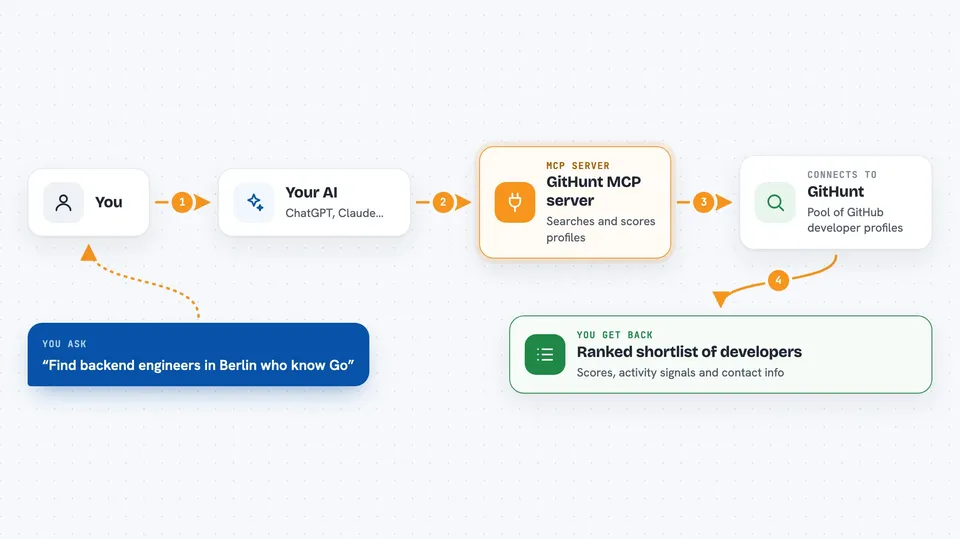
GitHunt is a helper that lets your AI assistant search a pool of GitHub developers and pull up ranked profiles. It is made for recruiters and hiring managers who want a shortlist fast without clicking around GitHub all day. You just ask in plain words and it does the digging.
What is an MCP server? The 30-second version
On its own, your AI can only chat with you. An MCP server is a small helper program that gives your AI a new skill or a connection to another service. This one connects your AI to GitHunt, a service that keeps a searchable list of GitHub developers. Once it is connected, your AI can look up people and pull their details for you when you ask.
What this MCP server does
You type a request like find backend engineers in Berlin who know Go. Your AI sends that to the GitHunt helper, which searches GitHunt's ready-made pool of GitHub profiles. GitHunt ranks the matches by fit and sends back a shortlist with scores, activity signals and contact info. Your AI shows you the result as a table in the chat. If you want more detail on one person, the helper can run a deeper look at their live GitHub activity.
 Click to zoom
What you can do with it
- Search developers by location, role, skills and languages
- Get a ranked shortlist with scores and activity signals
- Look up one developer's profile by their GitHub username
- Run a deeper analysis on a candidate, including best-fit roles and public emails
- Page through more results when you need a bigger list
- See contact info that GitHunt has found for candidates
Try asking your AI
- “Find senior frontend developers in Warsaw who know React and TypeScript”
- “Show me hireable DevOps engineers in Poland with 5 or more years on GitHub”
- “Pull up octocat's GitHunt profile”
- “Do a deep analysis of torvalds and tell me his best-fit roles and any public emails”
What it gives back to you
You get back a ranked list of candidates as a table, with scores for profile, tech stack and activity, plus contact info where GitHunt has it. For a single person, you get a profile summary with experience, commit activity and top repositories. A deep analysis adds a proficiency level, suggested roles and any public emails found. Everything shows up right in your chat, so you can read it or copy it into your notes.
Before you start
What you need
- A GitHunt account with an API key (you get it from your GitHunt account page)
- An MCP client like Claude Desktop, Claude Code or Cursor
- Node.js installed on your computer if you run the self-hosted version
Good to know
It only sees public GitHub activity, so quiet but strong engineers can be missed, and you should treat the scores as a starting point for a human conversation rather than a hiring decision. Requests also count against your GitHunt plan quota.
Install it with your AI
Add GitHunt MCP server to your AI, no technical skills needed
You don't install anything by hand. You copy one prompt, paste it into an AI that can work on your computer, and it checks, installs and connects the server for you, asking you when it needs something.
Sign in to get the install prompt
Members get a ready-made prompt that lets the Claude desktop app check GitHunt MCP server, install it and connect it for them, step by step. You don't need any technical skills: you copy, paste and answer a few questions. Your connected AI can also find and install any of the 4,609 MCP servers here for you.
Who it's for
Tech recruiters, hiring managers and talent teams who source engineers on GitHub.


