MCP server · Security
Webmin MCP server
by gjenkins20
Lets your AI check and manage Linux servers through Webmin: services, users, disks, logs and more.
This is a helper that connects your AI assistant to Webmin, the web control panel many people use to look after Linux servers. Once it is set up, you can ask your AI plain questions about your servers and it will fetch the answers or make the changes for you. It is handy if you look after one or more Linux machines and would rather type a sentence than click through menus.
What is an MCP server? The 30-second version
On its own, your AI can only chat with you. An MCP server is a small helper program that gives your AI a new skill or a connection to another app. This helper connects your AI to Webmin, the control panel on your Linux server. So when you ask about disk space or a stopped service, the AI can actually look it up on the server and tell you, instead of guessing.
What this MCP server does
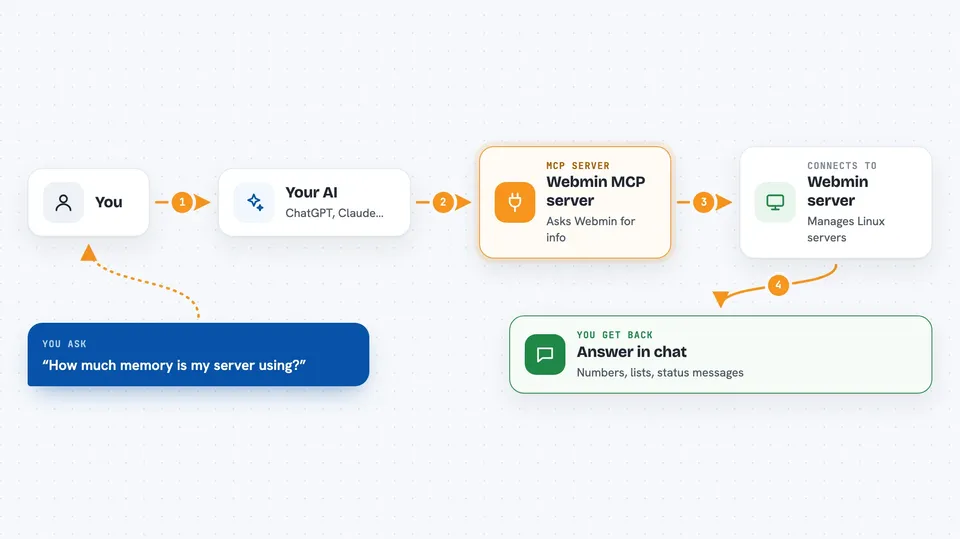
You ask your AI something like how much memory your server is using. The AI passes that request to this helper program. The helper logs in to your Webmin server and asks it for the information. Webmin sends the answer back, and the helper hands it to your AI, which explains it to you in normal words. For changes, like restarting a service, the same path runs in reverse: your AI tells the helper, the helper tells Webmin, and the change happens on the server.
 Click to zoom
What you can do with it
- Check system info, memory use, disk space and running processes
- Start, stop, restart, enable or disable services
- List, create, change or delete users and groups
- View, add, edit or remove scheduled cron jobs
- Read, write, copy, rename or delete files on the server
- Check disk health, mounts and LVM volumes
- Look at Fail2ban jails, banned IPs, MySQL databases and Webmin logs
Try asking your AI
- “How much memory and disk space is my server using right now?”
- “Is the nginx service running, and can you restart it if not?”
- “Show me the cron jobs on the pi1 server.”
- “List the MySQL databases on my web server.”
What it gives back to you
You get answers in the chat: numbers, lists, short summaries and status messages. For example, a list of services with their running state, or a table of disk usage per mount point. If you asked for a change, it tells you whether the change went through. It can also show file contents when you ask it to read a file.
Before you start
What you need
- A running Webmin server you can reach (usually on port 10000)
- A Webmin username and password with permission to use the modules you need
- Python 3.11 or newer, or Docker, depending on how you install it
- The XML::Parser module installed on the Webmin server
Good to know
This helper can change your server, not just read it: it can stop services, delete files, remove users and change passwords, so keep safe mode on unless you are sure, and check what your AI is about to do before you say yes.
Install it with your AI
Add Webmin MCP server to your AI, no technical skills needed
You don't install anything by hand. You copy one prompt, paste it into an AI that can work on your computer, and it checks, installs and connects the server for you, asking you when it needs something.
Sign in to get the install prompt
Members get a ready-made prompt that lets the Claude desktop app check Webmin MCP server, install it and connect it for them, step by step. You don't need any technical skills: you copy, paste and answer a few questions. Your connected AI can also find and install any of the 4,609 MCP servers here for you.
Who it's for
System administrators, IT support staff and anyone who looks after Linux servers and would rather ask questions in plain English than click through Webmin menus.