MCP server · Security
ThinkNEO MCP server
by ThinkneoAI
Lets your AI keep an eye on other AI agents: safety checks, spending, and activity logs.

This is a helper program from ThinkNEO that plugs into your AI assistant and gives it a set of tools for watching over other AI agents. It is made for teams that run AI assistants in a company and want to see what they are doing, keep them safe, and keep an eye on cost. If you are just one person chatting with ChatGPT, it is probably more than you need.
What is an MCP server? The 30-second version
On its own, your AI can only chat with you. An MCP server is a small helper program that gives your AI a new skill or a connection to a service. This one connects your AI to ThinkNEO's control plane, a system for overseeing other AI agents. Once connected, your AI can ask that system questions and get answers back, like which agents are running or how much they have spent.
What this MCP server does
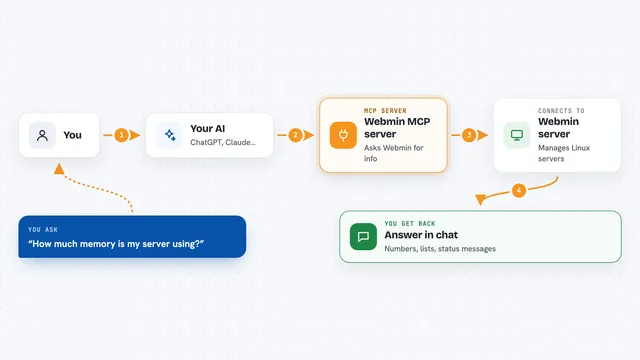
You ask your AI something about your AI agents, like how many are active or whether anything looks suspicious. Your AI passes that question to this helper program. The helper talks to the ThinkNEO system, which keeps track of agent activity, safety rules, and spending. The system sends back an answer, and your AI shows it to you in the chat. It also includes a built-in defense layer called ThinkShield that watches for common attack patterns.
 Click to zoom
What you can do with it
- Check which AI agents are registered and running
- See how much your AI agents have spent and where
- Look for suspicious activity like odd login attempts or strange requests
- Run a safety check on a prompt before sending it
- Get a trust score for an agent
- Pull a summary of recent activity for a report
- Set up alerts when something looks wrong
Try asking your AI
- “Show me all my registered AI agents and their current status”
- “How much have my agents spent this month, broken down by agent”
- “Are there any suspicious requests in the last 24 hours”
- “Give me a trust score for the agent called support-bot”
What it gives back to you
You get back plain answers in the chat: lists of agents, numbers for spending, short summaries of activity, and flags for anything that looks off. Some tools also return a score or a yes/no check. It is mostly read-and-report, so you see information rather than big changes.
Before you start
What you need
- An MCP client like Claude Desktop, Cursor, or another app that supports MCP
- A ThinkNEO account (the free tier gives you 500 calls a month and an API key automatically)
- Python 3.10 or newer and pip if you want to run it yourself
- Docker if you prefer the container setup
Good to know
It can change settings and policies for your AI agents, so be careful when you ask it to apply or delete anything.
Install it with your AI
Add ThinkNEO MCP server to your AI, no technical skills needed
You don't install anything by hand. You copy one prompt, paste it into an AI that can work on your computer, and it checks, installs and connects the server for you, asking you when it needs something.
Sign in to get the install prompt
Members get a ready-made prompt that lets the Claude desktop app check ThinkNEO MCP server, install it and connect it for them, step by step. You don't need any technical skills: you copy, paste and answer a few questions. Your connected AI can also find and install any of the 4,361 MCP servers here for you.
Who it's for
IT and security teams at companies that run several AI agents and want to watch their safety, spending, and activity in one place.