
MCP server · API
MCP MCP Server directory
by glenngillen
Ask your AI which other MCP helpers exist and how they might fit into your workday.
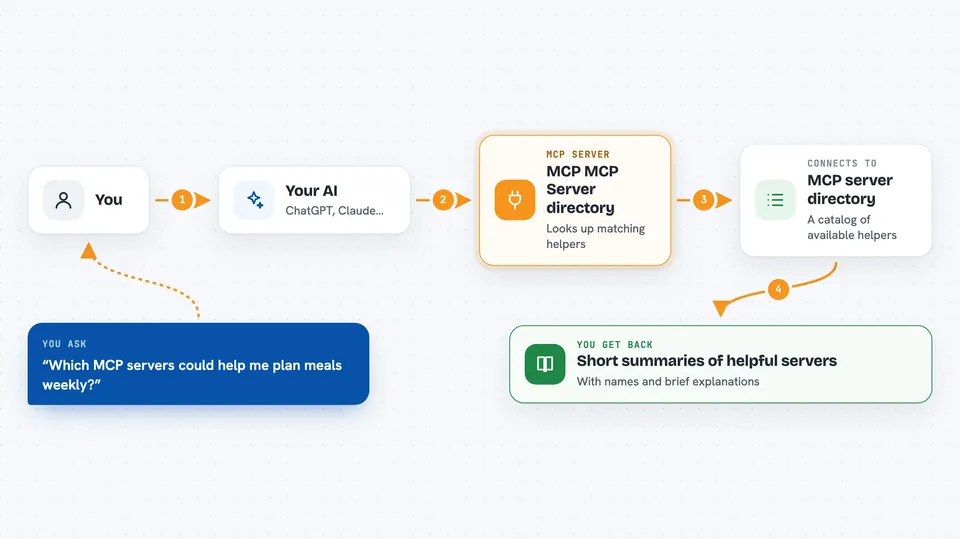
This is a little online address book of MCP servers. You connect it to your AI assistant once, then just ask questions out loud instead of hunting through websites yourself. It is handy if you keep hearing about new AI connectors and wonder where to start.
What is an MCP server? The 30-second version
On its own, your AI can really only talk. An MCP server is a small helper program that hands your AI a brand-new ability. This particular helper connects your AI to a big public list of other MCP servers. So rather than reading endless webpages, you simply ask your assistant "which connector would help me sort my email?" and it goes off and checks the list for you.
What this MCP server does
First you add this helper's internet address to your AI app. Then whenever you want ideas for improving some part of your day, you describe the task in normal words. Your AI sends the question across to this catalogue behind the scenes. The catalogue replies with matching entries, each carrying a short explanation of what that tool does. Finally your AI turns those results into a clear answer right inside your chat window.
 Click to zoom
What you can do with it
- Find MCP servers suited to tasks you mention
- Read short descriptions of listed servers
- Compare several options side by side after asking follow-up questions
- Get pointed toward installation details for something interesting
Try asking your AI
- “Which MCP servers could help me manage my calendar better?”
- “Is there any server for working with spreadsheets?”
- “What kinds of servers deal with writing notes down somewhere safe?”
- “Show me a couple of choices for searching company documents.”
What it gives back to you
Usually you receive a tidy written summary naming a few relevant servers along with a line or two describing each one. Sometimes links appear too, pointing at more detail elsewhere. Everything arrives as ordinary conversational text, easy to skim while drinking your tea. Nothing gets changed anywhere else because this helper only ever looks things up.
Before you start
Good to know
Treat whatever comes back as suggestions worth double-checking yourself since listings come straight from outside sources.
Install it with your AI
Add MCP MCP Server directory to your AI, no technical skills needed
You don't install anything by hand. You copy one prompt, paste it into an AI that can work on your computer, and it checks, installs and connects the server for you, asking you when it needs something.
Sign in to get the install prompt
Members get a ready-made prompt that lets the Claude desktop app check MCP MCP Server directory, install it and connect it for them, step by step. You don't need any technical skills: you copy, paste and answer a few questions. Your connected AI can also find and install any of the 4,609 MCP servers here for you.
Who it's for
Anyone curious about adding useful abilities to their AI assistant but unsure what already exists, especially busy office folks exploring possibilities.


