
MCP server · Developer tools
GraphPilot MCP server
Lets your coding AI look up functions, callers, and what breaks if you rename something, without grepping.
GraphPilot is a helper that builds a map of your TypeScript or JavaScript project: which functions exist, where they live, and who calls whom. It runs on your own computer and plugs into coding assistants like Claude Code, Cursor, or Cline. It is handy if you work in a codebase and want your AI to answer structural questions quickly instead of reading the same files over and over.
What is an MCP server? The 30-second version
On its own, your AI can only chat with you. An MCP server is a small helper program that gives your AI a new skill or a connection to something else. This one connects your AI to a structural map of your code project, so it can look up functions and their callers for you. You set it up once, and from then on your AI can ask GraphPilot questions whenever it needs to.
What this MCP server does
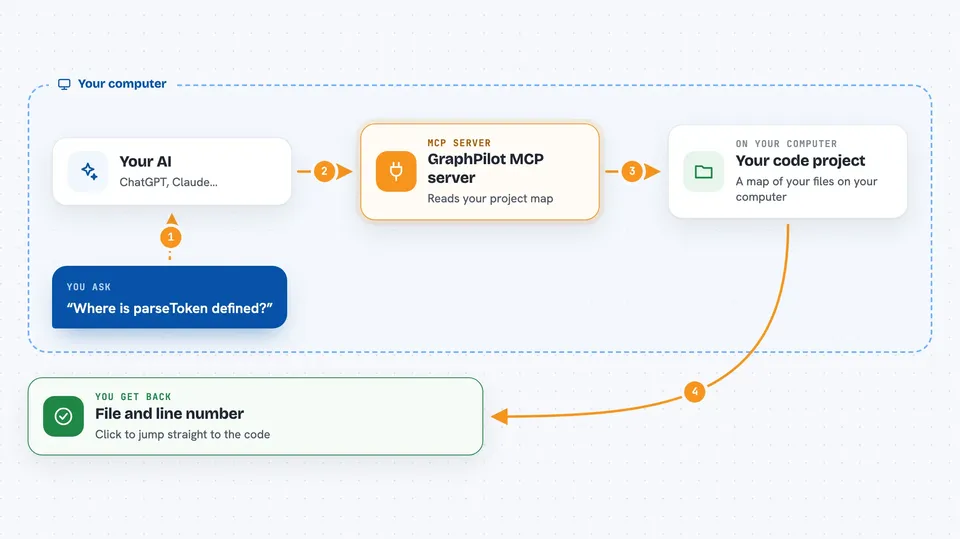
You ask your AI a question about your code, like where a function is defined or what calls it. Your AI sends that question to GraphPilot, which reads a pre-built map of your project stored on your computer. GraphPilot finds the answer and sends it back with the exact file and line number. Your AI then shows you the result in plain language, with clickable references you can jump to. GraphPilot never changes your code; it only reads and reports.
 Click to zoom
What you can do with it
- Find where a function or symbol is defined in your project
- List every place that calls a given function
- List everything a given function calls
- Show what would break if you rename or change a function
- Limit the impact list to files your current branch touches
- Refresh the map after you make edits, without leaving your AI chat
Try asking your AI
- “Use gp_recall to find where parseToken is defined”
- “Use gp_callers to show me everything that calls authenticate”
- “Use gp_impact to show what breaks if I rename extractSymbols, limited to my branch”
- “Refresh the index with gp_index so the next question sees my latest edits”
What it gives back to you
You get back short lists and summaries in your chat. Each item includes the file and line number, so you can click straight to the code. For impact questions, you get direct callers, deeper callers grouped by distance, likely affected tests, and a note about whether the function is public. Nothing is changed in your project; it is all read-only information.
Before you start
What you need
- Node.js version 20 or newer installed on your computer
- A coding assistant that supports MCP, like Claude Code, Cursor, Cline, Windsurf, or Continue
- A TypeScript or JavaScript project to index
- A one-time command to build the map of your project before your AI can use it
Good to know
It only reads your code and never changes it, but it only understands TypeScript and JavaScript structure, so for things like text, config values, or other languages you should still use a normal search.
Install it with your AI
Add GraphPilot MCP server to your AI, no technical skills needed
You don't install anything by hand. You copy one prompt, paste it into an AI that can work on your computer, and it checks, installs and connects the server for you, asking you when it needs something.
Sign in to get the install prompt
Members get a ready-made prompt that lets the Claude desktop app check GraphPilot MCP server, install it and connect it for them, step by step. You don't need any technical skills: you copy, paste and answer a few questions. Your connected AI can also find and install any of the 4,609 MCP servers here for you.
Who it's for
Developers and anyone who works in a TypeScript or JavaScript codebase and uses an AI coding assistant.




