
MCP server · Gaming
GripForge MCP server
by gripforgeai
Lets your AI build game characters and attach weapons, props and textures for Unity, Godot or Three.js.
GripForge is a helper that lets your AI make game assets for you: characters, weapons, textures, maps and small playable game kits. You describe what you want in plain words, and it builds the files and hands back the pieces your game engine needs. It is handy if you are making a game and want to skip a lot of the fiddly setup work.
What is an MCP server? The 30-second version
On its own, your AI can only chat. An MCP server is a small helper program that gives your AI a new skill or a connection to an app or service. This one connects your AI to GripForge, a service that builds 3D game assets. So when you ask for a knight holding a sword, your AI can actually go and make that happen instead of just talking about it.
What this MCP server does
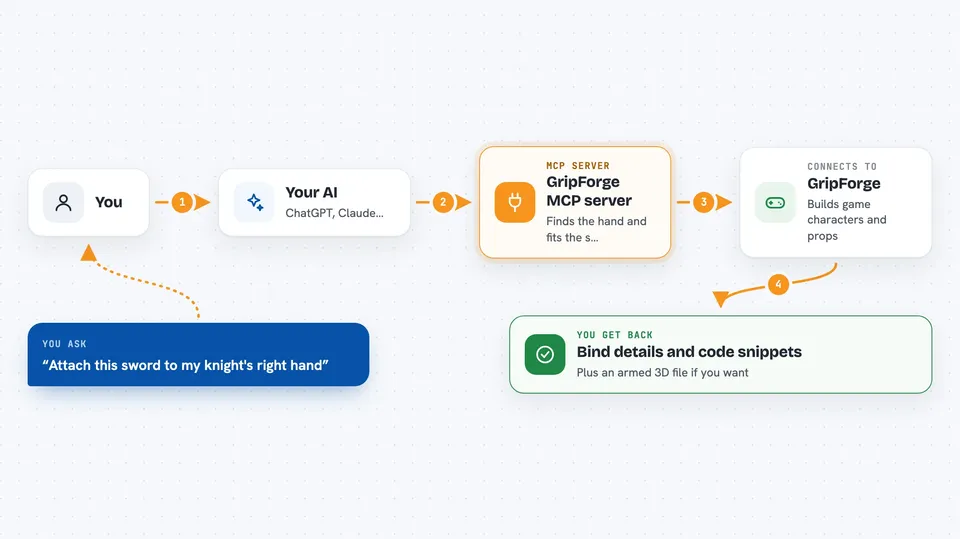
You type a request in your AI chat, like attaching a sword to a character. Your AI passes that request to the GripForge helper. The helper talks to the GripForge service, which finds the character's hand, sizes the weapon to fit, and closes the fingers around it. Then it sends back the details and ready-made code snippets for your game engine, and if you want, the finished 3D file too.
 Click to zoom
What you can do with it
- Create a rigged game character from a text description
- Attach a weapon or prop to a character's hand
- Generate seamless tileable textures from a prompt or image
- Build a playable boss with phases, attacks and an arena
- Plan a top-down shooter map with spawns and lanes
- Make a HUD, health bar or cape for your game
- Search your asset library by look, like 'genshin' or 'Devil May Cry like'
Try asking your AI
- “Attach this sword to my knight, right hand, then export the armed GLB”
- “Make me a boss for an ashen underworld, with three phases and an arena”
- “Give this floor a mossy cobblestone texture that tiles”
- “Build a playable roguelike slice I can try in the browser”
What it gives back to you
You get answers and files back in the chat. Often that means a written summary, a list of assets, or code snippets you can paste into Unity, Godot or Three.js. Some tools also save 3D models, textures or scene files into a folder you choose. For example, attaching a weapon returns the bind details, engine snippets, and optionally an armed GLB file.
Before you start
What you need
- A GripForge account and API key (a kind of password for apps; you create one on the GripForge website)
- An MCP client that can connect to remote servers, like Claude Code, Cursor or Windsurf
- For the local npm version: Node.js installed on your computer
Good to know
Some actions cost credits, so check before generating a lot, and the local version can write files into your project folder, so keep a backup.
Install it with your AI
Add GripForge MCP server to your AI, no technical skills needed
You don't install anything by hand. You copy one prompt, paste it into an AI that can work on your computer, and it checks, installs and connects the server for you, asking you when it needs something.
Sign in to get the install prompt
Members get a ready-made prompt that lets the Claude desktop app check GripForge MCP server, install it and connect it for them, step by step. You don't need any technical skills: you copy, paste and answer a few questions. Your connected AI can also find and install any of the 4,361 MCP servers here for you.
Who it's for
Game developers, hobbyist game makers and 3D artists who use AI and want help building characters, weapons and levels.





