MCP server · Research
AI visibility MCP server
by krissanders
Check whether AI bots can read your website, and get ready-to-paste fixes when they can't.

This is a small helper that lets your AI look at a website and tell you whether AI tools like ChatGPT, Claude and Perplexity are able to read it. It checks the rules files and page code that decide this, gives you a score, and then writes the corrected files for you to paste in. It is handy for anyone who runs a website and wonders why their brand never shows up in AI answers.
What is an MCP server? The 30-second version
On its own, your AI can only chat with you. An MCP server is a small helper program you connect to it, and that helper gives your AI a new skill. This helper's skill is checking websites the way AI crawlers see them. Once it is connected, you can ask your AI to look at a site, and it will go and fetch the real pages and rules files for you.
What this MCP server does
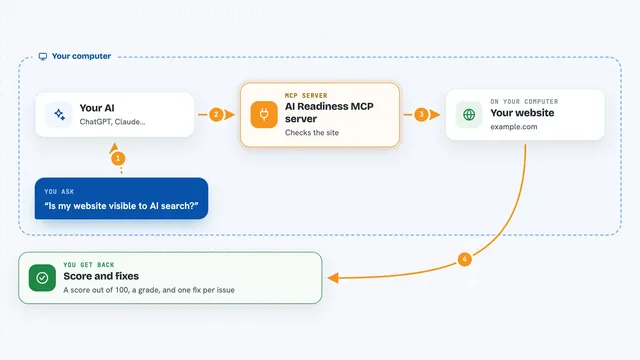
You ask your AI something like whether AI bots can read a site. Your AI passes that request to this helper. The helper then visits the site and reads its robots.txt rules, its page code, its sitemap and its llms.txt file. It comes back with a score, a list of what is blocking AI access, and, if you want, the corrected files you can paste onto your site.
 Click to zoom
What you can do with it
- Check which AI bots are allowed or blocked on a site
- Get a 0 to 100 visibility score with reasons for each deduction
- Compare your site against up to ten competitor sites side by side
- Generate a corrected robots.txt that opens access to AI bots
- Generate schema code (JSON-LD) for a page
- Generate an llms.txt file describing your site to AI tools
- See whether your brand is mentioned in answers from Perplexity, OpenAI and Gemini
Try asking your AI
- “Can AI bots read my site example.com? Give me the score and what is blocking them.”
- “Compare example.com with these three competitor sites and rank them.”
- “Write me a corrected robots.txt for example.com that allows GPTBot and ClaudeBot.”
- “Is my brand mentioned when people ask Perplexity who makes the best running shoes?”
What it gives back to you
You get back plain answers in the chat: a score out of 100, a short list of warnings with the points each one costs, and a list of which AI bots are blocked. The generator tools return ready-to-paste text, such as a full robots.txt file, a schema code block, or an llms.txt file, along with a note saying where on your site to put it. The brand mention check returns whether each AI model mentioned you, how many times, and roughly what the check cost.
Before you start
What you need
- Python 3.10 or newer
- The uv tool installed (a free program that runs Python helpers)
- A Perplexity API key if you want to check brand mentions on Perplexity
- An OpenRouter API key if you want to check brand mentions on OpenAI or Gemini models
Good to know
The brand mention check spends real money on AI model calls, though it has a daily cap and a per-call cap by default.
Install it with your AI
Add AI visibility MCP server to your AI, no technical skills needed
You don't install anything by hand. You copy one prompt, paste it into an AI that can work on your computer, and it checks, installs and connects the server for you, asking you when it needs something.
Sign in to get the install prompt
Members get a ready-made prompt that lets the Claude desktop app check AI visibility MCP server, install it and connect it for them, step by step. You don't need any technical skills: you copy, paste and answer a few questions. Your connected AI can also find and install any of the 4,361 MCP servers here for you.
Who it's for
Website owners, marketing and SEO people, and anyone who wants to know why their brand is not showing up in AI answers.