
MCP server · Research
HasData Web Scraping MCP server
by HasData
Lets your AI fetch any public web page and hand it back as clean text, markdown, HTML or JSON.
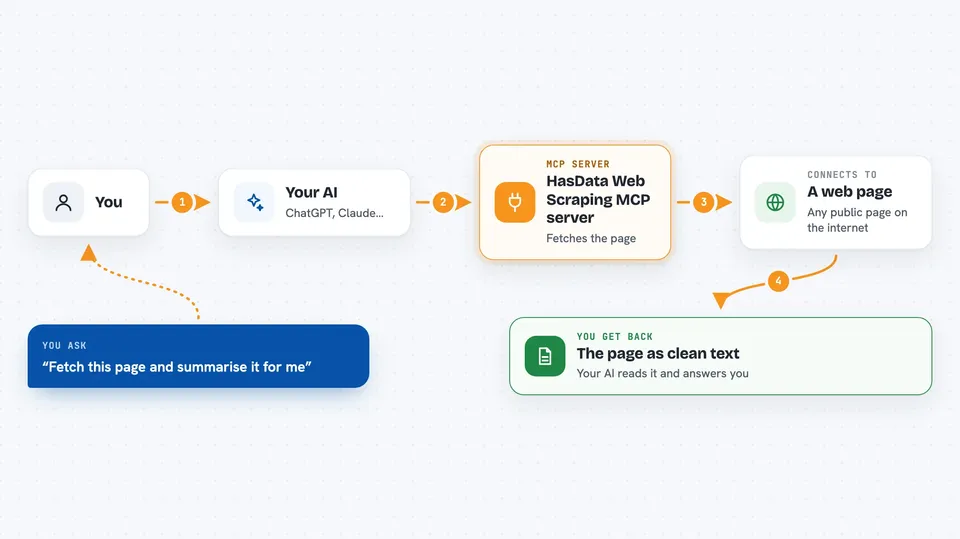
This is a helper that lets your AI open a public web page and read it for you. You ask in plain words, and it brings back the page content in a tidy form. It is handy for anyone who needs to pull information off websites without copying and pasting by hand.
What is an MCP server? The 30-second version
On its own, your AI can only chat with what it already knows. An MCP server is a small helper program that gives your AI a new skill or a connection to an outside service. This one connects your AI to HasData's web scraping service, so it can go out and fetch real pages from the web. When you ask for something on a website, your AI uses this helper to get it instead of guessing.
What this MCP server does
You ask your AI something like fetch this page and summarise it. The AI passes your request to this helper, which fetches the page through HasData's servers. The helper can run the page in a real browser if the content only appears with JavaScript, and it can wait for a specific part of the page to show up. It then returns the page as markdown, plain text, raw HTML or structured JSON, and your AI reads it and answers you in the chat.
 Click to zoom
What you can do with it
- Fetch any public web page and get it back as clean markdown or text
- Pull out specific fields like titles, links or prices using CSS selectors
- Collect all the links or email addresses on a page
- Render pages that only show their content with JavaScript
- Fetch a page through a proxy in a specific country to see local pricing
- Take a screenshot of a rendered page
- Ask a model to pull structured fields from a page into a shape you describe
Try asking your AI
- “Fetch this page as markdown and summarise it for me.”
- “Read this documentation page and pull out every code block.”
- “Get the titles and links from the front page of this site as JSON.”
- “This page loads its content with JavaScript, so render it and wait for the results list before reading.”
What it gives back to you
You get the page content back in the chat, as markdown, plain text, HTML or structured JSON, depending on what you asked for. Along with the content, you can get the page's status code, any links or emails found, and any fields you asked it to pull out. If you asked for a screenshot, you get an image. Your AI then reads all of this and answers you in normal words.
Before you start
What you need
- An MCP client like Claude Desktop, Claude Code, Cursor, Windsurf or VS Code
- A HasData API key from the HasData dashboard (free to create, no card needed; it works like a password for the service)
Good to know
Each fetch uses credits from your HasData plan, rendering a page costs more than a plain fetch, and a residential proxy costs more than a datacenter one, so keep an eye on your usage.
Install it with your AI
Add HasData Web Scraping MCP server to your AI, no technical skills needed
You don't install anything by hand. You copy one prompt, paste it into an AI that can work on your computer, and it checks, installs and connects the server for you, asking you when it needs something.
Sign in to get the install prompt
Members get a ready-made prompt that lets the Claude desktop app check HasData Web Scraping MCP server, install it and connect it for them, step by step. You don't need any technical skills: you copy, paste and answer a few questions. Your connected AI can also find and install any of the 4,361 MCP servers here for you.
Who it's for
Anyone who needs to read or pull information from public websites, like researchers, marketers, analysts and office workers who would otherwise copy and paste by hand.


