MCP server · Research
Yelp MCP server
by HasData
Lets your AI search Yelp businesses, read place details, and pull full reviews for you.
This is a helper that connects your AI assistant to Yelp. Once it is set up, you can ask your AI things like "find coffee shops in Austin and rank them by rating" and it will go look it up on Yelp for you. It is handy for anyone who researches restaurants, shops, or local businesses without wanting to click through pages by hand.
What is an MCP server? The 30-second version
On its own, your AI can only chat with you using what it already knows. An MCP server is a small helper program that gives your AI a new skill or a connection to an outside service. This one connects your AI to Yelp, so when you ask about a business or its reviews, the AI can actually go look it up on Yelp and bring the answer back. You do not need to install anything on your computer; it runs online and your AI talks to it for you.
What this MCP server does
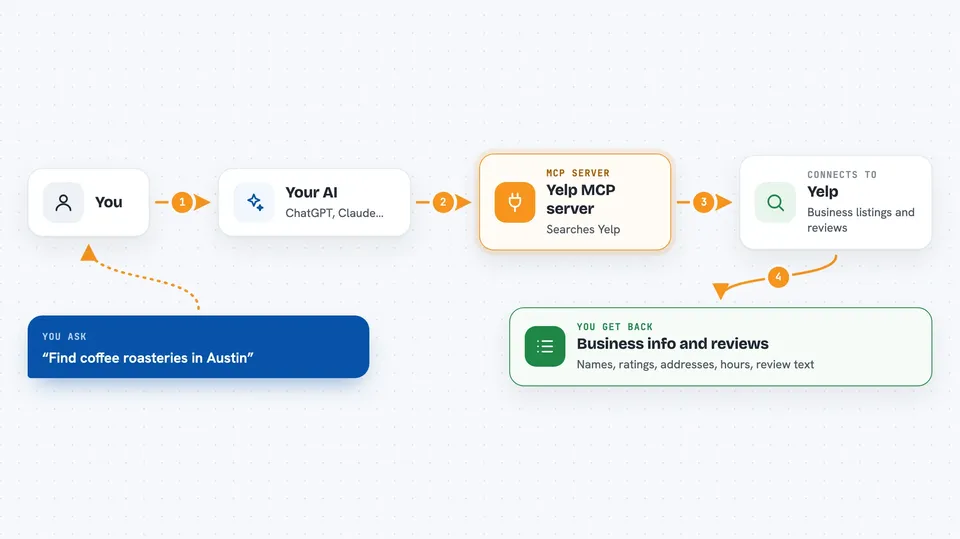
You ask your AI a question about a business or a place, like "find coffee roasteries in Austin" or "read the one-star reviews of this restaurant." Your AI sends that request to this helper. The helper goes to Yelp, reads the public pages, and brings back the results as clean information. Your AI then turns that into a normal answer in your chat, with names, ratings, addresses, hours, and review text. It can also look up a single business in full or page through its whole review feed.
 Click to zoom
What you can do with it
- Search Yelp for businesses by keyword and location
- Rank results by rating, review count, or price tier
- Look up one business in full, including hours, phone, website, and popular dishes
- Read the full review feed for a business
- Filter reviews by star rating, language, or a word inside the text
- Sort reviews by date, rating, or Yelp Elite reviewers
- Switch to Yelp sites in other countries
Try asking your AI
- “Find coffee roasteries in Austin, TX and rank them by rating against review count.”
- “Pull the hours, phone and website for the Yelp business desnudo-coffee-austin.”
- “Read every one-star and two-star review of this business and group the complaints by theme.”
- “Compare the rating distribution of these three competitors in the same neighborhood.”
What it gives back to you
You get back normal chat answers built from Yelp data: lists of businesses with names, ratings, review counts, addresses, and price ranges, or a full profile of one place with hours, phone, website, and popular dishes. For reviews, you get the actual review text, star rating, date, and reviewer details. You can also ask it to summarize or group what it found, like themes in the complaints.
Before you start
What you need
- An MCP client, such as Claude Desktop, Claude Code, Cursor, Windsurf, or VS Code
- A HasData API key, free to create on their dashboard with no card needed (a kind of password that lets the helper make calls for you)
Good to know
Each lookup uses credits from your HasData account (10 per call), and the free tier gives you about 100 calls a month, so heavy use can run out or cost money.
Install it with your AI
Add Yelp MCP server to your AI, no technical skills needed
You don't install anything by hand. You copy one prompt, paste it into an AI that can work on your computer, and it checks, installs and connects the server for you, asking you when it needs something.
Sign in to get the install prompt
Members get a ready-made prompt that lets the Claude desktop app check Yelp MCP server, install it and connect it for them, step by step. You don't need any technical skills: you copy, paste and answer a few questions. Your connected AI can also find and install any of the 4,361 MCP servers here for you.
Who it's for
Anyone who researches local businesses, restaurants, or shops, like market researchers, salespeople, food writers, or just someone planning a trip.