
MCP server · Developer tools
JetBrains Index MCP server
by hechtcarmel
Lets your AI use your JetBrains IDE's code smarts to find, rename, and check code safely.
This is a plugin for JetBrains IDEs like IntelliJ IDEA, PyCharm, and WebStorm. It shares your IDE's deep understanding of your code with AI assistants such as Claude, Cursor, or Codex. It is handy if you already use one of those IDEs and want your AI helper to give more accurate answers about your project.
What is an MCP server? The 30-second version
On its own, your AI can only chat with you. It cannot see inside your code editor or understand how your project is structured. An MCP server is a small helper program that gives your AI a new skill or a connection to another app. This one connects your AI to your JetBrains IDE, so the AI can look things up and make careful changes in your project when you ask.
What this MCP server does
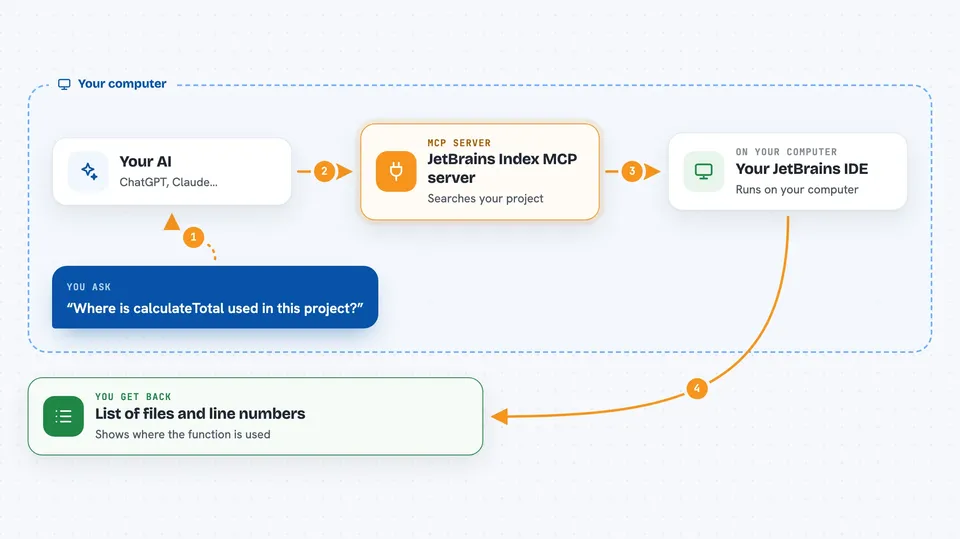
You ask your AI a question about your code, like where something is used or what a function does. The AI talks to this plugin running inside your IDE. The plugin uses the IDE's own index, which is like a smart map of your whole project, to find the answer. Then the AI explains what it found in the chat, or makes the change you asked for. Because it uses the IDE's real understanding of code, the answers are more accurate than plain text searching.
 Click to zoom
What you can do with it
- Find every place a function, class, or variable is used
- Jump to where something is defined
- Rename a symbol safely, with related names updated too
- See errors and warnings the IDE has found
- Look at the structure of a file, like a table of contents
- Search for classes, files, or symbols by name
- Delete code safely after checking it is not used elsewhere
Try asking your AI
- “Where is the calculateTotal function used in this project?”
- “Rename the class UserHelper to AccountHelper everywhere.”
- “Show me all the errors and warnings in the file I have open.”
- “Find the definition of the parseConfig method.”
What it gives back to you
You get answers in the chat, like a list of file names and line numbers where something is used. For a rename, you get a short confirmation that the change was made. For diagnostics, you get a list of errors and warnings with their locations. Some tools also return a summary of a symbol's signature and documentation.
Before you start
What you need
- A JetBrains IDE such as IntelliJ IDEA, PyCharm, or WebStorm
- The IDE Index MCP Server plugin installed from the JetBrains Marketplace
- An AI assistant that supports MCP, like Claude Code, Cursor, or Codex
Good to know
The server runs on your computer without a password, so any program on your machine could use it to read or change files in your IDE, which matters more on a shared computer.
Install it with your AI
Add JetBrains Index MCP server to your AI, no technical skills needed
You don't install anything by hand. You copy one prompt, paste it into an AI that can work on your computer, and it checks, installs and connects the server for you, asking you when it needs something.
Sign in to get the install prompt
Members get a ready-made prompt that lets the Claude desktop app check JetBrains Index MCP server, install it and connect it for them, step by step. You don't need any technical skills: you copy, paste and answer a few questions. Your connected AI can also find and install any of the 4,609 MCP servers here for you.
Who it's for
Developers and anyone who uses a JetBrains IDE and wants their AI assistant to understand their code more accurately.




