MCP server · Developer tools
Postmancer MCP server
by hijaz
Your AI can send API requests, save them in collections, and test responses for you.

Postmancer is a helper that lets your AI assistant talk to web APIs for you. Think of it as Postman or Insomnia, but built for your AI instead of a person clicking buttons. It is handy if you test or work with APIs and want to do it by just asking in plain words.
What is an MCP server? The 30-second version
On its own, your AI can only chat. An MCP server is a small helper program that gives your AI a new skill or a connection to an app or service. Here, that helper connects your AI to web APIs, so it can send requests, save them, and check the answers for you. You just ask, and the AI uses this helper behind the scenes.
What this MCP server does
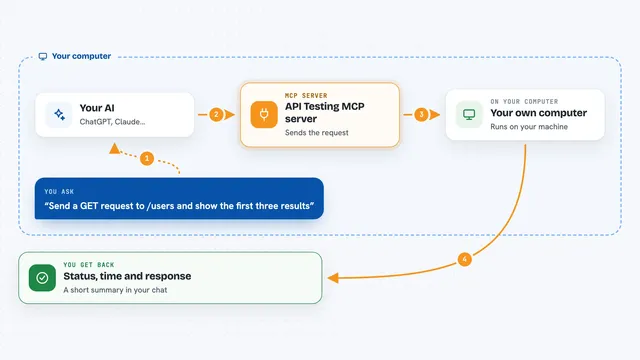
You ask your AI something like send a request to this web address and show me the answer. The AI passes that to Postmancer, which actually makes the web request. Postmancer can also save requests into collections so you can reuse them later. It can set variables, like a base web address or a token, and swap them into your requests. Then it hands the response back to your AI, which explains it to you.
 Click to zoom
What you can do with it
- Send a web request to any API address
- Save a request into a collection for later
- Run a saved request from a collection
- List your collections and the requests inside them
- Set environment variables like a base URL or token
- View your saved environment variables
- Use different login methods like Basic, Bearer, API Key, or OAuth2
Try asking your AI
- “Send a GET request to https://api.example.com/users and show me the response”
- “Save this request as get all users in my work collection”
- “Run the get all users request from my work collection”
- “Set an environment variable called base_url to https://api.example.com”
What it gives back to you
You get the answer from the API back in the chat, usually as text or structured data your AI can read out. When you save or list things, you get a short confirmation or a list of names. When you run a saved request, you get the response plus a note that it came from that collection. Your AI then explains what it means in plain words.
Before you start
What you need
- Node.js installed on your computer (for the npx command)
- The Claude desktop app or another AI tool that supports MCP servers
- The web address of the API you want to use, and any login details it needs
Good to know
It can send real requests to real APIs and save your login details, so be careful with what you ask it to call and where your collections are stored.
Install it with your AI
Add Postmancer MCP server to your AI, no technical skills needed
You don't install anything by hand. You copy one prompt, paste it into an AI that can work on your computer, and it checks, installs and connects the server for you, asking you when it needs something.
Sign in to get the install prompt
Members get a ready-made prompt that lets the Claude desktop app check Postmancer MCP server, install it and connect it for them, step by step. You don't need any technical skills: you copy, paste and answer a few questions. Your connected AI can also find and install any of the 4,609 MCP servers here for you.
Who it's for
Developers, testers, and anyone who works with web APIs and wants to try requests without opening a separate tool.