
MCP server · Gaming
WEPPY Roblox Studio MCP server
by hope1026
Lets your AI build and change things inside a live Roblox Studio session, from scripts to terrain.
This is a helper that connects your AI app to Roblox Studio, the program where Roblox games are made. Once it is set up, you can ask your AI in plain words to add a script, change lighting, or build terrain, and it happens right inside Studio. It is handy for Roblox creators who already use an AI assistant and want it to actually touch their game instead of just handing back code to paste.
What is an MCP server? The 30-second version
On its own, your AI can only chat and write text. An MCP server is a small helper program that gives your AI a new skill or a connection to another app. This one connects your AI to Roblox Studio through a matching Studio plugin, so the AI can look at your project and make changes there when you ask. You stay in charge and review what changed.
What this MCP server does
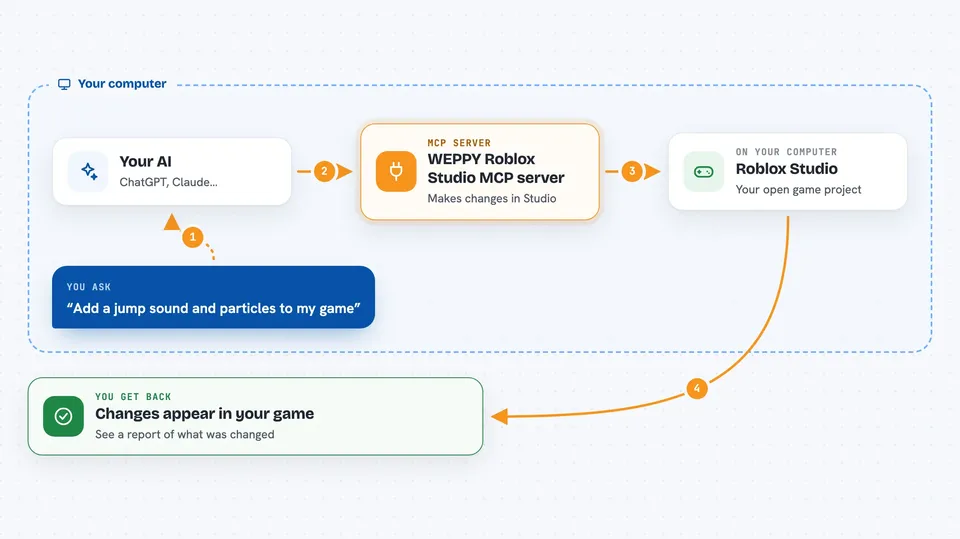
You type a request in your AI app, like adding a sound when the player jumps. Your AI sends that request to this helper program, which passes it to the WEPPY plugin running inside Roblox Studio. The plugin makes the change in your open project, such as creating a script, moving an object, or adjusting lighting. The result shows up in Studio and in a dashboard, so you can see exactly what was changed. For images, the AI can prepare a picture, upload it to Roblox, and apply it to a button or decal.
 Click to zoom
What you can do with it
- Create and edit scripts, objects, and properties inside Studio
- Build terrain like mountains and rivers, then place spawn points
- Change lighting and add effects such as particles or sounds
- Search the Creator Store and insert models into your game
- Generate an image, upload it to Roblox, and apply it to a UI element
- Work across up to five open Studio windows using Studio IDs
- Run a playtest and check the results automatically
Try asking your AI
- “Add particles and a sound when the player jumps, with a short cooldown”
- “Build a boss arena at the center of the map and place safe spawn points”
- “Create a gem icon for the shop button, upload it, and apply it to the ShopButton image”
- “In studio-1 add the event portal to the Lobby, and in studio-2 add the arrival point to the Game”
What it gives back to you
You get back a short report in the chat of what the AI did, plus the changes appearing live in Roblox Studio. The dashboard shows a list of what was created or modified, and for playtests it groups the results by server, UI, interaction, and visual evidence. For assets, you get the uploaded image applied to the property you asked for. Nothing is hidden: you can review the changes before or after they land.
Before you start
What you need
- Node.js 22 or newer installed on your computer
- Roblox Studio installed (Windows 10+ or macOS 12+)
- The WEPPY Roblox Studio plugin, from the same release as the server
- An AI app that supports MCP, such as Claude Desktop, Claude Code, Cursor, Codex, or Gemini CLI
Good to know
It can create, change, and delete things inside your Roblox Studio project, so review the changes it makes before you publish or save over important work.
Install it with your AI
Add WEPPY Roblox Studio MCP server to your AI, no technical skills needed
You don't install anything by hand. You copy one prompt, paste it into an AI that can work on your computer, and it checks, installs and connects the server for you, asking you when it needs something.
Sign in to get the install prompt
Members get a ready-made prompt that lets the Claude desktop app check WEPPY Roblox Studio MCP server, install it and connect it for them, step by step. You don't need any technical skills: you copy, paste and answer a few questions. Your connected AI can also find and install any of the 4,361 MCP servers here for you.
Who it's for
Roblox creators and small game teams who already use an AI assistant and want it to build and adjust things directly in Studio.





