
MCP server · Finance and crypto
Anchor x402 MCP server
Lets your AI check wallets, anchor hashes on chain, decode transactions and more, paying a few cents per use.
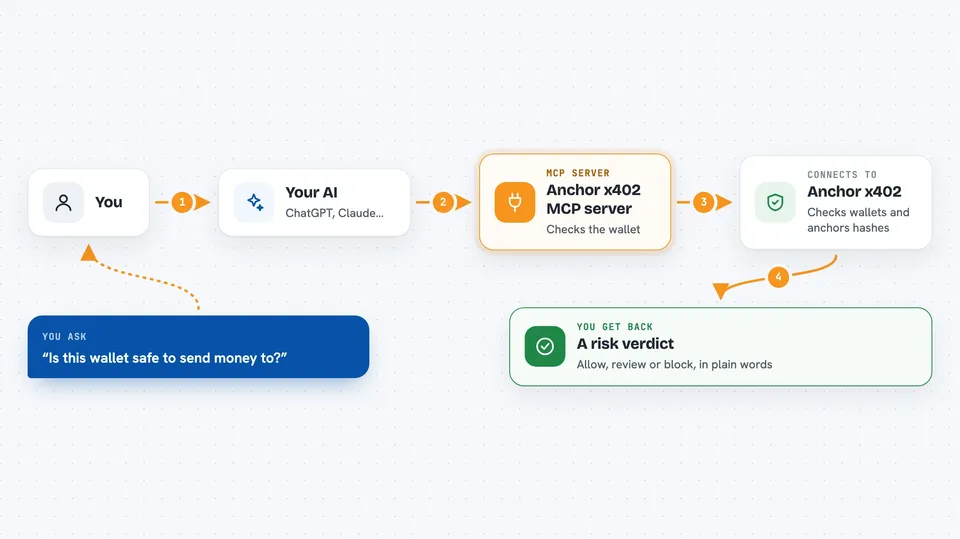
This is a helper that plugs into your AI app and gives it a set of crypto and blockchain tools. You ask a question, the AI uses one of these tools, and a tiny payment in USDC goes out from a wallet you set up. It is handy for people who work with crypto wallets, transactions or on-chain records and want their AI to look things up for them.
What is an MCP server? The 30-second version
On its own, your AI can only chat with you. An MCP server is a small helper program that gives your AI a new skill or a connection to a service. This helper connects your AI to anchor-x402, a paid service with blockchain tools. Once it is connected, your AI can run those tools for you when you ask, and each use costs a small amount of USDC from your wallet.
What this MCP server does
You ask your AI something like whether a wallet looks safe or what a transaction did. The AI picks the right tool from this helper and calls it. The helper talks to the anchor-x402 service over the internet, paying a few cents from your wallet for that call. The service does the work, like checking sanctions lists or anchoring a hash on two blockchains, and sends the answer back. Your AI then shows you the result in plain words in the chat.
 Click to zoom
What you can do with it
- Check a wallet for sanctions and reputation before you deal with it
- Anchor a hash on Base and Solana at the same time and get both transaction links
- Decode a transaction on Base, Ethereum or Solana into readable parts
- Look up a token's USD price by symbol or contract address
- Resolve a name like an ENS or SNS name to its address
- Get a quick summary of a web page or a block of text
- Sign and anchor a decision so you have a record of when you made it
Try asking your AI
- “Screen this wallet address for sanctions and tell me if it looks risky”
- “Anchor this hash on mainnet and give me the transaction links”
- “Decode this transaction and explain what it did”
- “What is the current USD price of this token”
What it gives back to you
You get answers in the chat, like a risk verdict of allow, review or block, or a list of balances and activity. For anchoring, you get two transaction links, one for Base and one for Solana, that you can open in a block explorer. For decoding, you get a structured breakdown of what the transaction did. Prices, names and summaries come back as short text or numbers.
Before you start
What you need
- An AI app that supports MCP servers, like Claude Desktop, Cursor or Codex
- Node.js installed on your computer so npx can run the package
- A wallet private key for a Base wallet, kept in your config file
- USDC on Base mainnet in that wallet to pay for calls
Good to know
The private key sits in your config file and the wallet pays automatically for every call, so use a fresh wallet with only a small amount of USDC in it.
Install it with your AI
Add Anchor x402 MCP server to your AI, no technical skills needed
You don't install anything by hand. You copy one prompt, paste it into an AI that can work on your computer, and it checks, installs and connects the server for you, asking you when it needs something.
Sign in to get the install prompt
Members get a ready-made prompt that lets the Claude desktop app check Anchor x402 MCP server, install it and connect it for them, step by step. You don't need any technical skills: you copy, paste and answer a few questions. Your connected AI can also find and install any of the 4,609 MCP servers here for you.
Who it's for
People who work with crypto wallets, transactions or on-chain records and want their AI to handle the lookups and checks for them.



