
MCP server · Developer tools · official
Hyperiux Vault MCP server
by Hyperiux-Immersion-Labs · official
Lets your AI browse and install Hyperiux animation effects for Next.js projects.
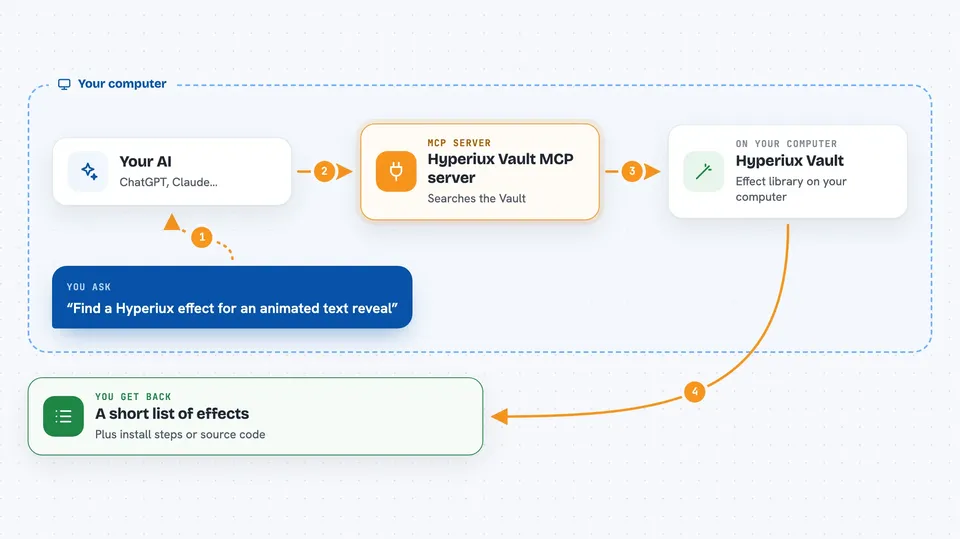
This is a small helper that connects your AI assistant to the Hyperiux Vault, a library of animation and interaction effects for Next.js websites. It is handy if you build web pages and want your AI to find the right effect, show you what it needs, and add it to your project. You do not need to be a developer to read about it, but you will need a Next.js project to actually use the effects.
What is an MCP server? The 30-second version
On its own, your AI can only chat with you. An MCP server is a small helper program that gives your AI a new skill or a connection to an app or service. This one connects your AI to the Hyperiux Vault, so it can look up effects and install them for you. You just ask in plain words, and the AI uses this helper behind the scenes.
What this MCP server does
You ask your AI something like which Hyperiux effect would work for a hero section. The AI uses this helper to search the Vault and comes back with a short list. If you pick one, the helper can show you the install command, the dependencies it needs, and the changelog. It can also pull the source code of free effects so you can see how they work. For Pro effects, it checks whether you are logged in before sharing anything.
 Click to zoom
What you can do with it
- Search the Vault for effects by name or category
- List all free and Pro effects with short descriptions
- Show the install command for a specific effect
- Show the dependencies and changelog for an effect
- Read the source code of a free effect
- Check whether your Pro login is active
Try asking your AI
- “Find a Hyperiux effect for an animated text reveal on my homepage”
- “What is the install command for phantom-image-trail?”
- “Show me the source of the spider-particles effect”
- “Which Hyperiux carousel effects are free?”
What it gives back to you
You get back short answers in the chat: a list of effect names with one-line descriptions, an install command you can copy, or the source code of a free effect. If you ask about dependencies or changelogs, it shows those as a short list. For Pro effects, it tells you if you need to log in first before showing anything.
Before you start
What you need
- Node.js 18 or newer installed on your computer
- An MCP client like Claude Desktop or Cursor
- A Hyperiux Pro subscription if you want to use Pro effects
Good to know
It can read and install files into your project, so check what it is about to add before saying yes, and do not turn on debug logging on shared machines.
Install it with your AI
Add Hyperiux Vault MCP server to your AI, no technical skills needed
You don't install anything by hand. You copy one prompt, paste it into an AI that can work on your computer, and it checks, installs and connects the server for you, asking you when it needs something.
Sign in to get the install prompt
Members get a ready-made prompt that lets the Claude desktop app check Hyperiux Vault MCP server, install it and connect it for them, step by step. You don't need any technical skills: you copy, paste and answer a few questions. Your connected AI can also find and install any of the 4,609 MCP servers here for you.
Who it's for
Web developers and designers who build Next.js sites and want their AI to help pick and install animation effects.




