MCP server · Health and learning
ICTExam MCP server
Let your AI read your ICTExam papers, gradebook and question analysis, and publish exams when you allow it.
This is a small helper that connects your AI assistant to ICTExam, the platform where you write exams and let the system grade them. Once it is set up, you can ask your AI things like which exams are still drafts or how students did on question 4. It is handy for teachers and school admins who already use ICTExam and want to save time looking things up.
What is an MCP server? The 30-second version
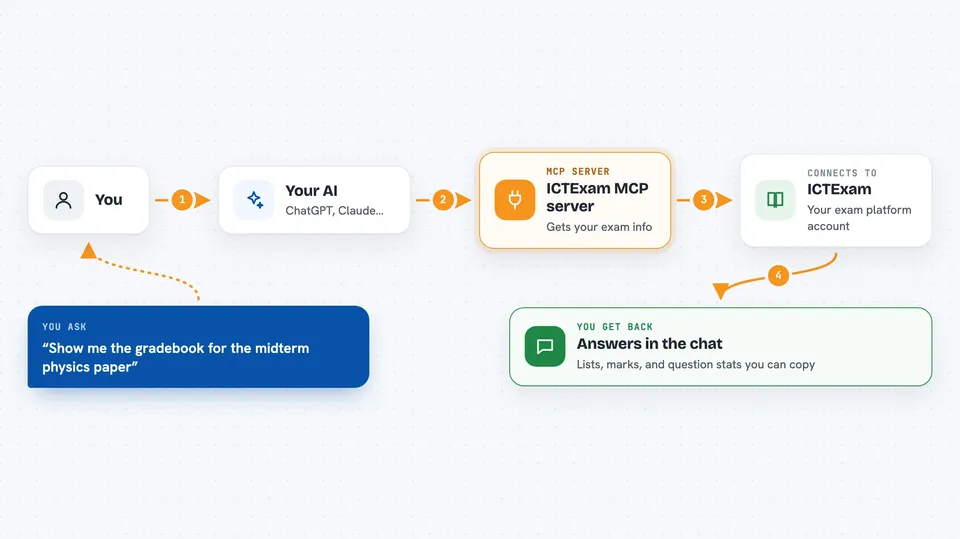
On its own, your AI can only chat with you. An MCP server is a small helper program that gives your AI a new skill or a connection to an app. This one connects your AI to your ICTExam account, so it can look up your exams, classes and gradebook for you. You just ask in plain words, and the helper fetches the answer from ICTExam.
What this MCP server does
You ask your AI a question about your exams, like which papers are published or how a class did. The AI passes that request to this helper. The helper signs in to your ICTExam account with your email and password, then asks the platform for the information. ICTExam sends back the details, and the AI shows them to you in the chat. If you turn writes on, it can also read a question paper file and create an exam from it, or publish a paper to students.
 Click to zoom
What you can do with it
- List your exam papers with their title, status, class and subject
- Open one exam to see its settings, share links and questions
- List your classes and the subjects tied to each class
- Show the gradebook for an exam, with totals and student marks
- Show per-question item analysis, like difficulty and average mark
- Parse a PDF or DOCX question paper into a structured exam (writes on)
- Publish or unpublish an exam (writes on)
Try asking your AI
- “List all my draft exams”
- “Show me the gradebook for the midterm physics paper”
- “Which questions were hardest on the biology quiz?”
- “Publish the maths paper for class 10B”
What it gives back to you
You get back plain answers in the chat: lists of exams, classes or subjects, the settings and questions of one paper, student marks and totals, or per-question numbers like difficulty and average mark. When you use a write tool, it tells you what it did, and publishing also gives you the student and teacher share links. Everything shows up as text you can read and copy.
Before you start
What you need
- An ICTExam account (teacher or admin)
- Your ICTExam site address, email and password
- Node.js 18 or newer on your computer
- An MCP client like the Claude desktop app
Good to know
It is read-only by default, but if you turn writes on it can publish exams to students and spend AI credit on the server, so keep that switch off unless you need it.
Install it with your AI
Add ICTExam MCP server to your AI, no technical skills needed
You don't install anything by hand. You copy one prompt, paste it into an AI that can work on your computer, and it checks, installs and connects the server for you, asking you when it needs something.
Sign in to get the install prompt
Members get a ready-made prompt that lets the Claude desktop app check ICTExam MCP server, install it and connect it for them, step by step. You don't need any technical skills: you copy, paste and answer a few questions. Your connected AI can also find and install any of the 4,361 MCP servers here for you.
Who it's for
Teachers, tutors and school admins who already use ICTExam and want to check exams, grades and question stats without clicking around the site.