
MCP server · Developer tools
Android device MCP server (adb-mcp)
by iksnerd
Lets your AI drive Android emulators and phones: take screenshots, tap and type, read logs, and run builds.
This is a small helper program that connects your AI assistant to Android devices and emulators. Once it is set up, you can ask your AI to open an app, tap a button, take a screenshot, or run your tests, and it will actually do it on the device. It is handy for app developers and testers who spend a lot of time poking at Android screens by hand.
What is an MCP server? The 30-second version
On its own, your AI can only chat. An MCP server is a small helper program that gives your AI a new skill or a connection to another tool. This one connects your AI to Android devices through a standard Google tool called adb, so the AI can look at the screen, tap things, and run commands there for you. You just ask in normal words, and the helper does the technical part behind the scenes.
What this MCP server does
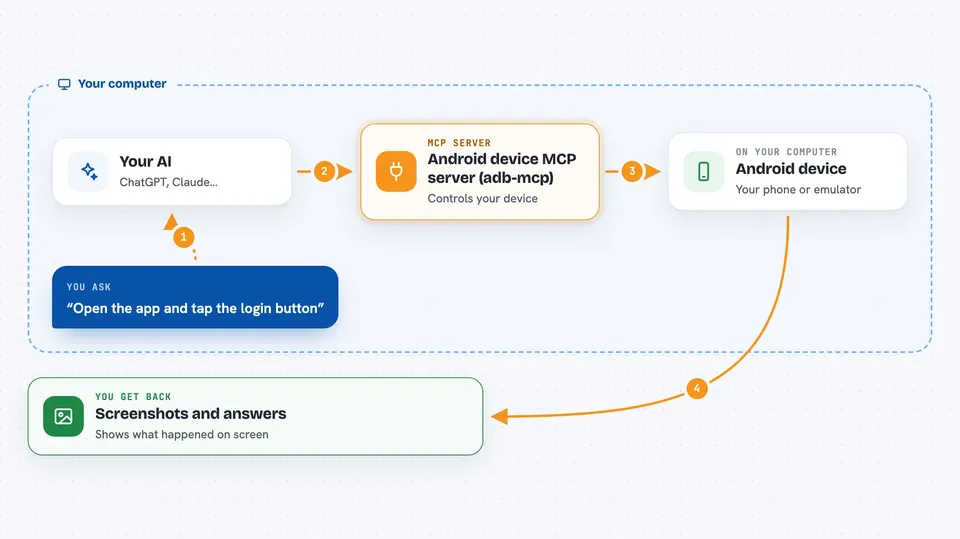
You ask your AI something like "open the app and tap the login button". Your AI passes that to this helper program. The helper talks to your Android emulator or phone using adb, the usual command line tool for Android. It takes a screenshot, reads the screen layout, finds the right spot, and taps it. Then it reports back what happened, often with a fresh screenshot so you can see the result.
 Click to zoom
What you can do with it
- Start and stop Android emulators and connected phones
- Take screenshots and read the on-screen layout
- Tap, swipe, type, and press keys on the device
- Install, launch, stop, and clear data for apps
- Read device logs and capture screen recordings
- Send fake SMS, calls, and sensor changes to the emulator
- Run Gradle builds, unit tests, and instrumented tests
Try asking your AI
- “Boot the Pixel emulator and take a screenshot”
- “Open the Settings app and turn on dark mode”
- “Type hello@example.com into the email field and tap Next”
- “Run the debug build and show me any test failures”
What it gives back to you
You get back answers in the chat: screenshots as images, lists of on-screen elements with their positions, log lines, test results, and short summaries of what the AI did. When it taps or types, it tells you whether the screen changed. For builds and tests, you get pass or fail plus the output.
Before you start
What you need
- The Android SDK installed, with the adb and emulator tools (Android Studio installs these for you)
- At least one Android emulator (AVD) created, or a real Android phone connected by USB
- The adb-mcp program installed and added to your AI client's MCP settings
Good to know
It can change things on your device or emulator, like tapping buttons, installing apps, clearing app data, and running builds, so only point it at devices you are happy to have modified.
Install it with your AI
Add Android device MCP server (adb-mcp) to your AI, no technical skills needed
You don't install anything by hand. You copy one prompt, paste it into an AI that can work on your computer, and it checks, installs and connects the server for you, asking you when it needs something.
Sign in to get the install prompt
Members get a ready-made prompt that lets the Claude desktop app check Android device MCP server (adb-mcp), install it and connect it for them, step by step. You don't need any technical skills: you copy, paste and answer a few questions. Your connected AI can also find and install any of the 4,361 MCP servers here for you.
Who it's for
Android app developers, QA testers, and anyone who spends time clicking through Android screens by hand.



