
MCP server · Developer tools
Marzban MCP server
by Ilmar7786
Let your AI manage your Marzban VPN panel: users, subscriptions, nodes and config.
This is a small helper that connects your AI assistant to a Marzban panel, the software many people use to run a VPN or proxy service. Once it is set up, you can ask your AI in plain words to look up users, create or renew accounts, check nodes, or change settings. It is handy for anyone who runs a Marzban panel and would rather type a request than click through the admin page.
What is an MCP server? The 30-second version
On its own, your AI can only chat. An MCP server is a small helper program that gives your AI a new skill or a connection to an app. This one connects your AI to your Marzban panel, so the AI can look things up there or make changes for you when you ask. You stay in charge: the helper only does what you tell it to do.
What this MCP server does
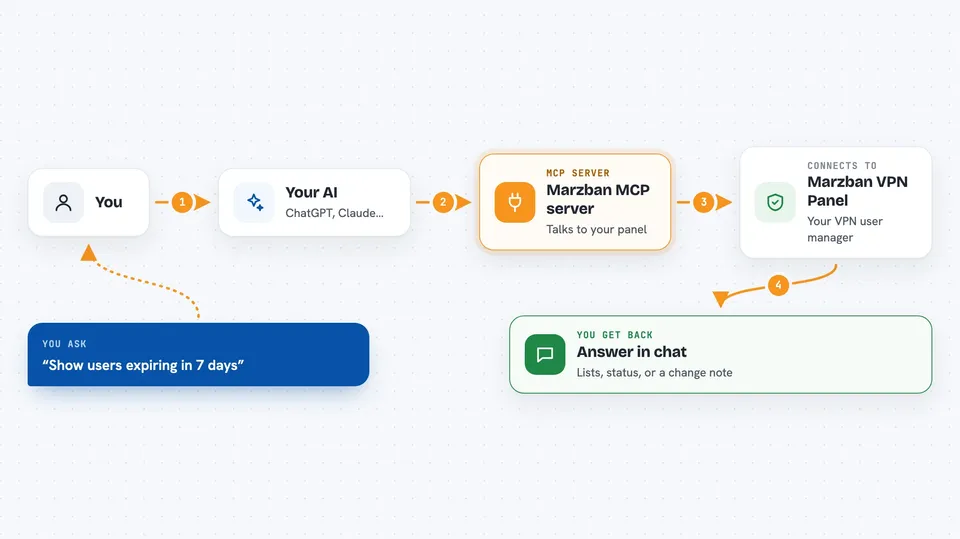
You ask your AI something about your panel, like how many users are close to expiring. The AI passes that request to this helper. The helper logs in to your Marzban panel with the details you gave it, asks the panel for the information or makes the change, and sends the answer back. Your AI then shows it to you in the chat in normal words. For anything that could delete or reset data, the helper asks for a second confirmation before it actually runs.
 Click to zoom
What you can do with it
- List your panel users and see who is close to running out of time or traffic
- Create a new user account and get its subscription link
- Renew or change the status of an existing user
- Check the health and status of your nodes
- Look at system statistics for your panel
- Read and update the core configuration
- Delete or reset a user, with a confirmation step first
Try asking your AI
- “Show me all users whose subscription expires in the next 7 days”
- “Create a new user called ali with 30 days and 50 GB”
- “Are all my nodes online right now?”
- “How much traffic did my panel handle this month?”
What it gives back to you
You get answers in the chat: lists of users with their expiry dates and traffic, node status summaries, system numbers, or a short note confirming a change was made. Subscription links and proxy details stay hidden unless you ask for them. For destructive actions, the first reply just describes what would happen and gives you a one-time code to confirm.
Before you start
What you need
- A running Marzban panel and its web address
- An admin username and password for that panel
- An MCP client such as Claude Desktop, Claude Code or Cursor
- Node.js installed if you run it with npx (or Docker if you prefer the container)
Good to know
It can change or delete real users and rewrite your panel config, so keep the default confirmation step on and only connect it to a panel you are allowed to manage.
Install it with your AI
Add Marzban MCP server to your AI, no technical skills needed
You don't install anything by hand. You copy one prompt, paste it into an AI that can work on your computer, and it checks, installs and connects the server for you, asking you when it needs something.
Sign in to get the install prompt
Members get a ready-made prompt that lets the Claude desktop app check Marzban MCP server, install it and connect it for them, step by step. You don't need any technical skills: you copy, paste and answer a few questions. Your connected AI can also find and install any of the 4,609 MCP servers here for you.
Who it's for
People who run a Marzban VPN or proxy panel and want to manage it by chatting with their AI instead of clicking through the admin page.



