
MCP server · Productivity
Drawing Converter MCP server
by imnoo-team
Convert technical drawing PDFs and callouts between metric and imperial, with values stamped on a converted copy.
This is a small helper that lets your AI assistant convert technical drawings from metric to imperial (or the other way around). It handles dimensions, tolerances, ISO fits, threads, surface roughness and weights, and can give you back a converted copy of the PDF. It is handy if you work with drawings from overseas suppliers or customers and keep having to translate millimeters into inches by hand.
What is an MCP server? The 30-second version
On its own, your AI can only chat with you. An MCP server is a small helper program that gives your AI a new skill or a connection to a service. This one connects your AI to a drawing conversion engine, so when you ask it to convert a PDF or a value, it can actually do the work instead of just talking about it. You install it once, and from then on your assistant can look up threads, convert callouts, and write converted PDFs for you.
What this MCP server does
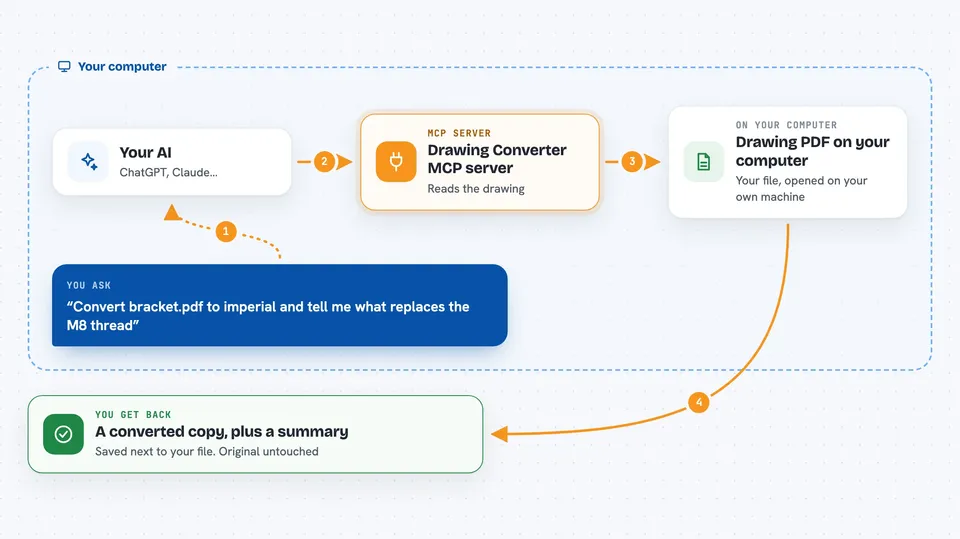
You ask your AI something like "convert this drawing to imperial" and point it at a PDF file. The AI uses this helper to read the text on the drawing, then decides which numbers are real values and what kind of value each one is. The helper converts those values using exact factors and a thread chart, and writes a new PDF with the converted numbers stamped over the original callouts. You get the new file back, plus a short summary of what changed. Your original file is never touched.
 Click to zoom
What you can do with it
- Convert a single value like a length, tolerance, roughness or weight between metric and imperial
- Convert a printed callout such as Ø30 H7 or M8 while keeping the notation intact
- Look up which inch thread is closest to a metric thread (or the other way around)
- Read the text layer of a drawing PDF and list every value it finds
- Produce a converted copy of a drawing PDF with the new values stamped in place
- Ask quick one-liners like what 84±0.1 mm is in inches
Try asking your AI
- “Convert bracket.pdf to imperial and tell me what replaces the M8 thread”
- “What is 84±0.1 mm in inches?”
- “Show me the full M2 to M30 thread chart”
- “Read the text on flange.pdf and tell me if it is metric or imperial”
What it gives back to you
You get answers in the chat: converted values with the exact number and a display number, plus a note on how it was derived and how confident it is. For a full drawing, you get a short summary of how many values were converted and what they became, for example Ø40 H7 turning into Ø1.5748 H7. The converted PDF is saved as a new file next to the original, with the new values stamped over the old callouts. Your source PDF stays unchanged.
Before you start
What you need
- Node.js version 18 or newer installed on your computer
- An MCP-enabled assistant such as Claude Desktop, Claude Code, Cursor or VS Code with Copilot
- A drawing PDF that has a text layer (not a scan or a flattened export)
Good to know
Converted values are stamped over the original callouts and metric and inch threads are never interchangeable, so always check safety-critical dimensions before you use them for manufacturing.
Install it with your AI
Add Drawing Converter MCP server to your AI, no technical skills needed
You don't install anything by hand. You copy one prompt, paste it into an AI that can work on your computer, and it checks, installs and connects the server for you, asking you when it needs something.
Sign in to get the install prompt
Members get a ready-made prompt that lets the Claude desktop app check Drawing Converter MCP server, install it and connect it for them, step by step. You don't need any technical skills: you copy, paste and answer a few questions. Your connected AI can also find and install any of the 4,609 MCP servers here for you.
Who it's for
Anyone who deals with technical drawings across metric and imperial units, like machinists, mechanical engineers, estimators and buyers handling overseas parts.





