MCP server · Customer communication · official
Offorte MCP server
by offorte · official
Let your AI create and send business proposals through your Offorte account.
This is a helper that connects your AI assistant to Offorte, a tool for making and sending business proposals. Once it is set up, you can ask your AI in plain words to draft a proposal and send it, and Offorte does the actual work. It is handy if you write proposals often and want to skip the repetitive clicking.
What is an MCP server? The 30-second version
On its own, your AI can only chat with you. An MCP server is a small helper program that gives your AI a new skill or a connection to another app. This one connects your AI to Offorte, your proposal software. So when you ask for a proposal, your AI can actually look things up and create or send it in Offorte for you.
What this MCP server does
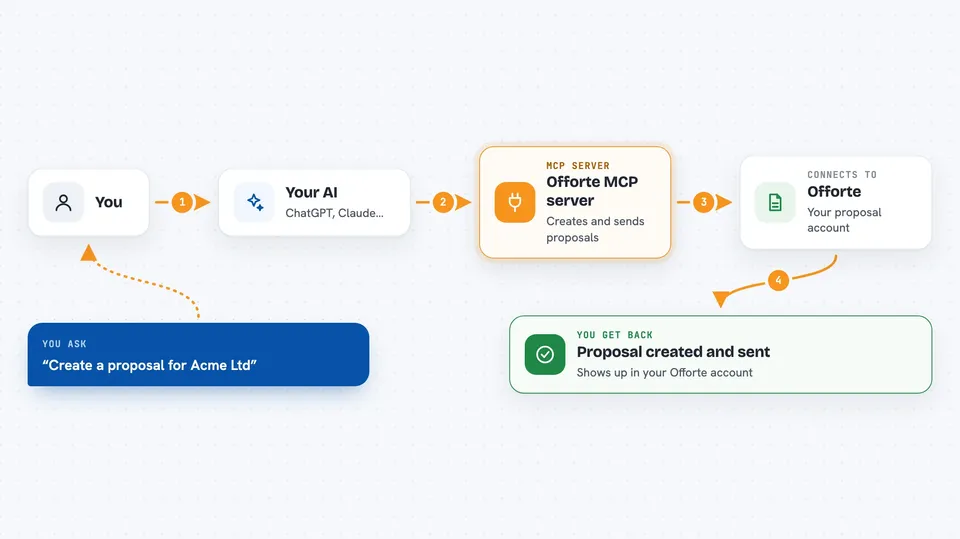
You ask your AI something like create a proposal for this client. Your AI uses this helper, which talks to your Offorte account behind the scenes. The helper can look up your contacts, templates, and existing proposals, then create a new proposal and send it to the right people. You get a confirmation back in the chat, and the proposal shows up in Offorte.
 Click to zoom
What you can do with it
- Create a new business proposal
- Send a proposal to its contacts
- Search your existing proposals
- Look up or create a contact
- List your proposal templates and design templates
- List email and text templates
- See your account users and automation sets
Try asking your AI
- “Create a proposal for Acme Ltd using my standard template”
- “Search my proposals for anything about the Johnson project”
- “Find the contact details for Sarah at Brightside Media”
- “Send the proposal I just made to its contacts”
What it gives back to you
You get answers in the chat, like a list of matching proposals, contact details, or a confirmation that a proposal was created or sent. It can also show you the templates and users available in your account. When it creates or sends something, you see a short message saying it worked, and the change appears in Offorte.
Before you start
What you need
- An Offorte account
- An Offorte API key (a kind of password for apps; you get one from your Offorte account settings)
- Your Offorte account name
- Node.js installed on your computer (version 20 is what they tested)
Good to know
This helper can create and send real proposals to real people, so check what your AI is about to send before you let it go out.
Install it with your AI
Add Offorte MCP server to your AI, no technical skills needed
You don't install anything by hand. You copy one prompt, paste it into an AI that can work on your computer, and it checks, installs and connects the server for you, asking you when it needs something.
Sign in to get the install prompt
Members get a ready-made prompt that lets the Claude desktop app check Offorte MCP server, install it and connect it for them, step by step. You don't need any technical skills: you copy, paste and answer a few questions. Your connected AI can also find and install any of the 4,361 MCP servers here for you.
Who it's for
People who write and send business proposals often, like sales teams, agencies, and freelancers who already use Offorte.