MCP server · Productivity · official
Pantrist MCP server
by Pantrist-dev · official
Let your AI manage your Pantrist shopping lists, pantry stock, recipes and weekly meal plan by chatting.
This is a helper that connects your AI assistant to your Pantrist account. Once it is set up, you can just talk to your AI about your shopping list, pantry, recipes and week plan, and it will make the changes in Pantrist for you. It is handy if you already use Pantrist to plan meals and keep track of what is in your kitchen.
What is an MCP server? The 30-second version
On its own, your AI can only chat. An MCP server is a small helper program that gives your AI a new skill or a connection to an app, and here that app is Pantrist. This helper lets your AI look at your Pantrist lists and recipes and change them when you ask. You do not need to know how it works inside; you just connect it once and then talk to your AI as usual.
What this MCP server does
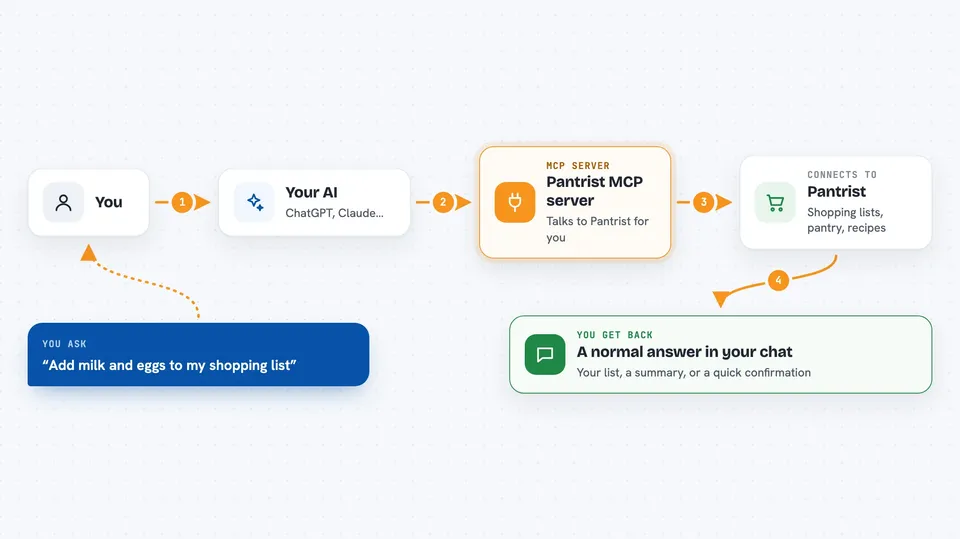
You ask your AI something in plain words, like what is on your shopping list or what you are eating on Friday. Your AI passes that request to this helper. The helper then talks to Pantrist through its official connection and fetches or changes what you asked for. The result comes back into your chat as a normal answer. For example, if you say add milk, the helper adds milk to your Pantrist shopping list and tells you it is done.
 Click to zoom
What you can do with it
- See what is on your shopping list
- Add items to your shopping list by name
- Tick off items you have already bought
- Remove items from your shopping list
- Check what is in your pantry and how much is left
- Add items to your pantry or reduce the amount when you use them
- Search your saved recipes and look at one in detail
- See and change your meal plan for the week
Try asking your AI
- “What's on my shopping list?”
- “Add milk and eggs to my shopping list.”
- “Check off the bread, I already bought it.”
- “What am I eating on Friday?”
- “Find a recipe with chicken in it.”
What it gives back to you
You get normal chat answers: lists of items, short summaries, or a confirmation that something was added, ticked off or changed. For example, it might show your shopping list as a bullet list, or say that milk was added. If you ask about a recipe, it can show the recipe details. If you ask about the week plan, it tells you what is planned for each day.
Before you start
What you need
- A Pantrist account
- The Claude app or another AI tool that supports MCP connectors
Good to know
It can change and delete things in your Pantrist account, like removing shopping items or recipes, so check with your AI before letting it delete anything important.
Install it with your AI
Add Pantrist MCP server to your AI, no technical skills needed
You don't install anything by hand. You copy one prompt, paste it into an AI that can work on your computer, and it checks, installs and connects the server for you, asking you when it needs something.
Sign in to get the install prompt
Members get a ready-made prompt that lets the Claude desktop app check Pantrist MCP server, install it and connect it for them, step by step. You don't need any technical skills: you copy, paste and answer a few questions. Your connected AI can also find and install any of the 4,361 MCP servers here for you.
Who it's for
People who already use Pantrist for shopping lists, pantry tracking and meal planning and want to manage it by chatting with their AI.