
MCP server · Finance and crypto
1C:Enterprise MCP server
by infaton
Lets your AI read and update data in your 1C:Enterprise ERP system, all from a chat.
This is a helper that connects your AI assistant to a 1C:Enterprise database, such as 1C:ERP, Accounting, or Trade Management. It is made for people who work with 1C every day and want to ask questions or make small changes without clicking through lots of screens. If you have ever wished you could just type "show me the stock balance for warehouse X" and get an answer, this is for that.
What is an MCP server? The 30-second version
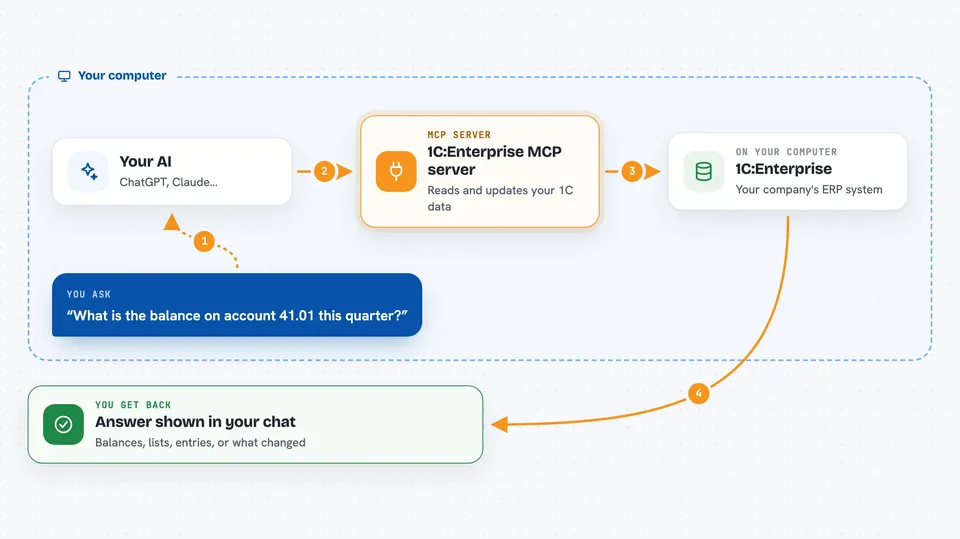
On its own, your AI can only chat. It cannot see your 1C database or change anything in it. An MCP server is a small helper program that gives your AI a new skill. This one gives your AI a connection to your 1C:Enterprise system, so when you ask a question about documents, stock, or accounting entries, the AI can go and look it up for you.
What this MCP server does
You ask your AI a question in plain words, like "what is the balance on account 41.01 this quarter?" The AI sends that request to this helper, which talks to your 1C database. The helper runs the right 1C query or action and sends the result back. Your AI then shows you the answer in the chat, as a list, a table, or a short summary. If you ask it to change something, like posting a document, the helper can do that too, if your setup allows it.
 Click to zoom
What you can do with it
- Look up balances and totals from accounting and accumulation registers
- List documents, catalog items, and register records with filters
- Show the accounting entries (debit, credit, amount) for a document
- Create, update, copy, or mark objects for deletion
- Post or unpost documents
- Check which fields are filled in a document before posting
- Find duplicate catalog items by their details
- Run 1C reports and show the results
Try asking your AI
- “Show me the stock balance for warehouse Main as of today”
- “List all unfulfilled customer order lines for last month”
- “What are the accounting entries for invoice number 1234?”
- “Find duplicate counterparties with the same tax ID”
What it gives back to you
You get answers in the chat: lists of documents or items, numbers like balances and totals, short summaries, or the entries behind a document. If you asked it to change something, it tells you what it did, for example that a document was posted or an item was updated. You can also ask for the structure of an object or the rights a user has, and it will show that as a simple list.
Before you start
What you need
- A 1C:Enterprise database (ERP, Accounting, Trade Management, or similar)
- The INFATON MCP extension (.cfe file) installed in that database
- A 1C user login and password for the connection
- Node.js 18 or newer if you use the Claude Desktop or Cursor app
Good to know
Some tools can change or delete data in your 1C system, and execute_code can run any 1C code, so use a limited 1C user and the ONEC_ALLOWED_TOOLS setting to control what the AI is allowed to do.
Install it with your AI
Add 1C:Enterprise MCP server to your AI, no technical skills needed
You don't install anything by hand. You copy one prompt, paste it into an AI that can work on your computer, and it checks, installs and connects the server for you, asking you when it needs something.
Sign in to get the install prompt
Members get a ready-made prompt that lets the Claude desktop app check 1C:Enterprise MCP server, install it and connect it for them, step by step. You don't need any technical skills: you copy, paste and answer a few questions. Your connected AI can also find and install any of the 4,361 MCP servers here for you.
Who it's for
Accountants, ERP administrators, and operations staff who work with 1C:Enterprise daily and want to ask questions or make small changes without navigating many screens.




