
MCP server · Developer tools
Infrawise Azure cost MCP server
by Infrawise
Ask your AI for Azure cost savings ideas like idle resources, rightsizing and Reserved Instance tips.
This is a helper that connects your AI assistant to Infrawise, a service that looks at your Azure cloud bill and finds ways to save money. Once it is set up, you can just ask your AI questions about your Azure spending in plain English. It is handy for anyone who pays an Azure bill and wants to spot waste without digging through the Azure portal.
What is an MCP server? The 30-second version
On its own, your AI can only chat with you. An MCP server is a small helper program that gives your AI a new skill or a connection to another service. This helper connects your AI to Infrawise, which in turn looks at your Azure subscriptions. So when you ask about your cloud costs, your AI can fetch real answers from Infrawise instead of guessing.
What this MCP server does
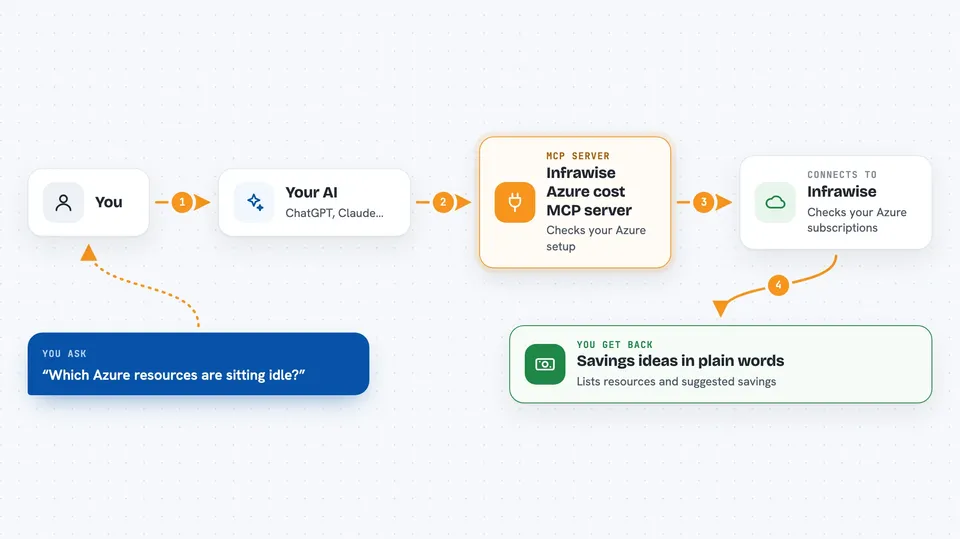
You ask your AI something like which Azure resources are sitting idle. Your AI passes that question to this helper, which talks to the Infrawise service. Infrawise checks your connected Azure subscriptions and sends back its findings. Your AI then shows you the answer in the chat, in normal words. You can also narrow it down to one subscription if you have several.
 Click to zoom
What you can do with it
- Find idle or zombie Azure resources you could delete or shut down
- Get rightsizing tips for resources that are bigger than they need to be
- See purchasing and licensing suggestions, like Reserved Instance ideas
- Get a total savings summary across all categories
- Limit any of these answers to one Azure subscription
What it gives back to you
You get back plain answers in the chat: lists of resources with what is wrong and what to do, plus suggested savings amounts. The savings summary gives you totals across categories. Everything is read-only, so nothing in your Azure account is changed. You just read the suggestions and decide what to act on.
Before you start
What you need
- An active Infrawise account
- At least one Azure subscription onboarded to Infrawise
- Node.js installed on your computer so you can run the npx command
- Claude Code (the setup registers the server there)
Good to know
This server is read-only and only looks at your Azure cost data, so it will not change or delete anything, but the suggestions it shows are just advice and you should check them before acting.
Install it with your AI
Add Infrawise Azure cost MCP server to your AI, no technical skills needed
You don't install anything by hand. You copy one prompt, paste it into an AI that can work on your computer, and it checks, installs and connects the server for you, asking you when it needs something.
Sign in to get the install prompt
Members get a ready-made prompt that lets the Claude desktop app check Infrawise Azure cost MCP server, install it and connect it for them, step by step. You don't need any technical skills: you copy, paste and answer a few questions. Your connected AI can also find and install any of the 4,609 MCP servers here for you.
Who it's for
People who manage or pay for Azure cloud costs, like cloud admins, finance teams and IT managers who want quick savings ideas without opening the Azure portal.



