MCP server · Analytics
DecisionMatrix MCP server
by inity13
Lets your AI rank options against weighted criteria and show the math behind the winner.
DecisionMatrix is a helper that does careful scoring when you need to compare several options against several criteria. You give it your choices, your criteria, and how much each criterion matters, and it works out the ranking. It is handy for anyone who has to pick between vendors, tools, laptops, or job candidates and wants a clear, repeatable answer.
What is an MCP server? The 30-second version
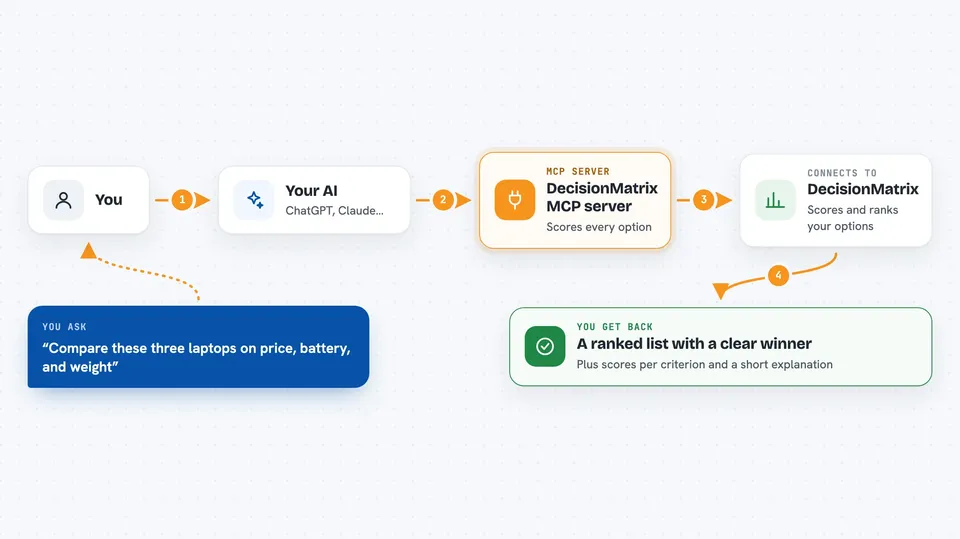
On its own, your AI can only chat and give you its best guess. An MCP server is a small helper program that gives your AI a new skill or a connection to a service. This one connects your AI to a scoring engine called DecisionMatrix, so when you ask it to compare options it can actually run the numbers instead of guessing. The helper does the math and hands the result back to your AI to explain to you.
What this MCP server does
You tell your AI the options you are considering, the criteria that matter, and how important each criterion is. Your AI passes that to the DecisionMatrix helper. The helper scores every option against every criterion, applies your weights, and ranks them from best to worst. It also writes a plain-language explanation of why the winner won. You get the ranking, the per-criterion breakdown, and the explanation right in your chat.
 Click to zoom
What you can do with it
- Rank several options against weighted criteria and get a clear winner
- See how much each criterion contributed to each option's score
- Run a sensitivity check to see how stable the winner is if weights change
- Compare exactly two options head to head and see which criteria each one wins
- Choose between three scoring methods depending on your situation
- Get a plain-language explanation of the result you can paste into a report
Try asking your AI
- “Compare these three laptops on price, battery life, and weight, with price mattering most”
- “Rank these five vendors on cost, quality, and delivery speed, and explain the winner”
- “Do a head-to-head between Vendor A and Vendor B on the criteria we discussed”
- “How stable is this winner if I change the weights by 20 percent”
What it gives back to you
You get back a ranked list of your options with a score for each one, from best to worst. Each option comes with a breakdown showing how it scored on every criterion and how much that criterion contributed. You also get a short written explanation of why the top option won, and if you asked for a sensitivity check, a note on how easily the winner could change. Everything appears as text and numbers in your chat.
Before you start
What you need
- Nothing to install if you use the hosted server
- An MCP client that supports remote servers, like Cursor or VS Code
- For Claude Desktop, the mcp-remote helper (installed automatically with npx)
Good to know
The free hosted tier allows only 15 calls per day per IP address, so heavy use will need a paid plan or your own copy.
Install it with your AI
Add DecisionMatrix MCP server to your AI, no technical skills needed
You don't install anything by hand. You copy one prompt, paste it into an AI that can work on your computer, and it checks, installs and connects the server for you, asking you when it needs something.
Sign in to get the install prompt
Members get a ready-made prompt that lets the Claude desktop app check DecisionMatrix MCP server, install it and connect it for them, step by step. You don't need any technical skills: you copy, paste and answer a few questions. Your connected AI can also find and install any of the 4,361 MCP servers here for you.
Who it's for
Anyone who has to make a choice between several options and wants the reasoning shown, like procurement staff, managers, analysts, and anyone comparing products or candidates.