MCP server · Social media
Discord MCP server
by SaseQ
Lets your AI read and send Discord messages, manage channels, roles, and members for you.

This is a helper that connects your AI assistant to Discord. Once it is set up, you can ask your AI in plain words to post a message, list your channels, or check who is banned, and it will do it for you. It is handy for anyone who runs or helps manage a Discord server and wants to skip a lot of clicking.
What is an MCP server? The 30-second version
On its own, your AI can only chat with you. An MCP server is a small helper program that gives your AI a new skill or a connection to an app or service. This one connects your AI to Discord, so it can look things up there or do things there when you ask. You stay in the chat, and the helper does the work behind the scenes.
What this MCP server does
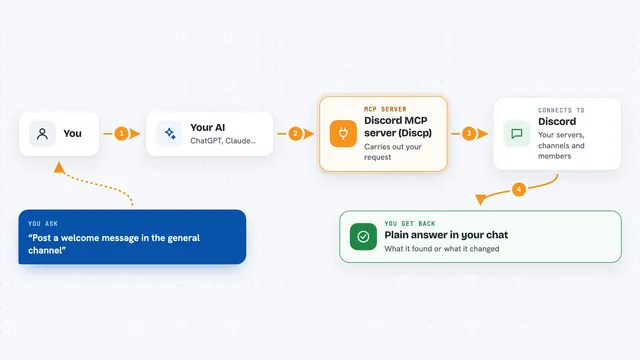
You type a request in your AI chat, like asking it to send a message to a channel. Your AI passes that request to this helper program. The helper talks to Discord using a Discord bot you set up, and Discord carries out the action. Then the helper sends the result back to your AI, which shows it to you in the chat. It can also read things back, like channel lists or message history, so you get answers, not just actions.
 Click to zoom
What you can do with it
- Send, edit, and delete messages in your channels
- Read recent message history from a channel or a private chat
- Create, rename, move, and delete channels and categories
- Create, edit, and delete roles, and assign them to members
- Kick, ban, time out, or rename members
- Create invite links and list who has joined
- Schedule events and manage forum posts and tags
Try asking your AI
- “Send a message to the announcements channel saying the server maintenance is done”
- “List all the channels in my server and tell me which ones are empty”
- “Create a new text channel called project-updates under the Projects category”
- “Show me the last 20 messages in the general channel”
What it gives back to you
You get answers in plain chat text. That can be a list of channels, roles, or members, a summary of recent messages, or details about a channel or event. When it makes a change, like sending a message or creating a channel, it tells you it worked. Some tools also return IDs you can reuse, like a channel ID or a user ID for pinging someone.
Before you start
What you need
- A Discord bot you create, plus its token (a kind of password for the bot)
- Docker installed, if you use the recommended setup
- Your Discord server ID (optional, but it saves you typing it each time)
- An AI app that can connect to MCP servers, like Claude Desktop or Cursor
Good to know
This helper can change and delete real things on your Discord server, like channels, roles, and members, so check what you ask for before you confirm.
Install it with your AI
Add Discord MCP server to your AI, no technical skills needed
You don't install anything by hand. You copy one prompt, paste it into an AI that can work on your computer, and it checks, installs and connects the server for you, asking you when it needs something.
Sign in to get the install prompt
Members get a ready-made prompt that lets the Claude desktop app check Discord MCP server, install it and connect it for them, step by step. You don't need any technical skills: you copy, paste and answer a few questions. Your connected AI can also find and install any of the 4,361 MCP servers here for you.
Who it's for
Discord server owners, moderators, and community managers who want to run everyday server tasks by just asking their AI.