MCP server · Analytics
Iris MCP server
by iris-eval
Your AI can log its own runs and score them for quality, safety and cost, all on your machine.
Iris is a small helper that watches over your AI agent's work. It saves each run of your agent to a file on your own computer and gives it a score for quality, safety and cost. It is handy if you build or test AI agents and want real numbers instead of just eyeballing the output.
What is an MCP server? The 30-second version
On its own, your AI can only chat. An MCP server is a small helper program that gives your AI a new skill or a connection to another tool. Iris is that helper here: it connects your AI to a scoring engine and a dashboard, so your AI can log a run, check it against rules, and show you the results. You just ask in plain words, and the helper does the rest.
What this MCP server does
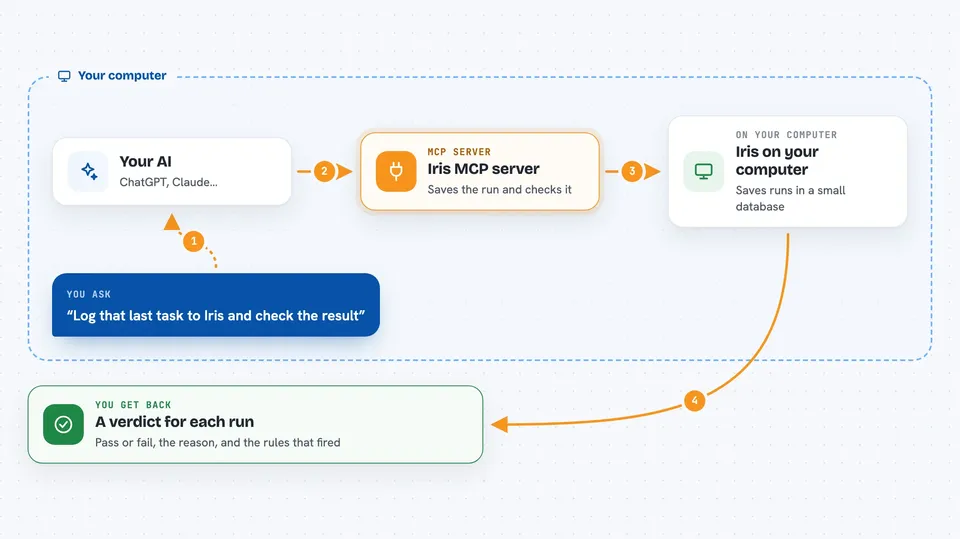
You ask your AI to log a task and check the result. Your AI calls Iris, and Iris saves the run into a small database on your computer. Then Iris runs its built-in rules over that run: it looks for private information, sneaky instructions hidden in text, made-up facts, and costs that are too high. You get back a verdict, and you can open a dashboard in your browser to see every run, what failed, and why.
 Click to zoom
What you can do with it
- Log a run of your agent and get a quality score
- Check an output for private information like names or emails
- Spot hidden instructions that try to trick your AI
- Catch numbers or facts the source never said
- Watch how much each run costs and set a limit
- Compare two runs on the same set of questions
- See every failure on a dashboard, worst first
Try asking your AI
- “Log that last task to Iris and evaluate the output.”
- “Check this reply for any private information before I send it.”
- “Show me the runs that failed today and why.”
- “Compare the last two runs on the same questions.”
What it gives back to you
You get a verdict for each run, with the state (pass or fail), the reason, and which rules fired. In the chat it looks like a short answer plus the details. On the dashboard you see cards for each failure, naming the rule and the evidence, and lists of runs you can click into.
Before you start
What you need
- Node.js 22.13 or later on your computer
- An MCP client like Claude Desktop, Claude Code, Cursor or VS Code
- Optional: an Anthropic or OpenAI key if you want the extra LLM judge
Good to know
It saves the text you send it word for word, including any private information, so be careful what you log and keep the dashboard on your own machine unless you set a password.
Install it with your AI
Add Iris MCP server to your AI, no technical skills needed
You don't install anything by hand. You copy one prompt, paste it into an AI that can work on your computer, and it checks, installs and connects the server for you, asking you when it needs something.
Sign in to get the install prompt
Members get a ready-made prompt that lets the Claude desktop app check Iris MCP server, install it and connect it for them, step by step. You don't need any technical skills: you copy, paste and answer a few questions. Your connected AI can also find and install any of the 4,361 MCP servers here for you.
Who it's for
People who build or test AI agents and want clear numbers on quality, safety and cost instead of guessing.