
MCP server · Research
Naver Search MCP server
by isnow890
Lets your AI search Naver blogs, news, cafes, images, places, and check search and shopping trends.
This is a helper that connects your AI assistant to Naver's search and trend data. Once it is set up, you can just ask your AI in normal words and it will pull results from Naver for you. It is handy if you work with Korean content, market research, or shopping trends.
What is an MCP server? The 30-second version
On its own, your AI can only chat with you using what it already knows. An MCP server is a small helper program that gives your AI a new skill or a connection to an outside service. This one connects your AI to Naver, so it can look things up on Naver and bring the answers back into your chat. You do not need to understand how it works inside. You just ask, and the helper does the fetching.
What this MCP server does
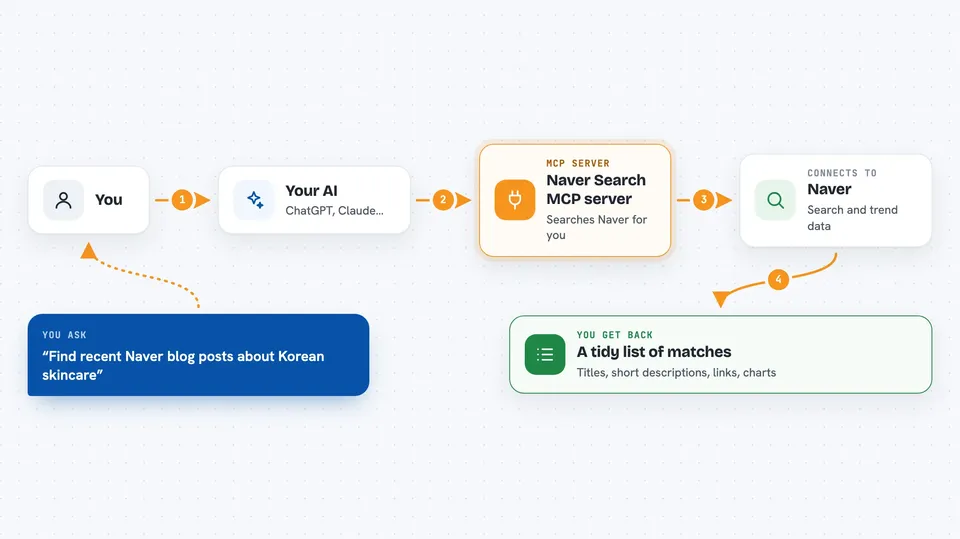
You ask your AI something like find recent Naver blog posts about a topic. Your AI passes that request to this helper program. The helper then talks to Naver's search and DataLab services using your Naver keys. Naver sends back the matching blogs, news, images, places, or trend numbers. Your AI shows you a tidy answer in the chat window.
 Click to zoom
What you can do with it
- Search Naver blogs, news, cafe posts, web documents, images, and encyclopedia entries
- Look up local places and businesses on Naver
- Find answers from Naver Knowledge iN
- Check how often a keyword has been searched over time
- See shopping trends by category, device, gender, or age group
- Look up the right Naver category number using plain words instead of a URL
Try asking your AI
- “Find recent Naver blog posts about Korean skincare routines”
- “What is the search trend for camping gear over the last year in Korea?”
- “Show me Naver news about electric cars from this week”
- “Find local Korean restaurants in Busan on Naver”
What it gives back to you
You get back a list of matching items with titles, short descriptions, and links, or trend numbers shown as a simple chart or table in the chat. For shopping insights, you get breakdowns by device, gender, or age group. Your AI usually summarizes the results for you and can point out the most relevant ones. Nothing is changed on Naver itself. It is read only.
Before you start
What you need
- A Naver account and an API key pair. You can get one from NAVER API HUB (the newer option) or from Naver Developers (the older option, still working until mid 2027).
- Node.js 18 or newer installed on your computer
- The Claude desktop app or Claude Code, if you want to add this server there
Good to know
This server only reads data from Naver, so it will not change or delete anything, but it does use your Naver API keys, so keep them private and do not share your config file with others.
Install it with your AI
Add Naver Search MCP server to your AI, no technical skills needed
You don't install anything by hand. You copy one prompt, paste it into an AI that can work on your computer, and it checks, installs and connects the server for you, asking you when it needs something.
Sign in to get the install prompt
Members get a ready-made prompt that lets the Claude desktop app check Naver Search MCP server, install it and connect it for them, step by step. You don't need any technical skills: you copy, paste and answer a few questions. Your connected AI can also find and install any of the 4,361 MCP servers here for you.
Who it's for
People who work with Korean content, marketing, or market research and want their AI to pull Naver search and trend data without leaving the chat.


