MCP server · GitHub
GitHub MCP server (unofficial)
by jaimenbell
Lets your AI look up GitHub repos, issues, pull requests and files, and post comments or open issues if you allow it.
This is a small helper program that connects your AI assistant to GitHub, the website where code lives. Once it is set up, you can ask your AI things like "what is the latest issue on this repo" and it will go and check for you. It is handy for anyone who works with code, tracks bugs, or just wants to keep an eye on a project on GitHub.
What is an MCP server? The 30-second version
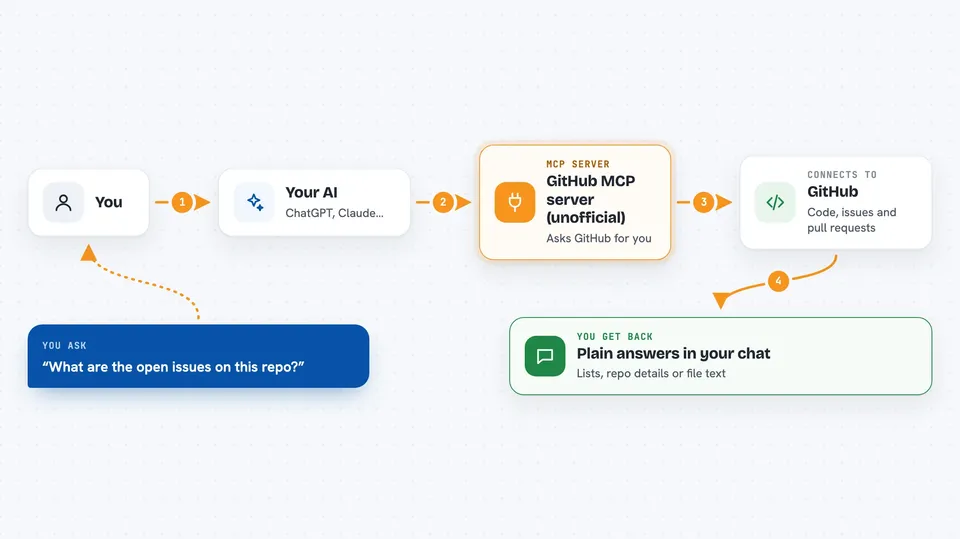
On its own, your AI can only chat with you using what it already knows. An MCP server is a little program you run alongside it that gives it a new skill, in this case the ability to talk to GitHub. When you ask a question, your AI passes the request to this helper, the helper asks GitHub, and the answer comes back into your chat. This particular helper is not made by GitHub itself, it is an unofficial one built by a developer.
What this MCP server does
You ask your AI something about GitHub, like the details of a repository or the open issues on it. Your AI sends that request to this helper program running on your computer. The helper then asks GitHub's public web service for the information. GitHub sends the answer back, and the helper hands it to your AI, which shows it to you in plain language. If you turn on the optional write mode, it can also post comments, open issues, add labels, or leave review notes on a pull request.
 Click to zoom
What you can do with it
- Look up details about a repository, like stars, language and license
- List or fetch issues and pull requests on a repo
- Read the contents of a file inside a repository
- Search public repositories on GitHub
- Check a public user or organisation profile
- List commits on a branch
- Open an issue, comment, add labels or leave a PR review note (only if you switch write mode on)
Try asking your AI
- “What is the latest issue on the anthropics/anthropic-sdk-python repo?”
- “Show me the open pull requests on this repository and summarise them”
- “How many stars does the fastmcp repo have and what language is it written in?”
- “Read the README file from this repo and tell me what it does”
What it gives back to you
You get back plain answers in your chat: lists of issues or pull requests, details about a repo, the text of a file, or a short summary your AI writes from the raw data. If you have write mode on, it also tells you what it changed, like the link to a new issue or comment it posted. If something goes wrong, like you have used up GitHub's free hourly limit, it tells you that in plain words instead of crashing.
Before you start
What you need
- Python 3.12 or newer installed on your computer
- The pip install command run once to install this helper
- A GitHub token (a kind of password you create on GitHub) if you want higher limits or write access; reading works without one but is limited to 60 requests per hour
Good to know
If you switch write mode on, your AI can actually change things on GitHub, like opening issues or leaving comments, so only enable it for repos you are happy to have changed.
Install it with your AI
Add GitHub MCP server (unofficial) to your AI, no technical skills needed
You don't install anything by hand. You copy one prompt, paste it into an AI that can work on your computer, and it checks, installs and connects the server for you, asking you when it needs something.
Sign in to get the install prompt
Members get a ready-made prompt that lets the Claude desktop app check GitHub MCP server (unofficial), install it and connect it for them, step by step. You don't need any technical skills: you copy, paste and answer a few questions. Your connected AI can also find and install any of the 4,609 MCP servers here for you.
Who it's for
Developers, project managers and anyone who tracks bugs, code or open-source projects on GitHub and wants to ask their AI about them instead of clicking around the website.