MCP server · Developer tools
CommitLore MCP server
by MongLong0214
Lets your AI see the reasons behind past code decisions before it changes a file.
CommitLore is a helper that keeps the reasoning behind your code decisions inside your Git repository. Before your AI edits a file, it can check which past decisions are still active for that file, so it does not repeat an idea your team already rejected. It is handy for developers and teams who use AI coding assistants on real projects.
What is an MCP server? The 30-second version
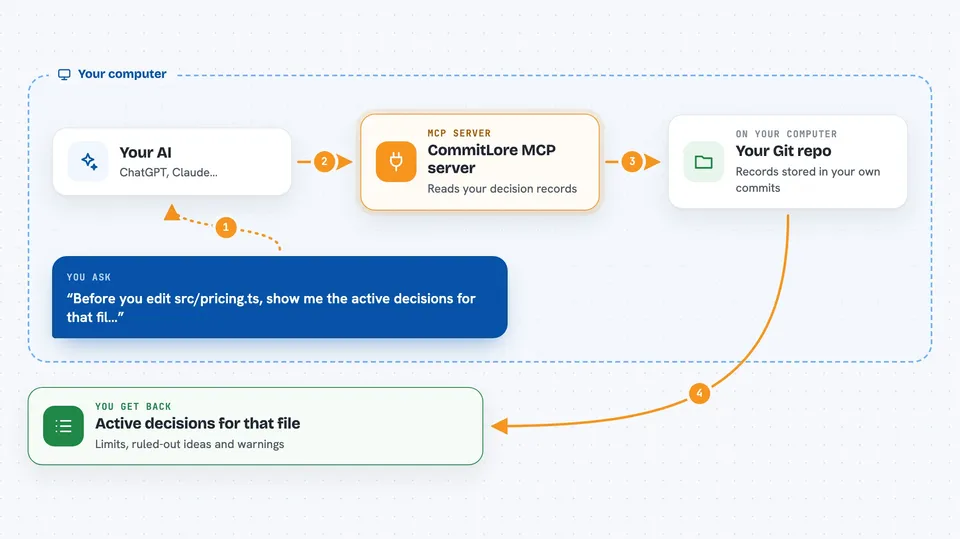
On its own, your AI can only chat with you. An MCP server is a small helper program that gives your AI a new skill or a connection to an app or service. This one connects your AI to CommitLore, which stores decision records inside your Git repository. When you ask your AI to edit code, it can use this helper to look up the decisions that still apply to that file.
What this MCP server does
You ask your AI to work on a file. The AI asks CommitLore for the active decisions for that path. CommitLore reads the records stored in your Git trailers and notes, filters out old or replaced ones, and returns only what is still in force. Your AI then sees constraints, ruled-out alternatives, and warnings before it makes changes. You get code that respects decisions your team already made.
 Click to zoom
What you can do with it
- See constraints recorded for the file your AI is about to edit
- Read ruled-out alternatives so the AI does not propose them again
- Get warnings left by earlier work on the same code
- Check which decisions are still active, replaced, or expired
- Initialize a repository so CommitLore can start tracking decisions
- Capture a decision record when a commit carries one
- Run a health check to see if squash merges are dropping records
Try asking your AI
- “Before you edit src/pricing.ts, show me the active decisions for that file.”
- “What constraints and ruled-out alternatives are recorded for the checkout module?”
- “Are there any warnings I should know about before changing the rounding logic?”
- “Which decision records are still active for this path?”
What it gives back to you
It gives back a short list of active records for the path you asked about. Each record shows a kind label like Limit, Ruled-out, or Warn, a short ID, and a plain sentence explaining the decision. If nothing applies, it stays quiet or tells you there is nothing to show. It does not change your code or block your edit; it just gives your AI context to weigh.
Before you start
What you need
- Node.js 22.23.2 or newer
- Git installed on your computer
- A Git repository where you want CommitLore to work
- The CommitLore CLI installed (the install script handles this)
Good to know
It reads your Git history and decision records, so make sure you are comfortable with your AI seeing that information.
Install it with your AI
Add CommitLore MCP server to your AI, no technical skills needed
You don't install anything by hand. You copy one prompt, paste it into an AI that can work on your computer, and it checks, installs and connects the server for you, asking you when it needs something.
Sign in to get the install prompt
Members get a ready-made prompt that lets the Claude desktop app check CommitLore MCP server, install it and connect it for them, step by step. You don't need any technical skills: you copy, paste and answer a few questions. Your connected AI can also find and install any of the 4,361 MCP servers here for you.
Who it's for
Developers and teams who use AI coding assistants and want them to respect past decisions instead of repeating rejected ideas.